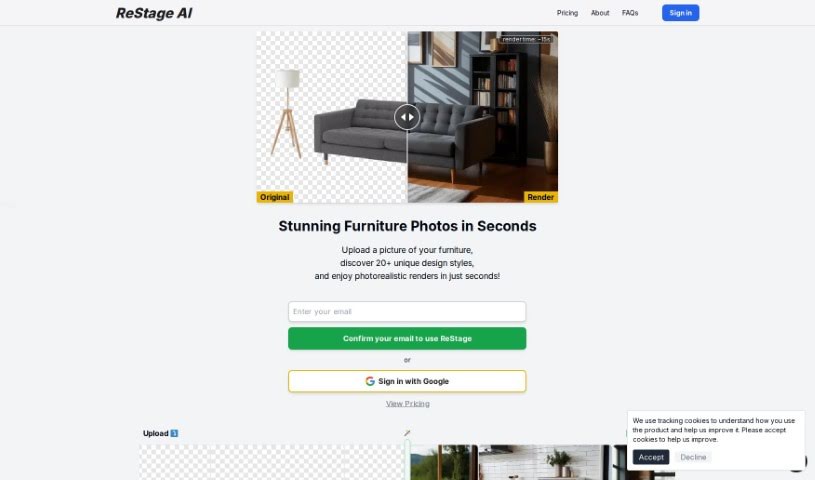
Screenshot of Restage

Restage

Discover what Restage is and how to use it effectively in 2025. We'll explore its features and see how it stacks up against other interior design tools.

Screenshot

What is Restage?

Restage AI is a really neat tool that uses artificial intelligence to help you out. You can upload a photo of any space, and then pick from over 20 different design styles. The AI then digitally transforms your photo, creating incredibly realistic images that match exactly what you had in mind. It’s perfect for visualizing concepts or products in a way that looks totally natural and fits your chosen style. Plus, it’s super easy to use, has a “Creative Mode” if you want to get a bit more experimental, and it generates these amazing renders super fast – usually in just seconds!

This tool works with all sorts of spaces, whether it’s a living room, kitchen, bedroom, office, or even an outdoor area. You can choose from styles like “Minimalist Haven,” “Modern Fusion,” or “Scandinavian Sanctuary,” among many others. Restage AI is a fantastic asset for anyone in interior design, real estate, or working on renovation projects. It’s also great for businesses and individuals who just want to create beautiful digital images of their products or visualize their projects realistically.

How does it create such realistic images? Well, ReStage AI uses smart AI algorithms. These algorithms learn from popular design trends and then apply them to your specific photos and preferences. This way, every image it creates really does match the style you picked and looks incredibly lifelike. And remember that “Creative Mode” I mentioned? It lets you play around and go beyond the standard styles, all while still getting quick results.

Who created Restage?

Restage was actually created by a company called Stylefie, Inc. They launched it on June 18, 2024. As we’ve touched on, Restage AI is a pretty advanced tool that uses AI to whip up photorealistic images, which is super handy for interior design, real estate, and planning renovations. You just upload your photo, pick one of the many design styles (over 20!), and you get your results quickly. It’s designed to be user-friendly, handles all sorts of spaces, and even has that “Creative Mode” for those unique design ideas.

What is Restage used for?

Restage is incredibly versatile! Here’s a breakdown of what you can do with it:

  • Create and visualize interior designs: Bring your design ideas to life digitally.
  • Real estate staging: Make properties look their absolute best for potential buyers.
  • Renovation planning: Visualize how changes will look before you start.
  • Craft unique styles: Experiment and create looks that are all your own.
  • Generate photorealistic renderings quickly: Get stunning visuals in just seconds.
  • Work with various space types: From living rooms and kitchens to bedrooms, offices, and even gyms – it handles them all.
  • Enjoy a flexible and user-friendly tool: It’s easy to navigate and pick your styles.
  • Get inspired: Check out examples from other users in the community section.
  • Provider of ReStage AI: This powerful AI is brought to you by Stylefie, Inc.
  • Explore over 20 unique design styles: Plenty of options to match any taste.
  • Visualize interiors without physical staging: Save time and resources.
  • Create realistic project renders: Perfect for businesses and individuals alike.
  • Make stunning digital product images: Showcase your products in appealing settings.
  • A valuable tool for professionals: Essential for interior designers, real estate agents, and renovators.
  • Visualize concepts in realistic settings: See your ideas come to life.
  • Explore aesthetics and designs: Enhance your interior projects with new looks.
  • Create personalized design aesthetics: Mix and match with over 20 predefined options.
  • Quick delivery of photorealistic renderings: Get your visuals fast.
  • Community sharing for inspiration: See what others are creating and get ideas.
  • Real estate staging for visualization: Help prospective buyers see a property’s potential.
  • Concept visualization: Quickly see what an idea looks like.
  • Value for real estate staging and renovation planning: Create realistic renderings to showcase properties or plan changes.
  • Creating unique design styles: Use the “Creative Mode” to go beyond the basics.
  • Support for a wide variety of space types: Living rooms, kitchens, bedrooms, offices, gyms, and more.

Who is Restage for?

Restage is a fantastic tool for a range of people:

  • Interior designers: To quickly visualize client ideas and present design options.
  • Real estate professionals: To stage properties virtually and attract more buyers.
  • Individuals planning home redesigns: To see how new styles and layouts will look.
  • Anyone undertaking renovation projects: To plan and visualize changes effectively.
  • Real Estate Agents: To enhance property listings with attractive visuals.
  • Professionals working on renovations: To get a clear picture of the final outcome.

How to use Restage?

Using Restage is pretty straightforward. Here’s how you can get started:

  1. Upload your photo: Begin by uploading a picture of the space you want to transform.
  2. Pick a style: Choose from the wide selection of over 20 design styles, like “Minimalist Haven,” “Modern Fusion,” or “Bohemian Oasis.”
  3. Get started: Confirm your email and check out the pricing options to begin using the tool.
  4. Experiment with Creative Mode: If you want to try something a bit different, use the “Creative Mode” to play around beyond the standard styles.
  5. See the AI magic: ReStage AI uses advanced algorithms to create photorealistic images, adapting popular design patterns to your specific preferences.
  6. Get fast results: Renders are generated in just seconds, giving you quick visuals for your concepts.
  7. Find inspiration: Explore the community section to see what other users have created.
  8. Works with many spaces: ReStage AI supports all sorts of areas, including living rooms, kitchens, offices, and even outdoor spaces like pools and patios.
  9. Who can use it? The tool is great for businesses, interior designers, real estate pros, and anyone planning a home makeover.
  10. Valuable for staging and planning: ReStage AI is especially helpful for real estate staging and renovation planning, offering realistic digital renderings that let you efficiently visualize renovation outcomes.

Related AI Tools

Discover more tools in similar categories that might interest you

123RF AI Image Generator

Creative Image Generation
Learn More

Stay Updated with AI Tools

Get weekly updates on the latest AI tools, trends, and insights delivered to your inbox

Join 25,000+ AI enthusiasts. No spam, unsubscribe anytime.