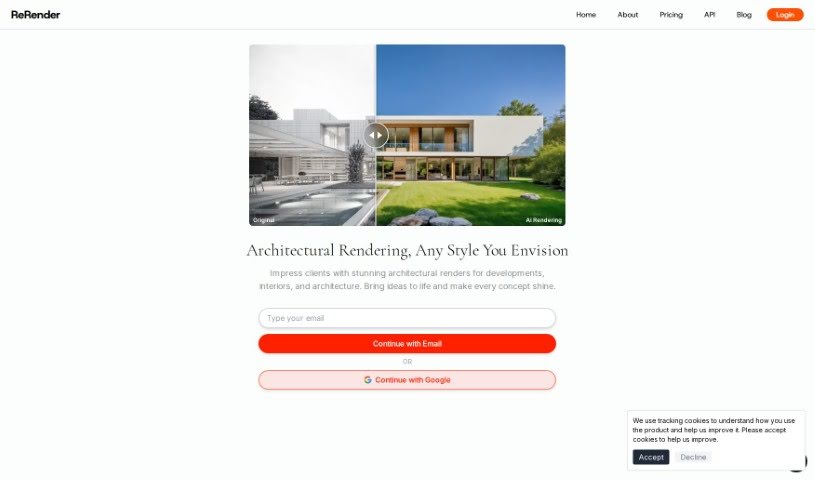
Screenshot of ReRender AI

ReRender AI

Discover what ReRender AI is and how to use it effectively in 2025. We'll explore its features and see how it stacks up against other architect tools.

Screenshot

What is ReRender AI?

ReRender AI is a platform designed to take your architectural designs and turn them into absolutely stunning visuals with instant, photorealistic AI renders. Imagine bringing your AutoCAD, Blender, or Sketchup projects to life in just moments! You can really play around with your visualizations, choosing from over 20 different design styles. Whether you’re going for a sleek international look or something more eco-friendly and sustainable, there’s a style for you. This tool is built to handle all sorts of architectural projects, from a cozy single-family home to a busy shopping mall or even an elegant performing arts center. With ReRender AI, you get seamless renderings in seconds, making it super easy to explore and really show off the full potential of your architectural ideas with vibrant detail.

Who created ReRender AI?

Rishit Patel is the mind behind ReRender AI. His platform is all about providing instant, photorealistic AI renders specifically for architectural designs. It works smoothly with popular tools like AutoCAD, Blender, and Sketchup. Users can pick from more than 20 distinct design styles. To get started, all you need to do is confirm your email, and then you can dive into exploring all the different architectural types and styles.

What is ReRender AI used for?

  • Instant AI Renders: Get your architectural projects rendered quickly and beautifully with photorealistic results.
  • Lots of Design Styles: You’ve got over 20 unique styles to choose from, helping you nail the perfect look for your renders.
  • Easy-to-Use Platform: Getting started is simple! Just upload your project and confirm your email to begin rendering.
  • All Kinds of Buildings: It’s great for visualizing a huge variety of building types and structures.
  • Works with Top Design Tools: Make your results even better by integrating with tools you already use, like AutoCAD, Blender, and Sketchup.

Who is ReRender AI for?

  • Architects
  • Interior Designers
  • Landscape Architects
  • Urban Planners
  • Real Estate Developers
  • Construction Managers
  • Graphic Designers
  • Marketing Professionals
  • Digital Artists
  • 3D Modelers
  • Product Designers
  • Project Managers

How to use ReRender AI?

Ready to give ReRender AI a try? Here’s a simple breakdown:

  1. First, head over to the ReRender AI website at https://rerenderai.com/.
  2. Next, upload your architectural design projects. These can be files you’ve created in AutoCAD, Blender, or Sketchup.
  3. Now, it’s time to customize! You can pick from over 20 unique design styles. Think sleek international vibes or perhaps an eco-friendly sustainable look – there are plenty of options.
  4. You’ll then experience instant, photorealistic AI renders of your projects, usually in just a few seconds.
  5. Feel free to explore the wide range of architectural types ReRender AI supports. It handles everything from a single-family home to a bustling shopping mall or an elegant performing arts center.
  6. To really boost your results, you can integrate with top design tools like AutoCAD, Blender, and Sketchup.
  7. Finally, confirm your email to kick off your architectural exploration journey. This will let you see your project’s potential in vivid detail.

By following these steps, you can really make the most of ReRender AI and transform your architectural designs into stunning presentations.

Related AI Tools

Discover more tools in similar categories that might interest you

Stay Updated with AI Tools

Get weekly updates on the latest AI tools, trends, and insights delivered to your inbox

Join 25,000+ AI enthusiasts. No spam, unsubscribe anytime.