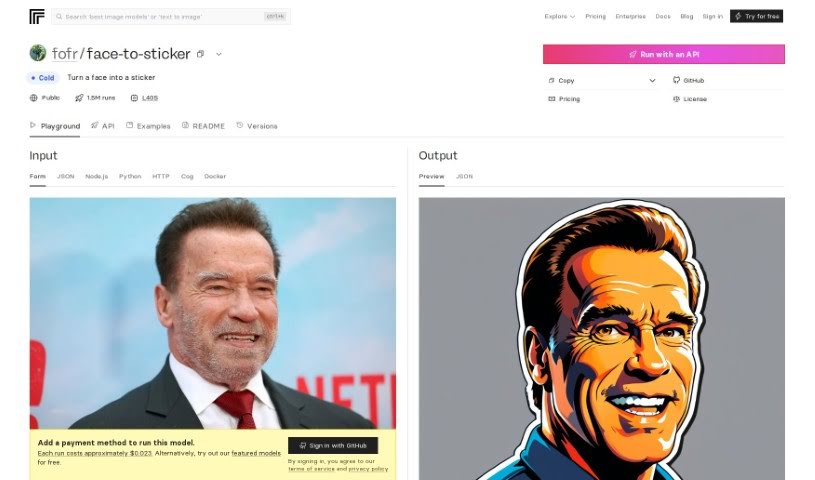
Screenshot of Replicate AI Face-to-Sticker

Replicate AI Face-to-Sticker

Curious about Replicate AI's Face-to-Sticker? We'll walk you through what it is, how to use it effectively in 2025, explore its features, and see how it stacks up against other AI image generators.

Screenshot

What is Replicate AI Face-to-Sticker?

Face-to-Sticker is a really neat model created by fofr. Its main job is to turn faces into stickers. It is a fun, creative way to give your photos a personal touch. You can take a facial image and transform it into a sticker format, making your pictures more unique and expressive. When you use the Face-to-Sticker model, you just need to provide an image and then tweak a few settings – like the width, height, a descriptive prompt, and some other options – to get the sticker just right. It’s a straightforward yet clever way to make eye-catching stickers from your own face for all sorts of uses.

Who created Replicate AI Face-to-Sticker?

The person behind Face-to-Sticker is artificialguybr. They’re the one who developed the special Loras that power the model. If you want to support their work, you can check out their Patreon or Ko-fi pages, and you can also follow them on Twitter. Essentially, this model takes a face and turns it into a sticker, and it runs on Nvidia A40 (Large) GPU hardware.

How to use Replicate AI Face-to-Sticker?

Ready to start making your own stickers? Here’s how you can use the Face-to-Sticker tool:

  1. Using Replicate’s API:
    • You can run fofr/face-to-sticker directly through Replicate’s API.
    • When you do this, you’ll need to provide inputs like the URL of your image, how many steps you want the process to take, the desired width and height for your sticker, a prompt to guide the style, and other settings like how much to upscale or the strength of the prompt.
    • For a complete rundown of all the inputs and what you can expect as outputs, definitely check out the model’s schema.
  2. Using Docker:
    • If you prefer to run things locally, you can pull and run fofr/face-to-sticker using Docker. This means you’ll download the entire model to your own computer.
    • There’s a specific command provided that you can use to get the tool up and running in your local setup.
  3. Using Cog:
    • Another way to run it locally is by pulling and running fofr/face-to-sticker with Cog. Like Docker, this method also involves downloading the full model to your machine.
    • You’ll set up your inputs much like the other methods – think image URL, steps, width, height, prompts, and any other relevant parameters you want to adjust.
  4. Viewing Examples:
    • Want to see what’s possible? Visit the link provided to check out more examples of how people are using the Face-to-Sticker tool for different creative projects.
  5. API Token:
    • To make sure you can authenticate and get predictions using the tool via Replicate’s API, you’ll need your API token. You can find this in your account settings.

So, these steps should give you a clear path to using the Face-to-Sticker tool, whether you’re working with Replicate’s API, Docker, Cog, or just want to see some examples and get your API token sorted.

Related AI Tools

Discover more tools in similar categories that might interest you

123RF AI Image Generator

Creative Image Generation
Learn More

Stay Updated with AI Tools

Get weekly updates on the latest AI tools, trends, and insights delivered to your inbox

Join 25,000+ AI enthusiasts. No spam, unsubscribe anytime.