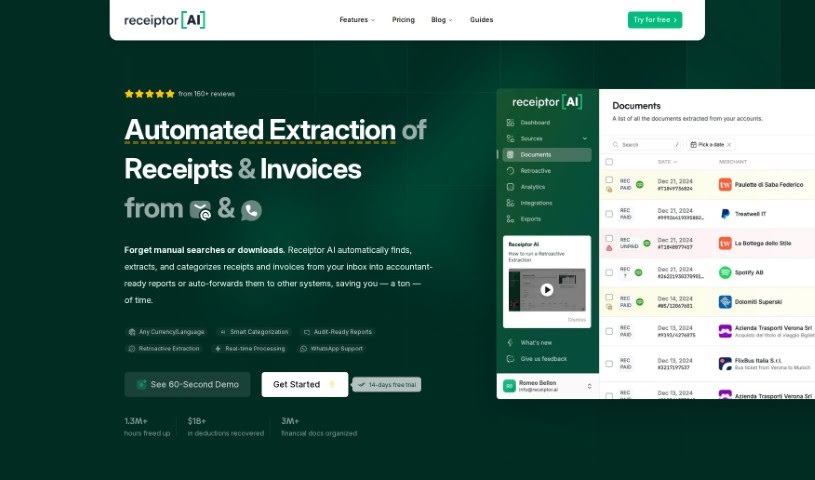
What is Receiptor AI?
Receiptor AI is a smart tool designed to make accounting much simpler. It automatically pulls receipts and invoices right from your emails, organizes everything neatly, and can even create detailed reports or connect with your favorite systems like Xero, QuickBooks, and Expensify. It is a way to save time, ditch manual data entry, and get a much clearer, more accurate picture of your finances. It’s really helpful for all sorts of people, from academic researchers and accounting services to digital nomads, e-commerce folks, event planners, freelancers, nonprofits, real estate investors, SaaS users, and travel bloggers. The system comes with some pretty neat features, like the ability to go back and analyze old emails, support for many languages, smart ways to categorize your spending based on context, and strong security to keep your financial information private and safe.
Who created Receiptor AI?
Jason Staats is the person behind Receiptor AI. He’s the Founder of Realize and also hosts a podcast. His company is all about making transaction categorization and receipt management automatic using this clever AI tool. Essentially, Receiptor AI makes accounting easier by grabbing and organizing receipts and invoices from emails, so you don’t have to sort through them yourself.
What is Receiptor AI used for?
- Event Planners: Keep your bookkeeping simple by automatically pulling invoices and receipts from various vendors.
- Academic Researchers: Spend more time on your research and less on admin. Receiptor AI can track and categorize your grant-related expenses.
- Accounting & Bookkeeping Services: Boost your service offerings by adding automated receipt extraction and management.
- Digital Nomads: Easily keep track of your work-related expenses for tax purposes.
- E-commerce Operators: Automate pulling and organizing invoices and receipts from your suppliers.
- Freelancers and Contractors: Seamlessly track your business expenses and potential tax deductions.
- Non-Profit Organizations: Streamline how you manage donation receipts with automatic extraction and categorization.
- Real Estate Investors: Efficiently handle property-related expenses by pulling related receipts directly from your emails.
- SaaS Users: Keep all your various subscriptions organized by identifying and categorizing recurring expenses.
- Travel Bloggers & Influencers: Gather and organize all your travel receipts so you can focus on creating great content.
Who is Receiptor AI for?
- Academic Researchers
- Accounting & Bookkeeping Services
- Digital Nomads
- E-commerce Operators
- Event Planners
- Freelancers and Contractors
- Non-Profit Organizations
- Real Estate Investors
- SaaS Users
- Travel Bloggers & Influencers
How to use Receiptor AI?
To get the most out of Receiptor AI, here’s a simple guide:
- Sign Up: Start by signing up for Receiptor AI. You can try it out for free – no credit card needed! This gets you access to the automated receipt and invoice extraction.
- Automatic Extraction: Receiptor AI automatically scans your emails. It finds emails with receipts or links to them and pulls out all the important details. This means you don’t have to search manually.
- Retroactive Email Analysis: You can even use Receiptor AI to look back through your entire email history. This is great because it makes sure you don’t miss any invoices or receipts from past years.
- Comprehensive Information Extraction: You’ll benefit from Receiptor AI pulling out key details from your receipts and invoices, like how much you spent, what category it falls into, and even dispute deadlines.
- Reports & Integrations: It’s easy to export your data as CSV and PDF reports, which really simplifies your accounting. Plus, Receiptor AI connects with systems like Xero and QuickBooks.
- Multi-Language Support: Receiptor AI can extract invoices and receipts in many different languages, making it super useful if you work internationally.
- Intelligent Contextual Categorization: The tool intelligently categorizes your transactions based on what you actually bought, adding a lot of precision to your financial tracking.
- Use Cases: Think about all the ways you can use Receiptor AI – it’s perfect for academic researchers, event planners, freelancers, real estate investors, and many more.
- Security Measures: Receiptor AI takes data security and privacy seriously. It follows Google’s API Services User Data Policy and has passed security assessments.
- Bulk Extraction: You can also have the tool go back through your entire email history all at once, organizing all your receipts, bills, and invoices in one place.
Basically, Receiptor AI makes expense tracking much better, simplifies getting your taxes ready, and keeps your data safe. It’s a really valuable tool for businesses and individuals who want to manage their receipts more efficiently.