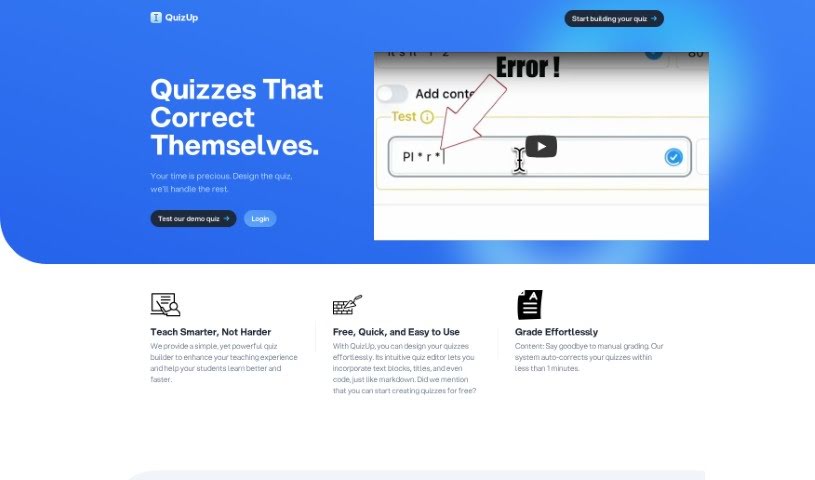
Screenshot of QuizUp

QuizUp

Discover what QuizUp is and how to use it effectively in 2025. We'll explore its features and see how it stacks up against other teaching tools.

Screenshot

What is QuizUp?

QuizUp is an online platform where you can create interactive quizzes. What’s neat is that it lets students answer open-ended questions, giving them a chance to really engage. You get instant feedback on their answers, and editing your quizzes is a breeze. Plus, it uses GPT-4 for corrections, which really helps with accuracy, and you can even tailor the quiz context to fit your specific needs. You can easily see and analyze what your students are submitting, and you can customize quizzes to match exactly what you’re teaching. For students, it’s a fantastic way to help them memorize information, revise for tests, and prepare for exams. The AI grading system works by comparing what students write against the answers you’ve set, then it gives you a success percentage. QuizUp charges based on how many responses you receive, so you pay for what you use.

Who created QuizUp?

Thor Fridriksson is the person behind QuizUp. His goal was to make learning more engaging with online quizzes that go beyond just multiple-choice. He wanted students to tackle open questions and get immediate feedback. The company is all about giving teachers and students the tools they need, with special plans that use AI to make testing simpler and learning environments better.

What is QuizUp used for?

  • Create engaging quizzes: Let students answer open-ended questions and see their feedback right away.
  • Analyze student work: Easily view and review all the responses your students submit.
  • Boost student learning: Help students with memorization, revising material, and getting ready for tests.
  • Share quizzes easily: Give students a unique link to access the quizzes you create.
  • Get instant feedback: Use the AI grading system to see how students are doing and check their answers.
  • Customize your quizzes: Adjust the quiz context to suit your teaching style and needs.
  • Tailored plans: Get plans designed to support both educators and students.
  • Learn anywhere, anytime: Conduct quizzes easily online, no matter where you are.
  • See results in real-time: Track quiz outcomes as they happen.
  • No email required: Students can submit answers without needing to provide an email address.
  • Share knowledge: Make it simple to pass on information and learning.
  • Invest in the future: Put resources into learning and development.
  • Precise corrections: Rely on the AI grading system for accurate feedback.
  • Variety of questions: Create quizzes with different types of questions.
  • Support for educators and students: Empower everyone involved in the learning process.
  • GPT-4 powered correction: Get more accurate grading thanks to GPT-4.
  • Remove branding: Take off the QuizUp brand from your quizzes if you prefer.
  • Effective for memorization and revision: Use quizzes to help students remember and review material.
  • Craft open-ended quizzes: Build online quizzes that encourage detailed answers.
  • Instant student feedback: Provide immediate feedback to students on their performance.
  • Smooth editing: Teachers can edit quizzes without any hassle.
  • Efficient assessment: Use the AI grading system for quick and effective assessments.
  • Aid test preparation: Quizzes are also great for preparing for entrance exams.
  • Powerful learning tools: Turn your quizzes into dynamic tools that really help students learn.
  • Personalized feedback: Give every answer detailed and insightful feedback.

Who is QuizUp for?

  • Educators
  • Students

How to use QuizUp?

Getting started with QuizUp is straightforward. Here’s a simple guide:

  1. Visit the Platform: Head over to QuizUp. It’s a great way to get a feel for everything it can do.
  2. Create Your Quizzes: Use the easy-to-navigate editor. You can add text blocks, titles, and build your quizzes piece by piece.
  3. Encourage Open Questions: Prompt your students to answer questions in their own words. They’ll get instant feedback on their responses.
  4. See the Benefits: Quizzes are excellent for learning. They help students check their understanding and strengthen their memory.
  5. Share with Students: Give students a unique identifier link. This is their ticket to start their learning journey with your quiz.
  6. Use the AI Grading: Let the AI grading system, powered by OpenAI, do the heavy lifting. It compares student answers to yours and assigns a grade. You can even set a minimum success percentage for what you consider a good answer.
  7. Understand the Payment: You pay based on the number of responses you get. You can create as many quizzes as you like, but the billing is per response.
  8. Invest in Learning: Explore the different plans available. They’re designed to make learning better for both teachers and students.
  9. Check the FAQs: If you have questions about analyzing responses, customizing quizzes, or sharing them, the FAQ section has you covered.

QuizUp really simplifies making, grading, and sharing quizzes. It’s a fantastic tool for making learning interactive and effective. Give QuizUp a try today to refresh your teaching methods and get your students more involved!

Related AI Tools

Discover more tools in similar categories that might interest you

Academic Help Free Essay Generator

Education Academic Writing
Learn More

Stay Updated with AI Tools

Get weekly updates on the latest AI tools, trends, and insights delivered to your inbox

Join 25,000+ AI enthusiasts. No spam, unsubscribe anytime.