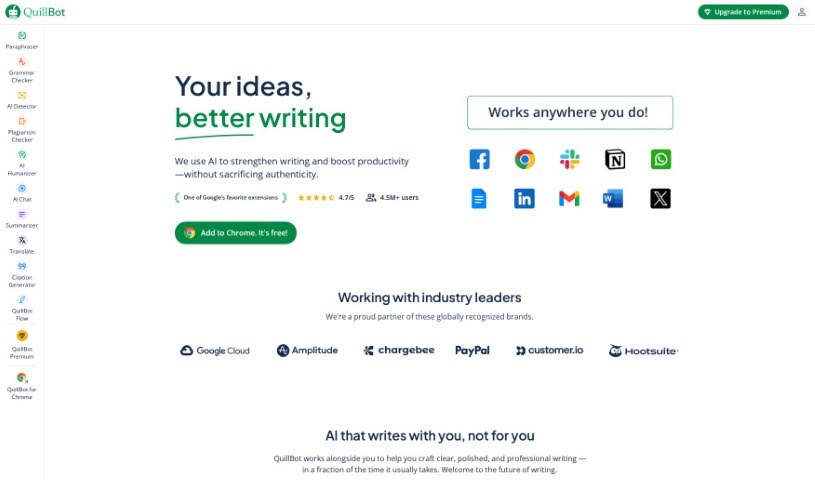
Screenshot of QuillBot

QuillBot

Discover what QuillBot is and how to use its powerful AI writing tools in 2025. We'll explore its key features, compare it to other academic writing tools, and show you how to boost your productivity and writing style.

Screenshot

What is QuillBot?

QuillBot is a really helpful platform packed with AI-powered tools designed to help you create unique content. It is your personal writing assistant! It’s built to help you rephrase sentences, paragraphs, or even whole articles, all while making sure the original meaning stays exactly the same. Essentially, QuillBot is here to make your writing process smoother and more productive by giving you efficient and effective ways to reword your text.

Who created QuillBot?

Rohan Gupta is the mind behind QuillBot. He started the company with a clear mission: to build innovative AI writing tools that genuinely help people. Quillbot itself is a software company based in Houston, Texas. They’re all about providing advanced paraphrasing and writing assistant tools that really make a difference in how users write.

What is QuillBot used for?

QuillBot can help you with so many things! Here’s a look at what it’s great for:

  • Boosting your productivity so you can get more done.
  • Enhancing your writing style to make your words more impactful.
  • Improving your communication across the board.
  • Paraphrasing content to avoid repetition or to explain things in a new way.
  • Writing emails that are clear and professional.
  • Expanding your ideas when you need more detail.
  • Improving your writing style for better flow and impact.
  • Generating detailed summaries to quickly grasp key information.
  • Enhancing your vocabulary with just the right words.
  • Adjusting the tone of your writing to fit your audience.
  • Transforming language to be more engaging or appropriate.
  • Rewriting sentences for clarity and conciseness.
  • Improving your overall writing quality in every piece you create.
  • Paraphrasing text to ensure originality and understanding.
  • Improving text clarity so your message always gets across.
  • Generating synonyms to find the perfect word.
  • Improving grammar and structure for polished writing.
  • Transforming passive voice into active voice for more direct impact.
  • Reducing wordiness to make your writing more concise.
  • Improving sentence fluency so your writing flows naturally.
  • Generating content for all sorts of writing tasks.
  • Enhancing readability so your audience can easily follow along.
  • Ace your essays with confidence.
  • Write like a boss with polished, professional prose.
  • Ignite your content flow and keep readers engaged.
  • Communicate clearly and fluently, no matter the topic.
  • Spicing up sentences to make them more interesting.
  • Stepping up your style for a more sophisticated touch.
  • Conquering deadlines by working more efficiently.
  • Perfecting projects with well-crafted text.
  • Summarization of text for quick reviews.
  • Rephrasing of text for clarity or variation.
  • Paraphrasing for better understanding, both for you and your reader.
  • Creating summaries for study purposes to help you learn.
  • Assistance in content creation from start to finish.
  • Enhancing content readability for maximum impact.
  • Aid in writing essays or articles for school or work.
  • Assisting in academic writing tasks to meet your scholarly needs.

Who is QuillBot for?

QuillBot is a fantastic tool for a wide range of people who write:

  • Academic writers looking to refine their research papers.
  • Content creators aiming for engaging and original material.
  • Students needing help with essays, assignments, and study notes.
  • Bloggers wanting to keep their content fresh and unique.
  • Researchers who need to rephrase findings clearly.
  • Marketers crafting compelling copy and campaign materials.
  • Business professionals communicating effectively in emails and reports.

How to use QuillBot?

Using QuillBot is pretty straightforward. Just follow these simple steps to get the most out of it:

  1. First, head over to the Quillbot website. It’s easy to find!
  2. You’ll see a text box right there, ready for your words.
  3. Go ahead and type or paste the text you want to paraphrase or improve into that box.
  4. Next, pick the mode that best suits your needs. You’ve got options like Standard, Fluency, Creative, Suggestive, or Concision.
  5. Once you’ve got your text and mode ready, just hit that “Quill It” button to kick off the paraphrasing.
  6. Take a look at the paraphrased text Quillbot gives you. It’s usually pretty good!
  7. Feel free to make any tweaks or adjustments you think are needed to make it perfect.
  8. Don’t forget to check out the other handy features, like the thesaurus for word choices, the grammar checker, or even the citation generator if you’re working on academic stuff.
  9. Finally, save your improved text or copy it to use wherever you need it.
  10. Just a friendly reminder to always respect Quillbot’s terms and conditions when you’re using their services.

By following these steps, you’ll be able to use Quillbot really effectively to improve and paraphrase your text whenever you need to.

Related AI Tools

Discover more tools in similar categories that might interest you

Academic Help Free Essay Generator

Education Academic Writing
Learn More

Stay Updated with AI Tools

Get weekly updates on the latest AI tools, trends, and insights delivered to your inbox

Join 25,000+ AI enthusiasts. No spam, unsubscribe anytime.