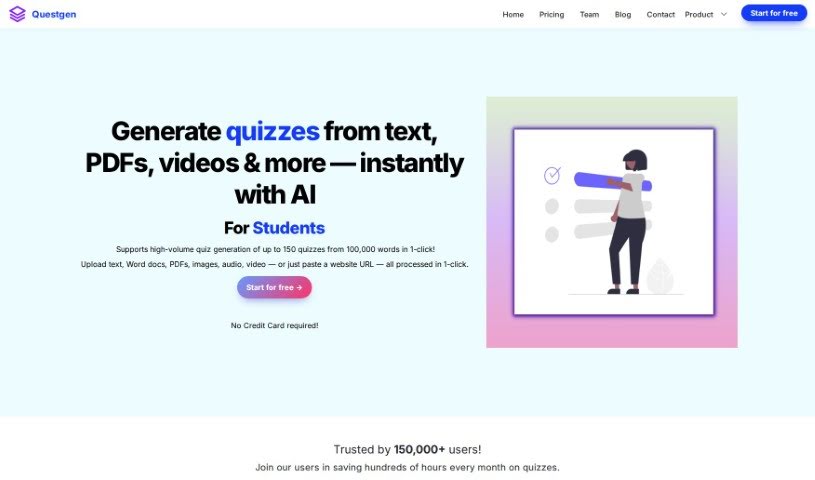
Screenshot of Questgen

Questgen

Discover Questgen, an AI-powered quiz generator, and learn how to use it effectively in 2025. We'll cover its features, compare it to other teacher tools, and show you how it can simplify assessment creation.

Screenshot

What is Questgen?

Questgen is a really neat AI tool that helps you create all sorts of quizzes and tests without any fuss. It’s pretty smart, too – it can whip up multiple-choice questions, true/false ones, FAQs, and even higher-level thinking questions based on Bloom’s Taxonomy, all from a text you provide, even if it’s quite long (up to 80,000 words!). What’s great is that it’s super easy to get started; you don’t even need a credit card. Over 80,000 people around the world already trust it.

Once Questgen generates your quiz, you can easily tweak the questions to make sure they’re just right for your specific needs before you export them. It’s a fantastic resource for teachers, schools, HR departments, publishers, and anyone in the edtech space.

Questgen packs a lot of features. You can generate a ton of quizzes quickly – up to 150 from 100,000 words with just one click! It supports various assessment types like MCQs, true/false, and fill-in-the-blanks. Plus, you can customize everything before exporting in formats like PDF, CSV, and JSON. This platform is built on years of AI research specifically focused on generating questions for education.

Who created Questgen?

Ramsri Goutham Golla, an AI product builder and the sole developer behind Questgen, created this tool. He poured 3 years of his independent research into Natural Language Processing for question generation into making Questgen. His company, QuestgenAI, Inc., offers this AI-powered platform that makes it simple to create different kinds of assessments, like MCQs, true/false questions, and higher-order questions from any text. Questgen is designed to help educators, HR teams, and publishers easily create quizzes in large volumes, with the flexibility to customize and export them in various formats.

What is Questgen used for?

  • Effortless Quiz Creation: Generate quizzes from any text in just one click using AI.
  • Scalable Assessments: Create assessments efficiently, even for large groups or extensive material.
  • High-Volume Generation: Supports generating a large number of quizzes quickly.
  • Customization: Easily edit and modify generated worksheets to fit your exact requirements.
  • Teacher & School Friendly: Create worksheets simply for teachers and educational institutions.
  • HR Compliance: Develop assessments from compliance documents for HR teams.
  • Publisher & Edtech Support: Outsource assessment creation for publishing houses and edtech companies.
  • Diverse Question Types: Supports various quiz formats, including MCQs, True/False, Fill-in-the-blanks, and more.
  • Student Practice: Offers a practice mode for students to prepare for exams.
  • Bloom’s Taxonomy: Generate questions tailored to different levels of cognitive thinking as defined by Bloom’s Taxonomy.

Who is Questgen for?

  • Teachers
  • Schools
  • HR teams
  • Publishers
  • Edtech Companies

How to use Questgen?

Using Questgen is straightforward. Here’s how you can get started:

  1. Input Your Content: You can either paste any text (up to 80,000 words) in any language directly into the platform or provide a URL. Then, simply select the type of questions you want to generate – like MCQs, True/False, Fill-in-the-blank, FAQs, Short Answers, or Higher Order QA – and submit your request.
  2. Review and Export: Once the questions are generated, you have the chance to edit them to ensure they’re perfect. After that, you can export your quiz in a variety of formats, such as text (AIKEN, RESPONDUS), PDF, CSV, QTI 2.1, Moodle XML, GIFT, JSON, and more.
  3. Tailor for Your Audience: Whether you’re a teacher, part of a school, an HR team, a publisher, or an edtech company, Questgen has features to help. This includes generating questions based on Bloom’s Taxonomy levels, creating Match-the-Following quizzes, or even converting images into quizzes.
  4. Student Study Mode: Students can use Questgen to create AI quizzes from their study materials. The ‘Study mode’ lets them practice for exams, and for quizzes like MCQs and True/False, they get automated scoring to see how they’re doing.
  5. Flexible Export Options: Questgen offers a range of export formats, including PDF, CSV, JSON, and others, so you can easily get your quizzes into the systems or platforms you need.
  6. Share and Embed: You can share your Questgen quizzes publicly or embed them directly onto your website using interactive iframes, creating engaging learning experiences for your audience.

By following these simple steps, you can easily use Questgen to create quizzes and assessments for your educational or training needs.

Related AI Tools

Discover more tools in similar categories that might interest you

Academic Help Free Essay Generator

Education Academic Writing
Learn More

Stay Updated with AI Tools

Get weekly updates on the latest AI tools, trends, and insights delivered to your inbox

Join 25,000+ AI enthusiasts. No spam, unsubscribe anytime.