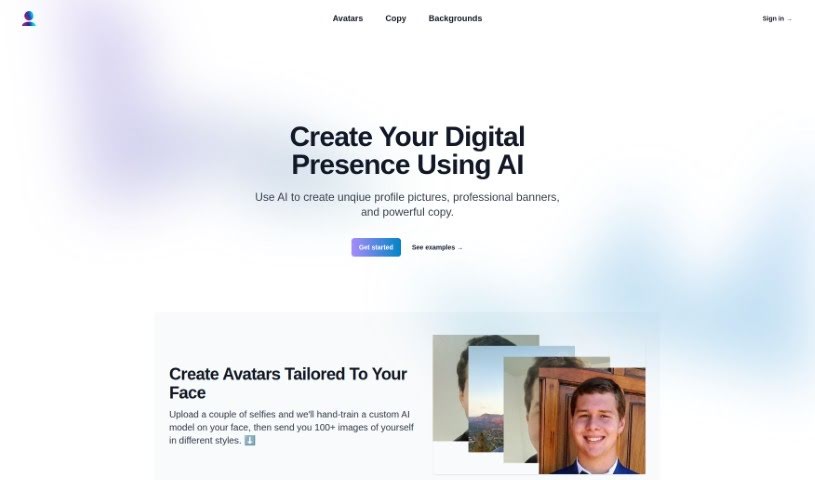
Screenshot of Profile Pro

Profile Pro

Discover what Profile Pro is and how to use it effectively in 2025. We'll explore its features and see how it stacks up against other AI Portrait Generators.

Screenshot

What is Profile Pro?

Profile Pro is a neat AI tool that helps you create really professional and unique digital avatars, banners, and even the text for your online profiles. It works by using custom AI models that it trains on your own face, using selfies you upload. This way, it can generate over 100 different avatar styles that are specifically made to look like you. Plus, Profile Pro lets you pick from all sorts of cool background scenery – think nature, outer space, or even cyberpunk themes – to make your profile pictures really pop. On top of that, you can use its features to write engaging descriptions, bios, and headlines for platforms like Twitter and LinkedIn, helping you definitely stand out in the digital crowd.

Who created Profile Pro?

Profile Pro was actually created by a founder who prefers to remain unnamed, and it first launched on April 25, 2023. At its core, it’s an AI-powered tool designed to help people create professional-looking, distinctive digital avatars, banners, and even the written content for their online profiles. The platform gives you plenty of options to customize your avatars and backgrounds. It also provides tools to help you write compelling descriptions, bios, and headlines for all sorts of social and professional sites, including Twitter, LinkedIn, and YouTube.

What is Profile Pro used for?

  • Create unique profile pictures: Get a profile pic that’s truly yours.
  • Generate custom avatars tailored to your face: The AI makes avatars that actually look like you.
  • Create professional banners: Design eye-catching banners for your profiles.
  • Write engaging copy for various platforms: Craft compelling text for your social media and professional sites.
  • Customize background scenery: Pick from different backdrops to match your style.
  • Utilize assets on LinkedIn, Twitter, YouTube, and more: Use your creations across your favorite platforms.
  • Craft descriptions, bios, and headlines: Make your profile text shine.
  • Enhance professional online presence: Boost how you appear online professionally.
  • Create a cohesive online image: Ensure your look is consistent everywhere.
  • Generate avatar styles like medieval, corporate, psychedelic: Explore a wide range of artistic looks.
  • Generate avatars tailored to your face: Get personalized avatar styles.
  • Create custom backgrounds for profiles: Design unique backdrops.
  • Help in crafting engaging bios and headlines: Make your profile text more appealing.
  • Maintain consistent online presence across different platforms: Keep your brand looking the same everywhere.
  • Aid in creating a personal brand online: Build your unique online identity.
  • Customize avatars in various styles: Play with different avatar looks.
  • Customize backgrounds with different scenery: Choose from a variety of backdrops.
  • Generate a variety of background scenery: Get lots of background options.
  • Craft engaging copy for platforms like Twitter and LinkedIn: Write great text for these sites.
  • Create cohesive online image for platforms like LinkedIn, Twitter, YouTube: Make your online look consistent across these key platforms.
  • Use colorful, medieval, psychedelic, corporate, and professional avatar styles: Explore a broad spectrum of avatar aesthetics.
  • Utilize nature, space, and cyberpunk backgrounds: Pick from these distinct scenery themes.
  • Assist in writing descriptions, bios, and headlines for various platforms: Get help with your profile text.
  • Enhance professional online presence on platforms like LinkedIn, Twitter, and YouTube: Improve how you look professionally on these major sites.

Who is Profile Pro for?

Profile Pro is a great tool for a variety of people who want to improve their online presence:

  • Social media managers: To create engaging content and profiles.
  • Freelancers: To present a professional image to clients.
  • Content creators: To design unique visuals for their channels.
  • Small Business Owners: To build a strong brand identity.
  • Entrepreneurs: To make a memorable first impression.
  • Job seekers: To create a polished LinkedIn profile.
  • Graphic designers: To explore new AI-driven creative avenues.
  • Marketing professionals: To craft compelling campaign visuals and copy.
  • Business owners: To enhance their company’s overall digital appearance.

How to use Profile Pro?

Using Profile Pro is pretty straightforward. Just follow these simple steps:

  1. Upload Your Selfies: First things first, upload a few of your best selfies to Profile Pro. These are what the AI will use to create all those cool avatar styles that are made just for you.
  2. Avatar Creation: Now, feed those selfies into Profile Pro’s avatar creation part. The custom AI model gets ‘hand-trained’ on your face, which is how it manages to generate over 100 different avatar styles.
  3. Background Selection: Next, pick out a background you like from the many options Profile Pro offers. You can choose from scenery like nature, space, or even cyberpunk to give your profile a unique visual feel.
  4. Customization Options: Take some time to customize your avatars and backgrounds. You can select different styles and settings provided by Profile Pro to really personalize your digital image and stand out online.
  5. Copy Crafting: Profile Pro also has tools to help you write engaging descriptions, bios, and headlines for platforms like Twitter and LinkedIn. This is a great way to boost your online presence with well-written text.
  6. Platform Usage: You can use the assets you create with Profile Pro on lots of different platforms, including professional ones like LinkedIn and social sites like Twitter and YouTube.
  7. Online Branding: Use Profile Pro to build a consistent personal brand online. You can generate custom avatars, backgrounds, and copy that all work together for your profiles.
  8. Sign In: To get started, just sign into Profile Pro. You can do this by clicking the ‘Sign in’ button, which you’ll usually find in the website’s main menu or at the bottom of the page.

By following these steps, you’ll be able to effectively use Profile Pro to create really professional and unique digital assets for all your online profiles.

Related AI Tools

Discover more tools in similar categories that might interest you

123RF AI Image Generator

Creative Image Generation
Learn More

Stay Updated with AI Tools

Get weekly updates on the latest AI tools, trends, and insights delivered to your inbox

Join 25,000+ AI enthusiasts. No spam, unsubscribe anytime.