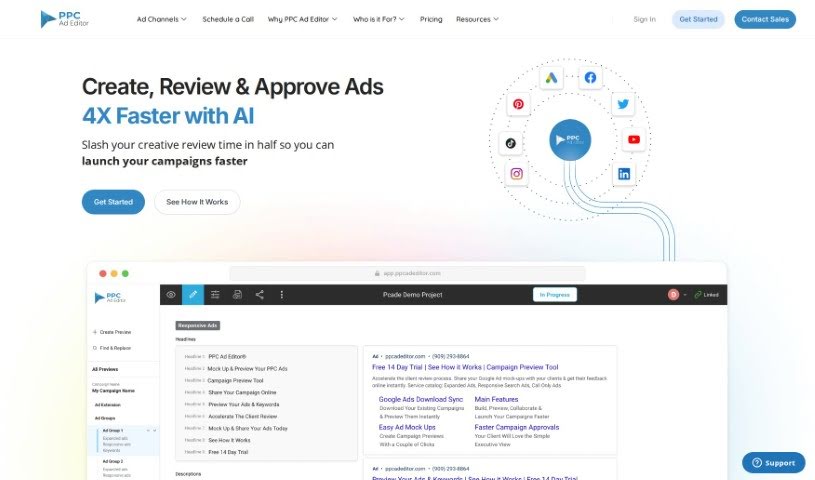
What is PPC Ad Editor?
PPC Ad Editor is a handy tool built for businesses and marketing pros. Its main job is to speed up how you review ad campaigns and get client approvals. It is a way to create, check, and approve ads much faster than you normally would. This means less time spent on creative reviews and getting your campaigns live quicker. The platform is easy to use, works with all sorts of PPC ad types, and really helps make your campaign workflow smoother.
If you’re curious about the tool or want to dive deeper into its features, just let me know!
Who created PPC Ad Editor?
PPC Ad Editor was brought to life by a dedicated team. Faisal N., a developer skilled in PHP, Laravel, VueJS, Javascript, and Bootstrap, was a key player. Laura V. handles customer service, making sure everyone gets the support they need, while Kenneth K. leads the strategy as Sr. VP. This innovative tool was designed to make working together easier for digital marketing agencies and their clients. It offers a complete preview tool specifically for Google Ads campaigns. The goal is to simplify creating, reviewing, and approving campaigns, tackling some of the common frustrations with existing Google Ads tools.
What is PPC Ad Editor used for?
- Speed up ad creation: Use smart design and editing tools to make ads faster.
- Cut review time: Halve the time it takes to review creative work, leading to quicker campaign evaluations.
- Fast client approvals: Get client consent quickly with a simple approval system.
- Flexible ad formats: Easily handle many different PPC ad types for versatile campaign management.
- Affordable start: Begin using the platform’s features with an introductory price of just $1.
- Streamlined agency-client collaboration: Improve how digital marketing agencies and clients work together on PPC campaigns.
- Simplify creative process: Make the creative work easier and get campaigns to market faster.
- Direct Google Ads upload: Once approved, you can upload campaigns straight into Google Ads.
- Better team collaboration: Improve teamwork between copywriters, account managers, and others.
- Boost efficiency: Visually build campaigns and update existing ones more efficiently.
- Error-free export: Avoid transcription mistakes by exporting entire campaigns to Google Ads Editor.
- Edit ad copy and keywords: Allow team members to easily add or update ad copy and keywords.
- Web-based review: Share and review complete PPC campaign builds right from your web browser.
- Copywriter access: Give copywriters edit access to write ads via a shareable link.
- AI-powered creation: Speed up ad production even more with AI tools for creating ads.
- Visual campaign presentation: Show clients what the ad copy, strategy, and campaign structure look like.
- Centralized review: Share and review all your PPC campaign builds online, all in one place.
- Smoother approval process: Make the campaign approval process much simpler.
- Create, preview, revise: Work with clients to create, preview, and make changes to PPC ads.
- Easier formative stage: Make the initial stages of a PPC campaign much more manageable.
- Organized comments: Enjoy a simple user experience, from drafting to organizing feedback.
- Designed for agencies: Built for digital agencies of all sizes, offering affordability and a free trial.
Who is PPC Ad Editor for?
- Digital marketers
- Advertising Agencies
- Marketing professionals
- PPC specialists
- Content creators
- Digital Advertising Agencies
- Marketing Agencies
How to use PPC Ad Editor?
Here’s how to get the most out of PPC Ad Editor:
- Build Your Campaign: Use the built-in visual ad builder to create campaigns quickly. You can also import existing campaigns or bulksheets straight from Google Ads.
- Collaborate Seamlessly: Work together by adding comments, reviewing feedback, and getting instant notifications for approvals or rejections.
- Craft Your Ads: Write ad copy with confidence using the visual builder, which includes character count features. You can also give copywriters edit access to improve the ad writing process.
- Present to Clients: Clearly explain your ad copy, strategy, and campaign structure to clients using the tool’s visual presentation features.
- Manage Campaigns Visually: See your campaigns laid out, refresh existing ones, or build new ones using bulk sheets. PPC Ad Editor makes campaign building easier and more visual than traditional methods.
- Share and Review: Easily share and review entire PPC campaigns right from your web browser. Once approved, export full campaigns to Google Ads Editor to avoid errors.
- Simple to Start: Begin working right away with your existing spreadsheets or directly within the tool. The user-friendly interface makes creating and managing campaigns efficient and straightforward.
- Effortless Client Approval: Make creating, previewing, and revising PPC ads with clients a breeze. The tool speeds up the creative process and gets your campaigns to market faster.
Overall, PPC Ad Editor is designed to really improve how digital marketing agencies and clients collaborate, making the whole PPC campaign process much more efficient and organized.
For more details on what the PPC Ad Editor tool can do, check out their website.