What is Pouncer AI?
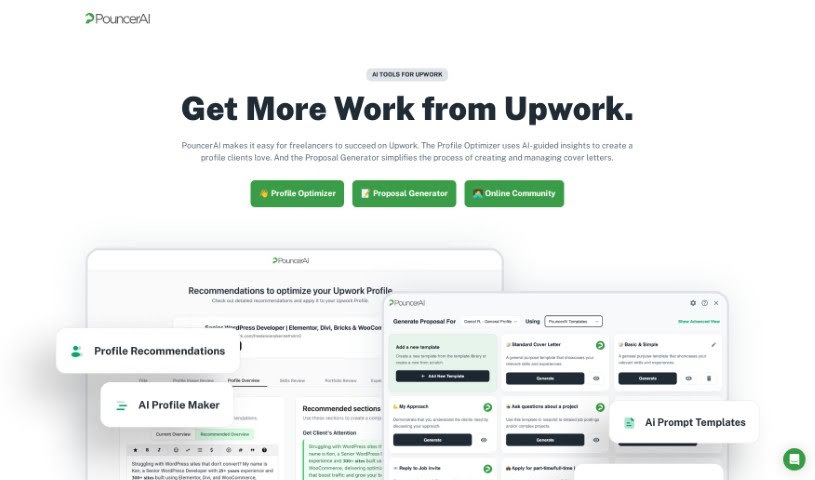
Pouncer AI is a really handy tool designed to help freelancers make their Upwork profiles shine. It is your personal Upwork profile enhancer! It gives you expert advice, shows you great examples, and provides design tools to make your profile really stand out to potential clients. The goal here is to make it simpler for you to land gigs on Upwork and get noticed more easily. It even has a special Proposal Generator that whips up tailored cover letters super fast, helping you apply for jobs and get ahead of the crowd.
Who created Pouncer AI?
PouncerAI was actually built by Daniel Reiling and Sean Jackson. They’re freelancers themselves, working on Upwork, and they got a bit fed up with how things worked on the platform. So, they decided to create tools to help attract more clients. They first shared these tools with friends, and then decided to make them available to other freelancers who wanted a better Upwork experience. Basically, PouncerAI is their way of making it easier for everyone to find good work on Upwork.
What is Pouncer AI used for?
Here’s a rundown of what Pouncer AI can do for you:
- Keep your data private and secure.
- Transform your Upwork Profile into something clients will love to read.
- Find Upwork jobs faster and create persuasive cover letters.
- Craft powerful cover letter templates that really grab a client’s attention.
- Organize jobs you’re interested in with a unique Job Inbox.
- Get instant Job Alerts via SMS, Slack, email, or desktop notifications.
- Generate eye-catching cover letter proposals using the AI-assisted Proposal Generator.
- Manage multiple Upwork profiles and send custom proposals for each freelancer.
- Help you stay compliant with Upwork’s Terms of Service to avoid any risks.
- Style your cover letters yourself with the Upstyler toolbar, adding unique touches like emojis, bold, and italic text, plus real bullet points.
- Focus on quality applications by limiting your monthly proposals.
- Improve your Upwork Profiles with expert suggestions and design tools.
- Generate persuasive cover letters quickly using PouncerAI’s helpful templates.
- Organize and apply for jobs efficiently with the special Job Inbox.
- Receive Real-time Job Alerts so you never miss a new opportunity.
- Create attention-grabbing cover letter proposals with the AI-powered Proposal Generator.
- Manage multiple freelancer profiles and send custom-tailored proposals with ease.
- Enhance your cover letters and proposals using the Upstyler toolbar.
- Ensure you’re following Upwork’s Terms of Service requirements.
- Use ChatGPT 4.0 and AI prompts to make your proposals super tailored.
- Transform your Upwork Profile specifically for clients.
- Generate persuasive cover letters that get noticed.
- Create proposals that are perfectly tailored to each job.
- Manage all your different freelancer profiles on Upwork in one place.
- Improve how well your proposals perform.
- Boost your profile’s visibility to potential clients.
- Save valuable time on your job applications.
- Use AI prompts to really fine-tune your proposals.
- Collaborate effectively with team members.
- Transform your Upwork Profile with expert tips and design features.
- Generate persuasive cover letters quickly and easily.
- Create attention-grabbing cover letter proposals with AI help.
- Manage multiple freelancer profiles on Upwork seamlessly.
- Help tailor proposals specifically for individual freelancers.
- Keep a history of all the proposals you’ve generated.
- Ensure the privacy and security of your job information and proposals.
- Allow you to create and use your own custom AI prompts.
- Enhance proposals with the unique Upstyler toolbar for added styling.
- Maintain compliance with Upwork’s Terms of Service.
Who is Pouncer AI for?
Pouncer AI is a great tool for:
- Freelancers
- Agencies
- Team members
- Anyone using the Upwork platform
- Freelancers specifically on Upwork
How to use Pouncer AI?
Here’s how to get the most out of PouncerAI:
- Sign Up: First, create your PouncerAI account. You don’t need to share your Upwork login details, which is great for security.
- Explore Features:
- You’ll find powerful cover letter templates that help you quickly write cover letters that really grab attention.
- Use the Job Inbox to easily organize and find the Upwork jobs that are most relevant to you.
- Get real-time job alerts sent straight to your SMS, Slack, email, or desktop so you’re always in the loop on new opportunities.
- Take advantage of the AI-assisted Proposal Generator to create cover letters that are perfectly matched to what clients are looking for in their job descriptions.
- Manage Profiles:
- Remember that your PouncerAI profile is separate from your Upwork profile. It’s designed to work smoothly with AI prompts.
- Utilize Tools:
- You can add multiple RSS feeds to help classify jobs more easily.
- The Upstyler toolbar lets you add extra flair to your cover letters, like emojis, bold text, and proper bullet points.
- Subscription and Usage:
- Keep an eye on your proposal limits, which depend on your subscription plan.
- It’s important to know that PouncerAI won’t apply for jobs automatically on your behalf. You’re always in control of the application process.
- Privacy and Security:
- PouncerAI takes data security and privacy very seriously. Your job information and proposals are stored securely and aren’t shared with anyone else.
By following these steps, you can really optimize your Upwork profile and make your job application process much smoother and more effective with PouncerAI.