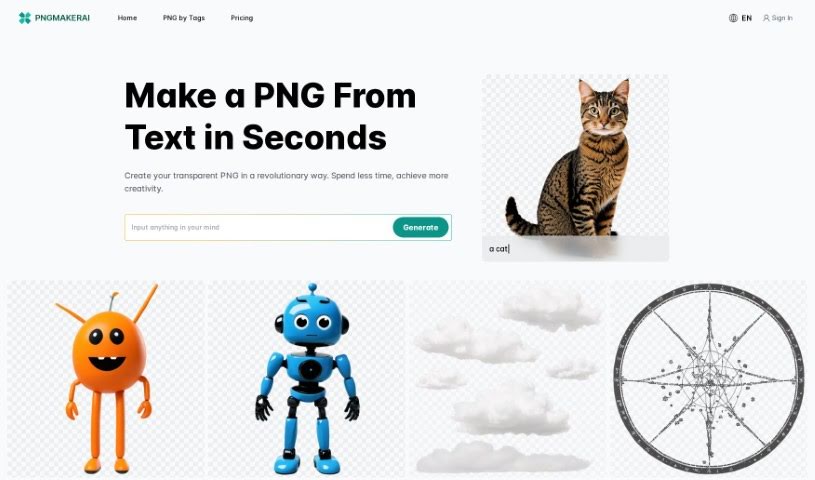
Screenshot of Pngmaker

Pngmaker

Discover Pngmaker in 2025! Learn what this AI tool is, how to use its features effectively, and how it stacks up against other Image Generators.

Screenshot

What is Pngmaker?

So, what exactly is Pngmaker? Based on the details in the “pngmaker.pdf” document, it’s an AI-powered tool that turns your text descriptions into PNG images. You just type out what you want, and the platform uses some pretty advanced algorithms to whip up transparent PNG images for you, usually in about 10 seconds. Pretty neat, right? PNGMaker AI can even blend new elements into PNGs you already have. It’s designed for all sorts of professionals – think graphic designers, content creators, web developers, and event planners. Plus, they offer a free trial so you can test out its image-generating magic yourself. They also have different subscription plans if you need more features, like unlimited normal processing, limits on how many jobs you can run, commercial licenses, or the option to keep your generated images private. All in all, it’s a super user-friendly way to create visuals, perfect for tons of different uses, and it really encourages you to get creative.

Who created Pngmaker?

A Quick Look at Pngmaker:

Launched: Pngmaker first appeared on March 14, 2024, bringing a fresh, fast way to create transparent PNG images.

The Team Behind It: Pngmaker was actually started by a startup team of 5 experienced professionals who really know their stuff in the AI world. They’re all driven by a shared passion for innovation and a desire to push what AI can do. The company’s guiding principle is “Technology Equality,” meaning they want to make advanced AI accessible to everyone. Their main goal is to use AI to boost productivity across different industries. They envision a future where AI is smoothly woven into our daily tasks, making us all more creative and efficient. Even though Pngmaker is still relatively new, they’re focused on hitting key milestones to get more people using AI-generated imagery. Long-term, they aim to expand the reach of their AI image technology and explore more commercial uses for these AI-created images.

What is Pngmaker used for?

  • Event Planning: Think custom invitations and unique dĂ©cor elements.
  • Marketing: Crafting eye-catching ads and presentations with stunning visuals.
  • Logo Design: Generating high-quality PNG logos with transparent backgrounds.
  • Web Graphics: Creating images directly from detailed descriptions.
  • Website & App Development: Providing visual elements that integrate smoothly.
  • Product Image Editing: Easily handling transparent backgrounds for product photos.
  • Social Media: Generating custom visuals tailored for social media posts.
  • Creative Projects: Making fantastical landscapes or specific objects from scratch.
  • Marketing Collateral: Producing logos, web graphics, and other marketing materials.
  • Image Prototyping: Quickly creating visual concepts.
  • Logo Creation: Designing professional, transparent PNG logos.
  • Web Graphics: Generating graphics based on your descriptions.
  • Website/App Development: Creating visual assets for seamless integration.
  • Product Images: Managing transparent backgrounds and integrating images perfectly.
  • Social Media Visuals: Crafting unique visuals for your social media presence.
  • Marketing Materials: Making logos, web graphics, and other promotional visuals.
  • Image Blending: Seamlessly incorporating new elements into existing PNG images.
  • Event Planning: Creating custom invitations and unique dĂ©cor elements.
  • Marketing: Generating impactful ads and presentations with stunning visuals.
  • Logo Creation: Designing high-quality, transparent PNG logos.
  • Web Graphics: Generating web graphics based on detailed descriptions.
  • Website and App Development: Creating images that seamlessly integrate into projects.
  • Product Images: Handling transparent backgrounds and integrating images perfectly.
  • Social Media Visuals: Generating custom visuals for social media.
  • Fantastical Landscapes or Specific Objects: Creating these based on user descriptions.
  • Marketing Collateral: Creating logos, web graphics, and other visuals for marketing projects.
  • Professional Fields: Graphic designers, content creators, web developers, marketing professionals, and event planners can all benefit from PNGMaker AI.

Who is Pngmaker for?

  • Graphic designers
  • Content creators
  • Web Developers
  • Marketing professionals
  • Event Planners

How to use Pngmaker?

Using Pngmaker to create transparent PNG images is pretty straightforward. Here’s how you do it:

  1. Input Your Idea: First, just describe the image you’re imagining in the input box. The more detail you give, the better the results will be.
  2. Wait About 10 Seconds: Once you hit submit, the AI algorithms get to work. It usually takes around 10 seconds to process your request.
  3. Receive Your PNG Image: After that short processing time, your transparent PNG image will be ready for you to check out.

If the first result isn’t quite what you had in mind, don’t worry! You can always tweak your description and try again until you get the perfect image. Pngmaker.ai is really designed to help you refine the generated image. It’s a fantastic tool for graphic designers, content creators, web developers, marketing pros, and event planners, helping them create intricate designs, unique visuals, engaging web graphics, and special touches for events. You can also efficiently create marketing collateral, logos, and social media visuals with Pngmaker. They offer a free trial, making it easy and enjoyable to explore your creativity.

Related AI Tools

Discover more tools in similar categories that might interest you

123RF AI Image Generator

Creative Image Generation
Learn More

Stay Updated with AI Tools

Get weekly updates on the latest AI tools, trends, and insights delivered to your inbox

Join 25,000+ AI enthusiasts. No spam, unsubscribe anytime.