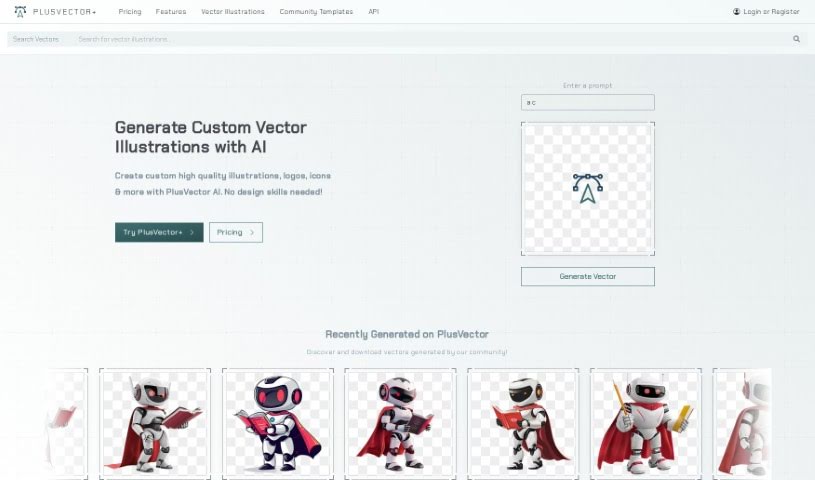
Screenshot of Plusvector

Plusvector

Discover Plusvector, an AI-powered tool for creating high-quality vector graphics in 2025. Explore its features, learn how to use it, and see how it stacks up against other AI image generators.

Screenshot

What is Plusvector?

PlusVector is your go-to AI engine for whipping up fantastic vector graphics. Whether you need illustrations, logos, or icons, it creates them instantly and really efficiently. The best part? You can generate scalable vector graphics (SVGs) just by typing in a simple prompt – no need to be a design pro! PlusVector lets you create vectors from prompts, gives you SVGs that look great no matter how big or small you make them, and includes easy editing tools. You also get access to a community library filled with vectors and templates, plus you can download as many vectors as you like. It’s also great for commercial projects because you don’t need to credit the tool for the images you use. Because the SVGs are resolution-independent, they’ll always look sharp and clear on any device or screen size, and you can even tweak them with CSS and JavaScript. PlusVector offers different pricing plans: Standard, Pro, and Enterprise. You can use it for commercial work, get support for file formats beyond SVG, design logos, and really customize the vectors to your liking.

Who created Plusvector?

Plusvector was actually created by a founder who prefers to remain anonymous. The company officially launched on December 1, 2023. They developed this AI-powered engine specifically to make it super easy for anyone to create high-quality vector illustrations, logos, icons, and more. The platform is designed to understand your prompts and then generate detailed, scalable vector graphics (SVGs). These are perfect for both web and print, and the key is that they maintain their quality no matter the screen size or device – that’s what we mean by resolution independence.

What is Plusvector used for?

Plusvector is incredibly versatile! Here’s a breakdown of what you can do with it:

  • Community Access: Dive into a library of vectors and templates created by the community.
  • Privacy Options: You can choose to keep your illustrations and templates private.
  • Premium Support: Get top-notch help when you need it.
  • Customization: Generate custom vectors, create new illustrations using prompts or templates, and produce vectors in consistent styles. You can even use prompt templates alongside the community library for that perfect look.
  • Core Creation: Craft custom, high-quality illustrations, logos, icons, and much more, all powered by AI.
  • Logo Design: It’s especially great for creating unique logos.
  • Technical Features: Enjoy prompt-based vector generation, resolution-independent SVGs, and easy-to-use editing tools for customization. You get unlimited vector downloads if you’re a subscriber.
  • Interactivity & Scalability: SVGs are interactive and easily scalable, meaning they maintain their quality no matter the size. This also means they’re great for high-quality printing and offer SEO benefits since the text is selectable and searchable.
  • Commercial Use: You’re free to use Plusvector-generated images for commercial projects without needing to provide credit.
  • Efficiency: Generate vectors quickly using prompts, and use the feature to share templates.
  • Code Integration: SVGs are editable with code, and the platform supports interactivity and programmable controls.
  • File Formats: You can export in SVG and PNG formats, and it supports animations natively.

Who is Plusvector for?

Plusvector is a fantastic tool for anyone involved in visual creation, including:

  • Graphic Designers
  • Illustrators
  • Logo Designers
  • Digital Artists
  • Web Designers
  • Artists in general
  • Anyone who designs!

How to use Plusvector?

Using Plusvector is pretty straightforward. Here’s a simple guide:

  1. First off, head over to the Plusvector website. It’s an AI-powered engine designed to help you create high-quality vector illustrations, logos, and icons really quickly and efficiently.
  2. Next, just type in a prompt – something like “cute dog” or “yellow truck” – and the AI will generate a vector illustration for you.
  3. Once you have your vector, you can easily tweak it. Use the user-friendly interface to adjust colors, shapes, and sizes before you download it.
  4. Want some inspiration or a consistent style? Check out the prompt templates or browse the community templates for a wide variety of design options.
  5. If you’re a subscriber, you can download vectors you’ve previously generated from Plusvector’s library, and you’ll have unlimited access to all the community vectors too.
  6. Remember, the vectors are resolution-independent. This means they’ll look perfect on any screen or in print, no matter how much you scale them.
  7. Plus, you can easily edit these vectors using CSS and JavaScript, giving you lots of flexibility to match your specific design needs.
  8. When you’re ready, download your creations directly from the platform. You can choose between SVG or PNG formats, so they’ll work with pretty much any project.
  9. Good news for commercial use: you can use Plusvector for your projects without needing to credit the tool for the images you generate.
  10. Take advantage of how scalable, editable, and resolution-independent these vectors are. They’ll always maintain quality and adapt easily across different devices and screen sizes.
  11. Figure out which pricing plan works best for you – Standard, Pro, or Enterprise – depending on your needs and how much you plan to use it.
  12. You’ll also enjoy features like high-quality vectors, community templates, fast loading, interactive SVGs, and programmable controls, all designed to help you create professional designs without the usual hassle.

Following these steps should help you make the most of Plusvector for all your design projects!

Related AI Tools

Discover more tools in similar categories that might interest you

123RF AI Image Generator

Creative Image Generation
Learn More

Stay Updated with AI Tools

Get weekly updates on the latest AI tools, trends, and insights delivered to your inbox

Join 25,000+ AI enthusiasts. No spam, unsubscribe anytime.