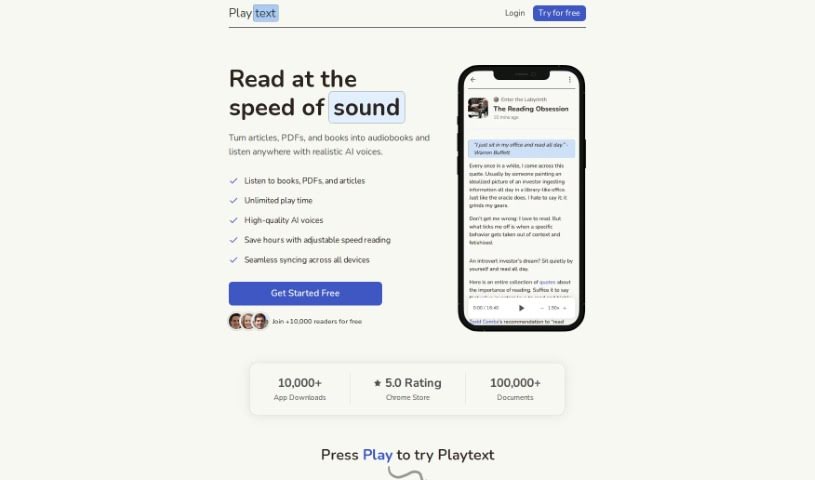
Screenshot of Playtext

Playtext

Discover what Playtext is and how to use it effectively in 2025. We'll explore its features and see how it stacks up against other Text-to-Speech tools.

Screenshot

What is Playtext?

Playtext is a text-to-speech app designed to really boost your reading speed, comprehension, and how much you remember. It lets you save articles and turn them into audio, so you can listen to your favorite pieces at faster speeds. Playtext handles different languages, offers a reading environment free from distractions, and is a great help for people with dyslexia. You can tweak the reading speed, listen along as the text is read, and enjoy the AI-generated, human-like voices for a truly engaging and informative experience.

Plus, Playtext is built to help you get faster at reading by letting you train yourself to read at speeds that feel comfortable, which can be up to four times quicker than you normally read. By reading and listening at the same time, Playtext helps you retain information better and understand it more deeply, making it a super versatile tool, especially for folks with learning differences.

You can use the app for all sorts of content, like books, emails, and PDFs, and it even offers keyboard shortcuts for a truly personalized reading experience.

Who created Playtext?

Playtext was developed by a team or individual who created a really powerful text-to-speech app. Their main goal was to improve reading speed and comprehension. It first launched on March 21, 2023, with a clear mission: to offer a reading environment that keeps you focused, using advanced AI to create voices that sound incredibly human. The app lets you adjust reading speeds, supports multiple languages, and is a big help for users with learning disabilities. You can access Playtext through a Chrome extension or simply by copying and pasting text directly into the app.

What is Playtext used for?

  • Boosting Reading Speed: It helps you read much faster.
  • Improving Comprehension & Retention: You’ll understand and remember more.
  • Speed Reading Support: It’s great for reading at 2x to 4x your normal speed.
  • Simultaneous Reading & Listening: Hear the words as you see them.
  • Better Content Retention: Helps you hold onto what you read.
  • Learning Disability Support: It’s designed to help those with dyslexia and other learning differences.
  • Versatile Content Use: Works with PDFs, emails, and books.
  • Focus & Engagement: Keeps your mind from wandering while you read.
  • Non-Native Speakers: A helpful tool for those learning English.
  • Dyslexia Aid: Specifically beneficial for users with dyslexia.
  • Making Reading Enjoyable: Turns reading into an engaging and informative activity.
  • High-Speed Reading Training: Helps you get used to reading faster.
  • Multilingual Reading: You can read content in different languages.

Who is Playtext for?

  • Teachers: To help students engage with material.
  • Students: For studying and absorbing information more effectively.
  • Professionals: Anyone who deals with a lot of reading material.
  • Individuals with Learning Disabilities: Including those with dyslexia or other learning challenges.
  • Non-Native English Speakers: To improve comprehension and pronunciation.
  • Anyone with Learning Disabilities or Dyslexia: Offering a more accessible reading experience.

How to use Playtext?

Here’s how you can get started with Playtext:

  1. Accessing Playtext: You have a couple of easy options! You can use it via a Chrome extension, or simply copy and paste any text directly into the app. This flexibility makes it super convenient to read web articles.
  2. Key Features: Playtext offers text-to-speech, a distraction-free reading space, adjustable speeds (up to 4x faster!), support for multiple languages, and handy keyboard shortcuts for a personalized experience.
  3. Boosting Your Reading Speed: Playtext helps you read faster by letting you listen to text at your preferred pace, even up to four times your usual speed. With consistent practice, you can actually train yourself to read at these higher speeds without losing understanding.
  4. Improving Comprehension: You can boost your comprehension and retention by reading and listening at the same time. This dual approach really helps solidify what you’re learning, especially when you’re reading faster.
  5. Support for Disabilities: Playtext is a great help for people with dyslexia and other learning disabilities. It provides input through both sight and sound, making reading less of a struggle and more enjoyable.
  6. Multilingual Support: Playtext currently supports translations in several languages, including English, Spanish, Portuguese, French, Italian, and German.
  7. The Chrome Extension: With the Playtext Chrome extension, you can instantly grab any online article and turn it into playable text right within the app.
  8. Training Your Reading Speed: By using Playtext regularly, you can train your brain to comfortably read at faster speeds, which naturally improves your overall reading pace.
  9. AI Technology: Playtext uses AI to create voices that sound remarkably human when reading aloud, making the whole experience more engaging and informative.
  10. What Makes it Different: Playtext really stands out from other text-to-speech apps because it specifically focuses on improving your reading speed, boosting comprehension, and offering great support for individuals with disabilities.

Ready to dive in? Just head over to their website and click the ‘Sign up — It’s Free!’ button on the homepage. Get ready to experience your favorite articles in a whole new way and really level up your reading skills with Playtext!

Related AI Tools

Discover more tools in similar categories that might interest you

Stay Updated with AI Tools

Get weekly updates on the latest AI tools, trends, and insights delivered to your inbox

Join 25,000+ AI enthusiasts. No spam, unsubscribe anytime.