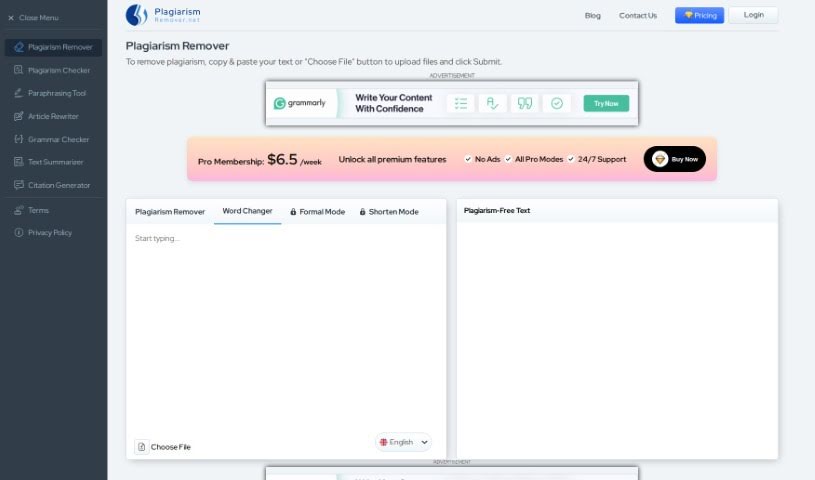
Screenshot of Plagiarism Remover

Plagiarism Remover

Discover what Plagiarism Remover is and how to use it effectively in 2025. We'll explore its features and how it stacks up against other plagiarism checkers.

Screenshot

What Exactly is Plagiarism Remover?

Plagiarism Remover is your AI-powered partner for creating original content. It’s designed to tackle plagiarism head-on and rewrite text so it sounds completely natural and human-written. It uses modern algorithms, along with Natural Language Processing (NLP) and Deep Learning, to make sure the content is rewritten accurately, all while keeping the original meaning intact. You’ve got four handy modes to choose from: “Plagiarism Remover” itself, “Word Changer” for tweaking specific words, “Formal” to give your writing a more professional edge, and “Shorten” to condense text without losing its unique, plagiarism-free quality. It’s pretty versatile, supporting over 15 languages and delivering that human-level touch for plagiarism removal. Plus, it even shows you your word count. It’s a great tool for anyone who writes, whether you’re a blogger, a student working on assignments, a content writer, or a freelancer needing to ensure your work is 100% original.

Who’s Behind Plagiarism Remover?

Plagiarism Remover was developed by the same team that creates other AI-driven tools focused on eliminating plagiarism and generating fresh, unique content. It first launched on May 17, 2022. The tool comes with several modes, including “Plagiarism Remover,” “Word Changer,” “Formal,” and “Shorten,” each tailored to different writing needs. The company behind it leverages advanced algorithms, Natural Language Processing (NLP), and Deep Learning technology. This allows them to rewrite content accurately while preserving the original context. People in various fields – like bloggers, students, content writers, and freelancers – can really benefit from its human-level plagiarism removal feature. It’s all about ensuring your content is 100% unique and reads smoothly.

What Can You Use Plagiarism Remover For?

This tool is a lifesaver for:

  • Students: Perfect for making sure essays, assignments, and research papers are original.
  • Bloggers: Helps keep your blog posts unique and engaging.
  • Freelancers: Essential for submitting polished, plagiarism-free work to clients.
  • Content writers: Ensures all your articles and web copy are original.

More specifically, you can use it to:

  • Remove plagiarism from articles, essays, or research papers.
  • Generate content that’s completely plagiarism-free, thanks to Natural Language Processing (NLP) and Deep Learning technology.
  • Easily upload content directly from your device for quick plagiarism removal.
  • Pick from four different modes – “Plagiarism Remover,” “Word Changer,” “Formal,” or “Shorten” – depending on what you need.
  • Work with content in over 15 languages, making it globally accessible.
  • Keep an eye on your word count as you work.
  • Bloggers can use it to make their content stand out and be completely original.
  • Students can get help from the educational sector to ensure their assignments and research papers are free from duplication.
  • Content writers can use it to make sure their projects are unique and plagiarism-free.
  • Freelancers can rely on it to remove plagiarism before submitting their projects.

Essentially, Plagiarism Remover helps you remove plagiarism from articles, essays, and research papers. It uses modern algorithms and technologies like Natural Language Processing (NLP) and Deep Learning to create plagiarism-free content while carefully maintaining the original context. You can either upload files or simply paste your text, then choose from modes like “Plagiarism Remover,” “Word Changer,” “Formal,” or “Shorten” to suit your specific needs. The tool is designed to be globally accessible, supporting over 15 languages. It also displays your word count and offers human-level plagiarism removal, ensuring your content is both unique and flows naturally. Bloggers, students, content writers, and freelancers are just some of the people who can really benefit from using Plagiarism Remover. Given that educational institutions and search engines have strict policies against plagiarism, tools like this are absolutely essential for keeping your content original. It’s also a cost-effective way to generate unique content for all sorts of purposes. Once the plagiarism is removed, you can easily download your unique content in .txt or .docx format. It’s built to produce plagiarism-free content efficiently, making it a valuable resource for anyone aiming for originality in their writing.

Who is Plagiarism Remover Designed For?

This tool is a great asset for:

  • Bloggers
  • Students
  • Content writers
  • Freelancers

How Do I Use Plagiarism Remover?

Using Plagiarism Remover is pretty straightforward. Just follow these simple steps:

  1. First, copy the text you want to check for plagiarism and paste it into the designated area. Alternatively, you can upload a file directly from your computer by clicking the “Choose File” button.
  2. Next, select the mode that best fits what you need. You can choose between “Plagiarism Remover,” “Word Changer,” “Formal,” or “Shorten.”
  3. Then, pick the language you want the text analyzed in from the options provided.
  4. Finally, click the “Submit” button to start the plagiarism removal process.
  5. Once the tool has finished removing plagiarism, you can download your unique content in either .txt or .docx format.

The tool itself uses advanced algorithms, Natural Language Processing (NLP), and Deep Learning technology to rewrite content accurately, all while making sure the original context stays the same. It offers modes like “Word Changer” if you want to focus on changing specific words, and the “Formal” mode is great for giving your text a more professional tone. People all over the world can find this tool useful because it supports over 15 languages. So, whether you’re a blogger, a student, a content writer, or a freelancer, you can definitely use this tool to make sure your content is plagiarism-free before you publish it. Plagiarism Remover provides unique content, it’s cost-effective, and it offers human-level plagiarism removal, making it a really valuable resource for keeping your written work original and maintaining its integrity.

Related AI Tools

Discover more tools in similar categories that might interest you

Academic Help Free Essay Generator

Education Academic Writing
Learn More

Stay Updated with AI Tools

Get weekly updates on the latest AI tools, trends, and insights delivered to your inbox

Join 25,000+ AI enthusiasts. No spam, unsubscribe anytime.