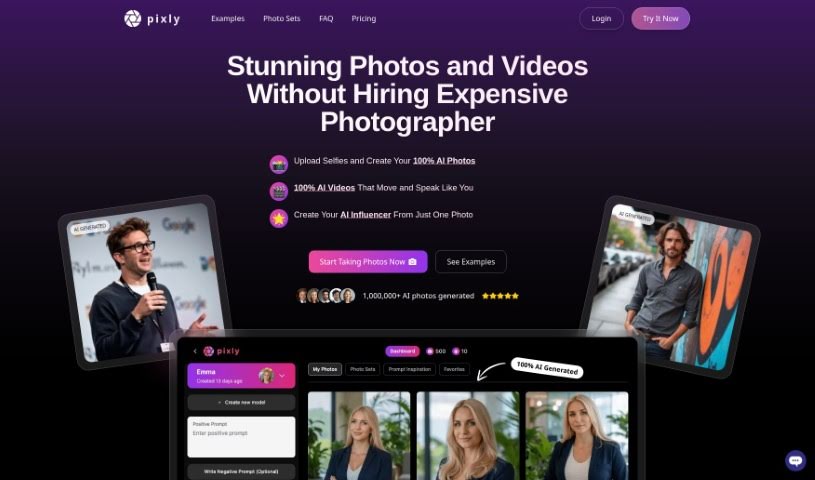
What is Pixly.app?
Pixly.app is an AI tool designed specifically for creating professional, photo-realistic images. It lets you upload your own photos, like selfies, to train a personalized AI character. This character can then generate a variety of photo styles based on what you prefer. You can even specify details like clothing and hairstyles for your AI character to produce high-quality results. Pixly.app also prioritizes data safety and privacy, offers some free photo generation options, and has different pricing plans to suit everyone’s needs. Plus, it includes advanced features such as custom model training and generating images with even better resolution.
Jan Kratochvil, the person behind Pixly.com, created this service to make it super easy for anyone to create professional photos using AI. You can generate professional shots from just one selfie, train your own AI character using your personal photos, and then set the styles or prompts you want for the images it creates. Pixly.com offers several pricing plans: a Starter plan for those just beginning, a Pro plan for more regular users, and a Business plan for heavy users. Each plan comes with different features and credits for the AI-generated photos. The whole idea behind the platform is to deliver stunning AI-generated photos with a simple, one-time payment.
Who created Pixly.app?
Jan Kratochvil, a programmer and solopreneur, is the creator of Pixly.app. He’s known for building helpful apps for people, and he launched Pixly.app on November 19, 2023. Jan also founded other popular apps like pawesome.art and jre.ai.
What is Pixly.app used for?
- Creating high-quality images.
- Generating professional, photo-realistic pictures.
- Making photos for your CV or resume.
- Producing yearbook-style photos.
- Specifying clothing, hairstyles, and even locations for your AI characters.
- Crafting unique, custom styles.
- Using various image customization features.
- Training your own AI characters.
- Accessing free photo generator tools.
- Applying your personal preferences to AI-generated characters.
- Generating photos without needing to log in.
- Creating professional, photo-realistic images.
- Generating a wide range of different photo styles.
- Developing custom styles.
- Defining clothing, hairstyles, body types, and more.
- Generating photos for your CV.
- Enhancing your existing photos.
- A feature that converts your selfies.
- Generating unique photos based on your personal styles.
- Training AI characters specifically for image creation.
- Producing a variety of different photo styles.
- Defining clothing, hairstyles, and body features for your AI.
- Creating AI-generated yearbook photos.
- Generating a diverse selection of styles.
- It creates professional, photo-realistic images.
- It generates a range of different photo styles.
- You can generate dream-like photos.
- It can create hundreds of photos from just one selfie.
- Offers private image generation.
- Provides a vast choice of pre-defined styles.
Who is Pixly.app for?
- Photographers
- Graphic designers
- Artists
- Creative professionals
- Digital marketers
- Content creators
- Marketing professionals
- Models
- Designers
- Branding Specialists
- Anyone looking for unique profile photos.
- Photography professionals
- Visual Artists
How to use Pixly.app?
Using Pixly.app is pretty straightforward. Just follow these steps:
- Upload Your Selfie: Start by uploading your selfie or another personal photo. This is what the AI character will use to learn your likeness.
- Select Style and Preferences: You can pick from ready-made styles, like those for CV photos, or create your own custom style. When creating a custom style, you can define things like clothing, hairstyle, body features, and even the location.
- Train Your AI Character: Pixly.app uses the photo you uploaded to train its AI character, making sure it captures the key details needed for generating new photos.
- Generate Photo: Once your AI character is trained, it can create professional, photo-realistic images in all sorts of styles you choose.
- Customization Options: You’ll find a wide range of options to customize your images, including clothing, hairstyles, body features, and backgrounds.
- Free Offerings: Pixly.app also provides free tools, such as a general photo generator, a selfie generator, and a Barbie generator, which you can use without even logging in.
- Advanced Features: If you opt for paid services, you can get custom model training, generate images with superior resolution, and benefit from their data safety measures.
- Payment Plans: There are different pricing plans available depending on what you need. These plans offer various features, like custom AI models and a set number of AI-generated photos.
Pixly.app is designed to keep your data safe and secure. It consistently delivers high-quality images, and the whole process of creating personalized, professional photos is made easy and effortless for you.