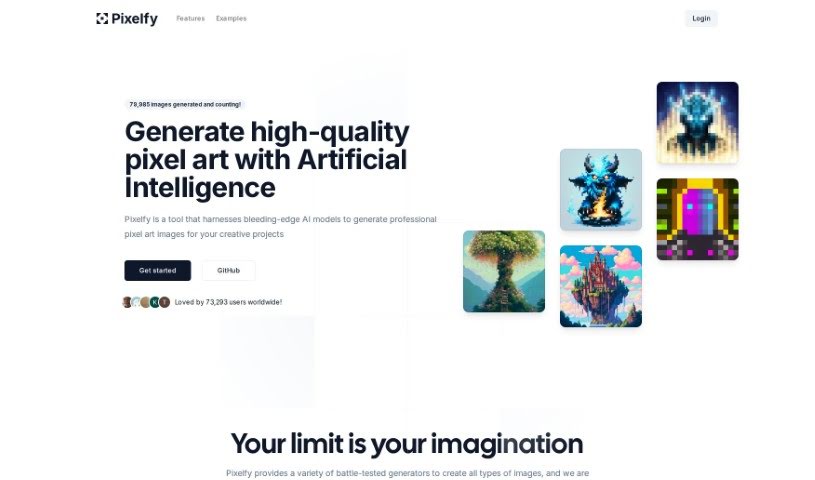
What is Pixelfy?
Pixelfy is a fantastic open-source AI application that’s all about creating high-quality pixel art for your creative projects. It uses some pretty advanced AI models to whip up all sorts of images – think backgrounds, characters for fantasy RPGs, 32x32 skill art, or even 16x16 pixel portraits, and so much more. You can either give it a prompt to work from or upload your own images to guide the pixel art generation. Pixelfy also lets you customize grid sizes, tweak advanced sampling controls, upload reference images, and use a handy prompt builder to make things even easier. Plus, it’s known for being super user-friendly and gets new features added all the time.
Who created Pixelfy?
David Parks is the creative mind behind Pixelfy, launching it on May 3, 2023. It’s an open-source AI application that really shines when it comes to generating high-quality pixel art. It does this using advanced AI models and a variety of specific generators, perfect for things like backgrounds, fantasy RPG characters, and detailed pixel portraits. The platform is designed to be user-friendly, offering features like customizable grid sizes, helpful prompt guidance, a credit system, and it’s always being updated with new capabilities.
What is Pixelfy used for?
Pixelfy is incredibly versatile! You can use it for:
- Creating backgrounds for your projects.
- Generating fantasy RPG images.
- Making 32x32 Skill Art.
- Designing 16x16 Pixel Portraits.
- Easily isolating subjects from backgrounds.
- Saving your generated images so you can download them later.
- Enjoying a user-friendly way to create pixel art.
- Having control over the image generation process.
- Uploading reference images to help guide your pixel art creation.
- Selecting variable grid sizes to get the exact look you want.
- Crafting Fantasy RPG scenes.
- Creating art inspired by Warhammer 40k.
- Generating images with a Frostbolt theme.
- Designing otherworldly avatars.
- Making galactic images.
- Producing lush green landscapes.
- Creating cozy cabins.
- Generating unique backgrounds.
- Bringing fantasy RPG characters to life.
- Making detailed 32x32 Skill Art.
- Crafting precise 16x16 Pixel Portraits.
- Creating pixel art directly from prompts.
- Choosing from customizable grid sizes.
- Adjusting sampling steps for fine-tuning.
- Creating pixel art by uploading your own images.
- Isolating subjects from image backgrounds.
- Exploring Galactic Themes.
- Designing Space Marines.
- Developing Fantasy RPG characters.
- Creating Space marine art.
- Depicting snow-capped peaks.
- Illustrating cozy cabins.
- Showcasing lush green landscapes.
Who is Pixelfy for?
Pixelfy is a great tool for anyone involved in visual creation, including:
- Artists looking for new ways to create.
- Designers needing unique visual assets.
- Game developers building worlds and characters.
- Creative professionals across various fields.
- Graphic designers seeking pixel art styles.
- Illustrators wanting to experiment with pixel art.
- Content creators needing eye-catching visuals.
- Dedicated Pixel Artists.
How to use Pixelfy?
To get the most out of Pixelfy, here’s a simple step-by-step guide:
- Get Started: First, head over to the Pixelfy website or check out its GitHub repository to access the application.
- Create Your Pixel Art:
- Decide what kind of image you want to make – maybe a background, a fantasy RPG character, or a pixel portrait.
- Then, either type in a prompt describing what you envision or upload a reference image. This helps the AI understand exactly what you’re looking for in your pixel art.
- Fine-Tune Your Settings:
- You can adjust things like the sampling steps and how the prompt guides the AI. This gives you more control over the final image.
- Save Your Work:
- Pixelfy lets you save all your pixel art creations, so you can download them whenever you’re ready.
- Experiment with Grid Sizes:
- Feel free to pick different grid sizes, from a detailed 16x16 all the way up to 128x128, depending on your project’s needs.
- Make the Most of Credits:
- You can purchase credits as needed for various services within Pixelfy.
- Keep an eye out for special offers, like a 50% off code, which can make using credits even more beneficial.
- Embrace Open Source:
- Since Pixelfy is open-source, you benefit from its transparency and the community’s contributions.
- You can even explore and modify the tool’s code on GitHub if you’re interested in enhancing its functionality.
- Enjoy the User-Friendly Interface:
- You’ll find the interface is designed to be really easy to use, making the whole process of creating pixel art efficient and enjoyable.
- Isolate Subjects Easily:
- There’s a handy feature that lets you isolate subjects from their backgrounds, giving you more flexibility when creating your images.
- Use the Prompt Builder:
- This feature is great for helping you create clear, effective prompts that guide the AI in generating stunning images exactly to your specifications.
By following these steps, you’ll be able to really unleash your creativity and efficiently generate some amazing high-quality pixel art with Pixelfy.