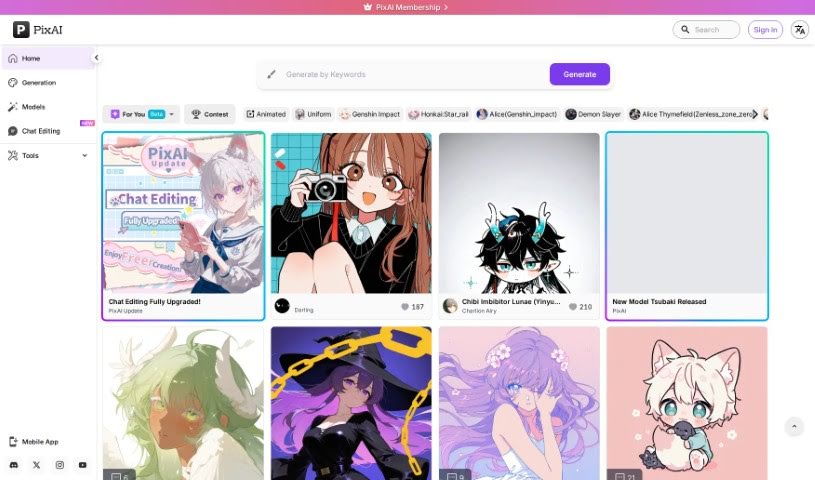
Screenshot of PixAI

PixAI

Discover what PixAI is and how to use its free AI art generator in 2025. Explore its features for Anime, Realistic, and Fantasy Art, and see how it stacks up against other image generators.

Screenshot

What is PixAI?

PixAI is a really cool platform that gives you a free AI art generator. It’s perfect for creating Anime Fanart, letting you bring any pose, style, or scene you can imagine to life. You can generate top-notch Anime, Realistic, and Fantasy Art using a variety of AI art models. Plus, it’s packed with advanced features like image-to-image generation, ControlNet for precise control, inpainting to fix or change parts of an image, and Hires fix for sharper details. You can even use reference images to get exactly the look you want, picturing your favorite anime characters in specific poses and then crafting unique anime, waifu, realistic, or fantasy art. Basically, PixAI is a feature-rich, character-rich, and totally free way to make anime art, helping you unleash your creativity and make your anime dreams a reality.

Who created PixAI?

PixAI was developed by a company that shares its name: PixAI. This company offers a free AI art generator specifically designed for creating Anime Fanart, supporting a wide range of styles and scenes. Users can generate high-quality Anime, Realistic, and Fantasy Art by choosing from a broad selection of AI art models. The platform also includes advanced features like image-to-image capabilities, ControlNet for detailed manipulation, inpainting for image editing, and Hires fix for enhanced resolution. PixAI empowers users to create distinctive Anime, Waifu, Realistic, or Fantasy Art by allowing them to visualize their beloved anime characters in specific poses and use reference images to ensure precision and achieve perfect results.

What is PixAI used for?

Here’s a quick rundown of what you can do with PixAI:

  • Create Anime Fanart: Bring your favorite characters to life.
  • Generate Realistic and Fantasy Art: Explore different artistic styles beyond anime.
  • Image to Image AI Generation: Transform existing images into new creations.
  • ControlNet AI Features: Gain precise control over your artwork’s composition and pose.
  • Inpainting AI Tool: Edit or add elements to your images seamlessly.
  • Hires Fix Tool: Enhance the resolution and detail of your generated art.
  • Visualize Anime Characters in Desired Poses: Position characters exactly how you envision them.
  • Craft Unique Anime, Waifu, Realistic, or Fantasy Art: Make truly one-of-a-kind pieces.
  • Utilize Reference Images for Precision: Guide the AI with your own visual examples.
  • Create Characters, Waifus, or Fantasy Scenes: Build entire worlds and characters from scratch.

How to use PixAI?

Getting started with PixAI is pretty straightforward. Just follow these steps:

  1. First, head over to the PixAI website. You can check out the different membership options if you’re interested in unlocking even more advanced features.
  2. Once you’re on the site, look for the “How to Use PixAI” section. It’s packed with detailed guides to help you get the most out of the tool.
  3. It’s a good idea to get familiar with the content rules and the privacy policy. This just ensures you’re using the platform smoothly and in line with their guidelines.
  4. PixAI also provides helpful support resources, like tutorials and articles, so don’t hesitate to use them if you get stuck or want to learn more.
  5. Now for the fun part! Jump into the AI art generator to start creating your Anime Fanart. You can play with different poses, styles, and scenes to your heart’s content.
  6. You’ll be able to generate really high-quality Anime, Realistic, and Fantasy Art. PixAI offers a wide range of AI art models, so you have plenty to choose from.
  7. Make sure to explore those advanced features we mentioned – image to image, ControlNet, inpainting, and Hires fix. They really help take your artwork to the next level.
  8. PixAI also lets you share your creations and try out tons of user-trained AI art models. It’s a great way to see what others are making and find new inspiration.
  9. Get creative with visualizing your favorite Anime characters! You can put them in any pose you like and then craft unique Anime, Waifu, Realistic, or Fantasy Art.
  10. Don’t forget to use reference images. They’re super helpful for getting precise results and making sure your artwork turns out exactly how you pictured it.
  11. Finally, just let your creativity flow! Bring your Anime dreams to life by creating your own characters, waifus, or fantasy scenes using PixAI’s free AI generator.

By following these steps, you’ll be well on your way to using PixAI effectively and creating some truly stunning AI-generated artwork that matches your vision.

Related AI Tools

Discover more tools in similar categories that might interest you

123RF AI Image Generator

Creative Image Generation
Learn More

Stay Updated with AI Tools

Get weekly updates on the latest AI tools, trends, and insights delivered to your inbox

Join 25,000+ AI enthusiasts. No spam, unsubscribe anytime.