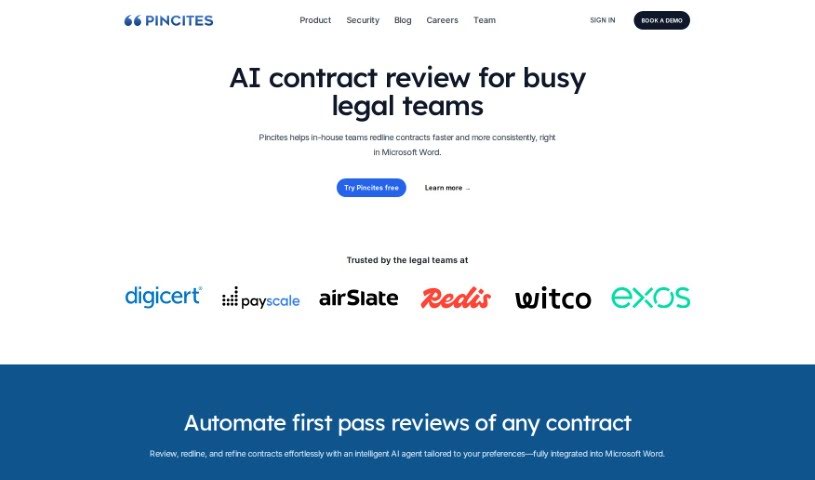
Screenshot of Pincites

Pincites

Discover what Pincites is and how to use it to your advantage in 2025. We'll explore its key features and see how it stacks up against other legal tools.

Screenshot

What is Pincites?

Pincites is designed to really help out with contract negotiation. It is a way to give your legal team a boost, letting them review contracts in Microsoft Word much faster and with more consistency. It generates AI-powered redlines and comments that are specifically made for your business contracts. This not only cuts down on legal costs but also speeds up the whole review process. How? By spotting terms that are high-risk or missing, and then creating custom playbooks that fit exactly what your contracts need. The AI behind Pincites learns from past contracts and your company’s policies, so it’s efficient right from the start.

Within Microsoft Word, Pincites offers a bunch of useful features. You can redline contracts more quickly and consistently, compare different versions of a draft, and easily see any terms that are high-risk or missing. Plus, you get AI-generated redlines and comments that are based on your specific contracts and what your business prefers. For legal teams, Pincites means instant extra capacity. This leads to faster, more consistent redlining, quicker contract turnarounds, easier playbook building, testing, and deployment, access to a clause library, and, importantly, significant savings on legal expenses.

Pincites is built to be flexible, working well for both large enterprise companies and smaller law firms. It adapts to different industries and sizes of operations. By learning from your existing contracts and policies, it delivers results that are truly customized. It also makes deploying playbooks much smoother, helping you create, test, and roll out playbooks that are perfectly suited for your specific contracts. You’ll also find features like automatic redlining, a collaborative clause library, the ability to compare drafts side-by-side, a way to detect high-risk terms, and help with building your playbooks.

Who created Pincites?

Pincites was brought to life by a founding team that includes Sona Sulakian, Grey Baker, and Mariam Sulakian. Sona Sulakian is an experienced attorney who knows transactional law and has consulted on strategic legal tech. Grey Baker is a serial entrepreneur with a knack for tech startups. Mariam Sulakian brings a strong background in software engineering and product management, having worked at major tech companies like GitHub and Meta. The company officially launched on July 22, 2023, and is supported by investors who have considerable experience in AI.

What is Pincites used for?

  • It helps with contract negotiation by giving legal teams more capacity.
  • It makes reviewing contracts in Microsoft Word faster and more consistent.
  • It creates AI-driven redlines and comments that are specifically made for your business contracts.
  • It lowers legal costs and speeds up how quickly contracts are reviewed.
  • It can spot terms in contracts that are high-risk or missing.
  • It helps you build custom playbooks that match your specific contract needs.
  • It learns from past contracts and policies to become more efficient.
  • It offers various functions right within Microsoft Word for redlining contracts.
  • It gives legal teams instant extra capacity for quicker contract redlining.
  • It makes it easier to build, test, and deploy your own custom playbooks.

Who is Pincites for?

  • Anyone working in legal roles
  • In-house legal departments
  • Enterprise-level companies
  • Law firms of all sizes

How to use Pincites?

To get the most out of Pincites for your contract negotiations, here’s a straightforward approach:

  1. Boost Your Team’s Capacity: Pincites gives your legal team more bandwidth by letting them review contracts quickly and consistently, all within Microsoft Word. It generates AI-powered redlines and comments that are tailored to your specific contracts, which means lower legal costs and faster reviews.
  2. Works Seamlessly in Microsoft Word: Pincites operates directly inside Microsoft Word. This means you can review contracts, use AI-generated redlines, compare different drafts, and easily spot any terms that are high-risk or missing, all without leaving your familiar environment.
  3. Get Smart AI Assistance: The tool helps your legal team by providing immediate extra capacity, allowing for faster contract redlining, and offering AI-generated redlines and comments. It learns from your past contracts and policies, so it’s efficient from the very first day.
  4. Build Custom Playbooks: You can create playbooks that are specifically designed for your contracts. This includes spotting high-risk or missing terms, and then building, testing, and deploying these playbooks to ensure effective collaboration.
  5. AI Redlines and Comments Made for You: Pincites uses AI to generate customized redlines and comments that are specific to your contracts and your business’s preferences.
  6. Lower Your Legal Costs: By making contract reviews smoother and learning from your existing contracts, Pincites can significantly cut down on legal expenses for your organization.
  7. It’s Versatile: Pincites works well for both large enterprise companies and law firms, showing how flexible and effective it is across different industries and scales.
  8. It Learns and Adapts: The tool learns from precedent contracts and policies, which allows it to deliver results that are customized to your business needs and preferences.
  9. Automated Functions for Efficiency: Pincites includes features like automated redlining, collaborative clause libraries, draft comparison tools, and playbook deployment support to help manage your contracts more efficiently.

By following these steps, you can really make Pincites work for you, improving your contract negotiation processes, reducing legal costs, and boosting overall efficiency in your legal operations.

Related AI Tools

Discover more tools in similar categories that might interest you

Stay Updated with AI Tools

Get weekly updates on the latest AI tools, trends, and insights delivered to your inbox

Join 25,000+ AI enthusiasts. No spam, unsubscribe anytime.