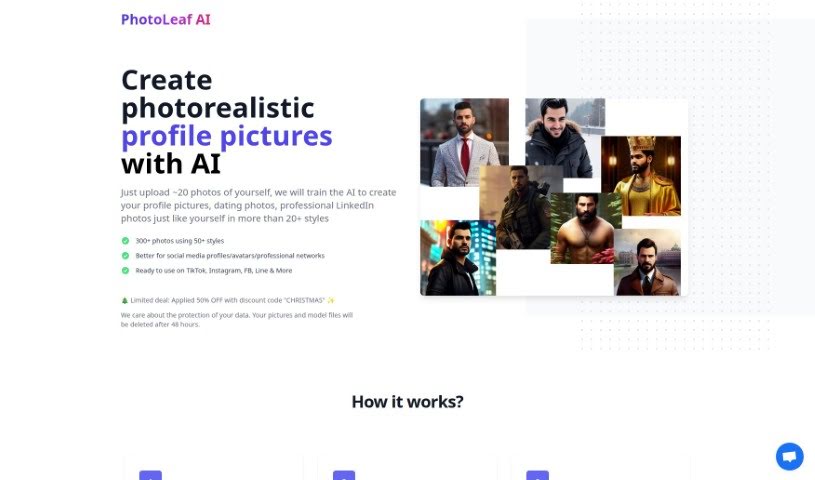
Screenshot of PhotoLeaf AI

PhotoLeaf AI

Curious about PhotoLeaf AI? We'll walk you through what it is, how to use it to generate over 300 unique profile pictures in 2025, and how it stacks up against other AI portrait tools. Plus, we cover its styles and data privacy.

Screenshot

What is PhotoLeaf AI?

PhotoLeaf AI is a really neat tool that uses artificial intelligence to create over 300 photorealistic profile pictures for you, all from just about 20 photos you upload. You can pick from tons of different styles – think professional headshots, casual Instagram looks, cool sketches, futuristic designs, and so much more. These generated images are perfect for sprucing up your profiles on social media sites like Instagram, Facebook, LinkedIn, and TikTok. What’s also great is that PhotoLeaf AI takes your privacy seriously; they delete all your uploaded pictures and model files after 48 hours, unless you specifically ask them to keep them. And if you’re not totally happy with the first batch of results, they’ll even do a free retraining with a new set of your photos. Just a heads-up: using high-quality photos taken from different angles really helps the AI produce the best possible outcomes!

Who created PhotoLeaf AI?

PhotoLeaf was actually started by a team, with John Doe as the founder. They officially launched the company on June 14, 2024. Their big idea was to create a unique AI tool that could generate over 300 photorealistic profile pictures using around 20 uploaded photos. They offer more than 50 different styles – like professional shots, Instagram-ready looks, sketches, and many others – which are great for all sorts of platforms, whether it’s social media or professional networking sites. To make sure users feel secure, the tool automatically deletes all uploaded pictures and model files after 48 hours, unless you decide you want them kept for future training purposes.

What is PhotoLeaf AI used for?

  • Creating eye-catching profile pictures for your social media accounts.
  • Optimizing your professional online presence, especially on platforms like LinkedIn.
  • Generating images in a wide array of styles, including professional, office-ready, Instagram-friendly, sketches, drawings, futuristic looks, and even fun ones like Egypt God, Superman, or Cyberpunk themes.
  • Making great profile pictures for dating apps.
  • Generating images of yourself in a military suit style.
  • Creating black and white drawings of yourself.
  • Producing a large volume of images quickly.
  • Getting custom-tailored image styles.
  • Deciding how long your data is kept.
  • Handling your photos securely.

Who is PhotoLeaf AI for?

  • Photographers looking for new ways to present their subjects.
  • Graphic designers needing quick, varied avatar options.
  • Content creators wanting to refresh their online persona.
  • Social media influencers aiming for a consistent and professional look.
  • Business professionals updating their headshots for various platforms.
  • Marketers needing diverse imagery for campaigns.
  • Artists exploring AI-generated portraiture.
  • Models seeking professional-looking portfolio images.

How to use PhotoLeaf AI?

To get the most out of Photoleaf AI, here’s a simple step-by-step guide:

  1. Upload Photos: Start by uploading about 20 clear photos of yourself. Make sure they show you from different angles so the AI has plenty of data to work with.
  2. Style Selection: Browse through the more than 50 available styles. You can choose from professional looks, office settings, Instagram vibes, sketches, drawings, futuristic themes, and many more.
  3. Generation Process: Once you’ve made your selections, the AI gets to work! It will process your photos to create over 300 unique profile pictures, usually within 4 to 6 hours.
  4. Download Images: When your personalized images are ready, you’ll get a download link. Just click it to save all your new pictures.
  5. Retraining Option: If the first set of results isn’t quite what you were hoping for, don’t worry! You can use the one-time free retraining feature with a fresh set of your images.
  6. Data Protection: For your privacy, your uploaded photos and the AI’s model files are automatically deleted after 48 hours.
  7. Utilization: Now you can use these fantastic images everywhere! Share them on social media like Instagram, Facebook, and TikTok, or update your professional profiles on networks like LinkedIn.
  8. Additional Features: PhotoLeaf also offers a wide variety of image styles to explore. Plus, you can use the discount code ‘CHRISTMAS’ for some savings, and you can even ask them to keep your photos if you think you might want to use them for future training.

By following these steps, you’ll be able to effectively use PhotoLeaf AI to create personalized and artistic profile pictures for all sorts of uses.

Related AI Tools

Discover more tools in similar categories that might interest you

123RF AI Image Generator

Creative Image Generation
Learn More

Stay Updated with AI Tools

Get weekly updates on the latest AI tools, trends, and insights delivered to your inbox

Join 25,000+ AI enthusiasts. No spam, unsubscribe anytime.