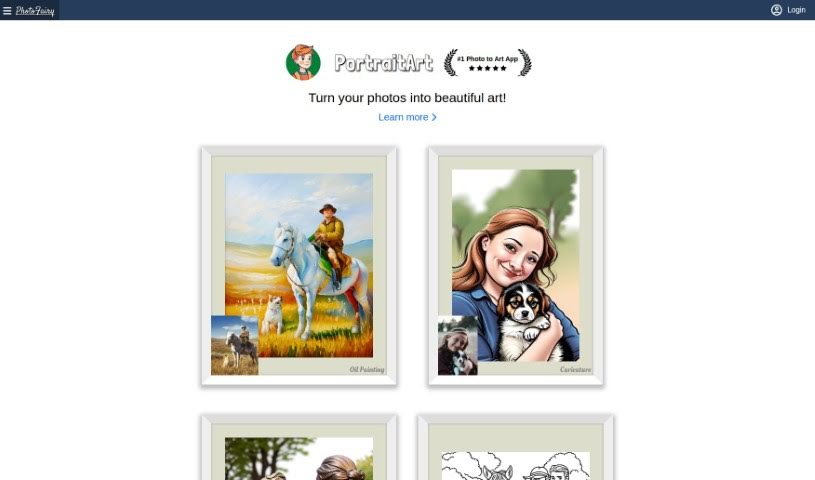
Screenshot of PhotoFairy

PhotoFairy

Discover PhotoFairy in 2025! Learn what this user-friendly photo editing and graphic design platform is all about, explore its features like background removal and art transformations, and see how it stacks up against other editors.

Screenshot

What is PhotoFairy?

PhotoFairy is a really user-friendly platform, perfect whether you’re just starting out with photo editing or you’re already a seasoned pro in graphic design. It comes packed with over 50 different preset styles, plus a bunch of handy functions. You can easily remove backgrounds, cut out objects, change hairstyles, and even touch up faces to make them look their best. Plus, you can play around with virtual objects, create cool double exposures, and apply all sorts of styles to your images – and the best part? It’s all free! PhotoFairy also shines when it comes to turning your photos into different art styles, like oil paintings, pencil sketches, or watercolors. You can see some great examples of what it can do on their website.

The team behind PhotoFairy has some serious experience in AI research and product development, with folks who’ve worked at places like Google, Brown University, GE, and various startups. Their goal with PhotoFairy is to give everyone the tools to really let their creativity flow. This is all made possible by the latest advancements in computing technology, including artificial intelligence, cloud computing, and modern web and mobile platforms.

Who created PhotoFairy?

PhotoFairy was actually started by a team of really accomplished people who have experience working at major companies like Google, Brown University, and GE, as well as with startups. They’re all about helping people be more creative using AI-powered tools for photo editing and graphic design. On their platform, you’ll find all sorts of features, from cutting out objects and removing backgrounds to applying preset styles that transform your photos into art. PhotoFairy’s interface is designed to be super easy to use, so whether you’re a beginner or a professional designer, you can create your own personalized art without a hassle.

What is PhotoFairy used for?

  • Removing unwanted objects from photos
  • Cutting out specific objects or entire backgrounds
  • Filling in areas with AI-generated content (generative completion)
  • Reimagining everyday objects in new ways
  • Creating unique letter art
  • Making Google Doodle-style creations
  • Using virtual models for design
  • Adding text that appears behind objects
  • Transforming scenes, like changing winter to spring or day to night
  • Beautifying faces in portraits
  • Making seasonal or time-of-day changes to photos

Who is PhotoFairy for?

  • Photographers looking to enhance their shots
  • Graphic designers needing efficient tools
  • Artists exploring new creative avenues
  • Anyone who loves playing with and editing photos

How to use PhotoFairy?

Using PhotoFairy is pretty straightforward. Here’s a quick rundown:

  1. First, sign up for a free account on the PhotoFairy website. It’s quick and easy.
  2. Once you’re in, you’ll get access to the platform’s features, including a really flexible AI canvas that’s great for all your photo editing and graphic design needs.
  3. Take some time to explore the top features. You can transform your photos into different art styles, like classic oil paintings, detailed pencil sketches, or soft watercolors.
  4. You’ll find the interface is really user-friendly, making it a good fit for both beginners and professional designers alike.
  5. Don’t forget to try out the advanced editing tools. They’re great for tasks like cutting out objects, using generative completion to fill spaces, and transforming styles.
  6. There are over 50 preset styles available, so you can experiment a lot with your photo editing and transformations.
  7. Get creative by applying different styles like Oil Painting, Pencil Sketch, and Watercolor directly to your photos.
  8. You can easily perform tasks such as cutting out objects, removing backgrounds, and making faces look even better.
  9. Feel free to try out virtual objects, explore creating double exposures, and experiment with all sorts of style transformations.
  10. The best part is that you can use most of the platform for free; there are no costs for accessing the basic tools.

PhotoFairy’s main goal is to make creating visual content simple and accessible for everyone. The platform was developed by a team with solid experience in AI research and product development, which means it’s packed with robust features and is easy for users to get started with. If you ever have any questions or need a hand, you can always reach out to them via email at [email protected].

By following these steps, you can really make the most of PhotoFairy’s AI-powered tools. They’ll help you enhance your visual creations and unleash your creativity without any fuss. Why not start creating your own personalized art today and experience the magic of AI with PhotoFairy?

Related AI Tools

Discover more tools in similar categories that might interest you

123RF AI Image Generator

Creative Image Generation
Learn More

Stay Updated with AI Tools

Get weekly updates on the latest AI tools, trends, and insights delivered to your inbox

Join 25,000+ AI enthusiasts. No spam, unsubscribe anytime.