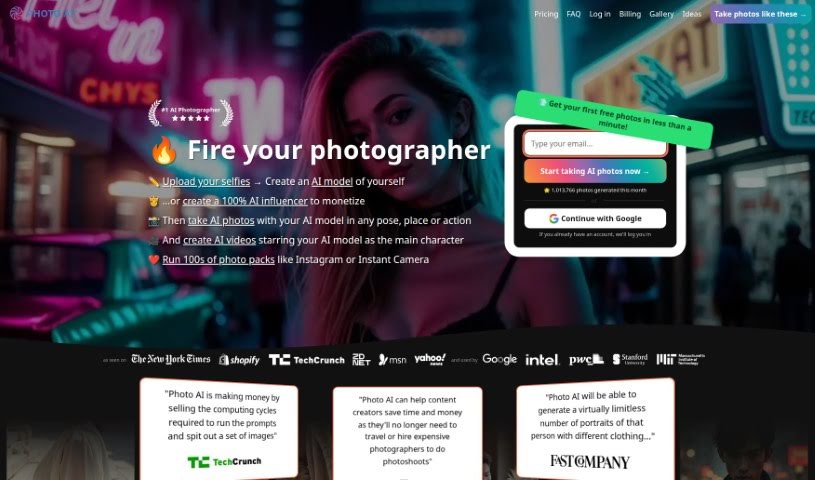
Screenshot of Photo AI

Photo AI

Discover what Photo AI is and how to use it effectively in 2025. We'll explore its features and see how it stacks up against other Image Generators.

Screenshot

What is Photo AI?

Photo AI is a really neat platform that lets you create impressive, lifelike photos using AI. You don’t need any fancy camera gear at all! Just upload your selfies, and the platform quickly turns them into photorealistic AI characters. You can then easily try out different poses, settings, and actions. Photo AI also has fun themed packs, like AI Yearbook and Naughty Halloween, plus cool features like virtually trying on clothes and hairstyles. There’s even a Sketch2Image™ tool for designing unique fashion looks. Basically, Photo AI makes AI photography super accessible and user-friendly, whether you’re into fashion or just looking for new ways to create content.

Who created Photo AI?

Photo AI was actually made by Pieter Levels. He’s a Dutch entrepreneur who’s behind other well-known projects like Nomad List and Remote OK, as well as Interior AI. With Photo AI, you can upload your own selfies and transform them into incredibly realistic AI characters. This means you can generate lifelike images without ever needing a traditional camera. The platform offers a bunch of handy features, such as virtually trying on clothes and hairstyles, special themed photo packs, and AI-driven design capabilities that are really changing the game for digital imagery.

What is Photo AI used for?

Here’s a look at what you can do with Photo AI:

  • Easily turn your selfies into incredibly lifelike AI avatars.
  • Generate AI images of yourself in any pose, location, or action you can imagine.
  • Explore special themed photo collections, including the popular AI Yearbook and Naughty Halloween packs.
  • Virtually try on different clothes and hairstyles using your AI-generated characters.
  • Use the Sketch2Imageâ„¢ tool to design and create your own unique AI fashion.
  • Transform your selfies into lifelike AI avatars.
  • Access a variety of themed photo collections, like AI Yearbook and Naughty Halloween.
  • Experiment with virtual try-ons for clothes and hairstyles on your AI characters.
  • Design original AI-generated fashion using the Sketch2Imageâ„¢ feature.
  • Create photorealistic AI characters straight from your selfies.
  • Generate versatile AI photos showing you in various poses, locations, and actions.
  • Experiment with virtually trying on clothes and hairstyles on your AI characters.
  • Design unique AI-generated fashion with the Sketch2Imageâ„¢ tool.
  • Try on clothes virtually.
  • Experiment with virtual hairstyles to enhance your personal style.
  • Generate unique fashion designs with AI.
  • Create AI influencers based on specific descriptions you provide.
  • Upload any clothes you like for your AI characters to wear.
  • Experiment with clothes and hairstyles virtually on your AI-generated characters.
  • Try on clothes virtually using the platform’s features.
  • Improve how closely the AI resembles you by uploading a good variety of photos.
  • Create AI characters with a high degree of photo variety.
  • Take up to 16 photos at once.
  • Important: It’s strictly forbidden to upload or generate photos of children or minors.
  • Capture AI-generated images in any pose, location, or action.
  • Try on different looks virtually.
  • Create AI influencers based on the photos you generate.
  • Generate AI characters based on the photos you upload.
  • It’s perfect for fashion lovers and content creators.
  • Get photorealistic images without needing professional photographers.

Who is Photo AI for?

  • Anyone interested in fashion.
  • Content creators looking for new tools.

How to use Photo AI?

Ready to dive in? Here’s how to get started with Photo AI:

  1. First, sign up for Photo AI to get access to the AI Photo Generator.
  2. Next, upload your selfies to create your AI characters. Or, if you prefer, you can describe the AI influencer you want to create.
  3. Once you’re in the studio, you can really customize your AI character. You can use presets, write your own prompts, or even use copycat photos to guide the AI.
  4. Have fun experimenting with different looks, outfits, poses, and actions using the templates provided.
  5. Then, generate your AI photos, placing your created characters in all sorts of settings and actions.
  6. Don’t forget to take advantage of the platform’s features, like virtually trying on clothes and hairstyles.
  7. For the best results and accurate AI representation, make sure you upload a good variety of high-quality photos.
  8. You can upload photos in JPG, PNG, WebP, or AVIF file formats.
  9. Plan for about 30 minutes to create your initial AI character, and then around 120 seconds to generate each AI photo.
  10. Managing your subscription is easy – you can upgrade, downgrade, or cancel anytime.

Just so you know, your data privacy is super important to us. The models you create and the photos you upload stay private and secure on the platform. Have fun creating amazing photorealistic AI characters and photos with Photo AI!

Related AI Tools

Discover more tools in similar categories that might interest you

123RF AI Image Generator

Creative Image Generation
Learn More

Stay Updated with AI Tools

Get weekly updates on the latest AI tools, trends, and insights delivered to your inbox

Join 25,000+ AI enthusiasts. No spam, unsubscribe anytime.