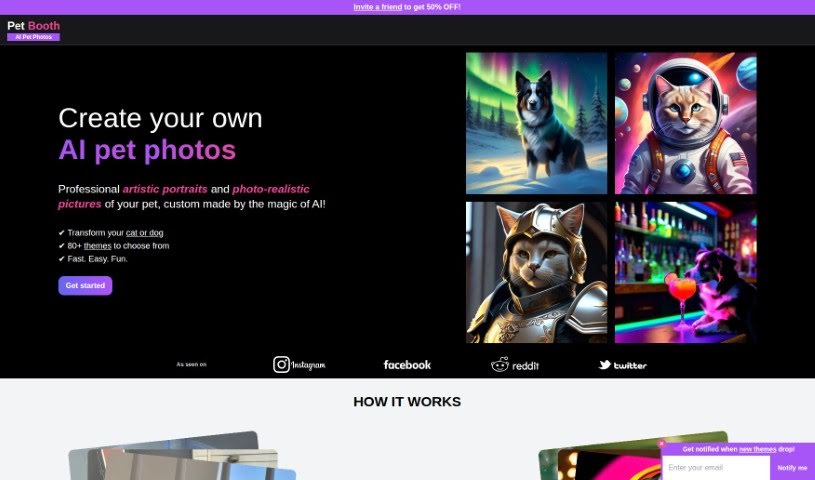
Screenshot of Pet Booth

Pet Booth

Discover what Pet Booth is and how to use it effectively in 2025. We'll explore its features and see how it stacks up against other AI image generators for pets.

Screenshot

What is Pet Booth?

Pet Booth is a really fun, special photo booth service designed just for pets! It lets pet parents capture all sorts of memorable and playful moments with their furry best friends. The booth itself is built with pets in mind, making sure it’s a comfy and safe spot for them to strike a pose. You can even customize the backgrounds and props, which makes for a super interactive and enjoyable experience for both the pets and their humans. It’s absolutely perfect for any pet-centric events, parties, or just when you want to create some lasting memories with your beloved companions. Basically, Pet Booth aims to bring together the joy of taking pictures with the deep love we have for our pets, offering a creative way to celebrate that special bond.

Who created Pet Booth?

Pet Booth first launched on March 12, 2023. We checked it out and featured it on December 16, 2023. With Pet Booth, you can create unique pet images just by uploading 10 to 20 of your own photos. It gives you over 80 different themes to choose from, offering a wide variety of backgrounds and poses. You can get results that look incredibly realistic or more artistic simulations, all within about 30 minutes. While the company’s specific details and founder information aren’t available in the content we have, we know it’s a tool designed for creating personalized pet visuals.

What is Pet Booth used for?

Here’s a look at what makes Pet Booth so useful:

  • It’s really easy to use.
  • It lets you personalize your pet’s look.
  • It helps enhance your pet’s photos.
  • You get results that look like real photos.
  • It can also create artistic simulations.
  • It’s great for making holiday-themed pictures.
  • You can also generate occupation-themed images.
  • It works well with pets of different backgrounds.
  • It handles various poses successfully.
  • Your privacy is kept secure.
  • It supports JPG and PNG file types.
  • You can generate up to 100 images.
  • It accepts 10-20 photos as input.
  • Processing is quick, taking only about 30 minutes.
  • The variety in your input photos really affects the final result.
  • You get both photo-realistic and fun outputs.
  • It generates photos at a crisp 2048x2048 resolution.
  • It’s designed for both cats and dogs.
  • It’s excellent at generating photo-realistic images.
  • It’s also great for creating artistic simulations.
  • You can personalize your pet’s appearance.
  • It’s useful for enhancing pet images.
  • It’s perfect for generating holiday-themed pictures.
  • You can also create occupation-themed images.
  • It ensures your privacy is protected.
  • You’ll get an email notification when your images are ready.

Who is Pet Booth for?

Pet Booth is a fantastic tool for a variety of people, including:

  • Anyone who owns a pet!
  • Artists looking for inspiration or new ways to create.
  • Photographers wanting to offer unique pet portraits.
  • Pet portrait artists specifically.
  • People who love creating holiday-themed images.
  • Those who enjoy making occupation-themed images.
  • Pet Groomers who want to showcase their clients.
  • Pet sitters looking for fun ways to share updates.
  • Veterinarians who might want to create engaging content.
  • All sorts of pet care professionals.
  • Rescue workers who want to highlight adoptable animals.

How to use Pet Booth?

Using Pet Booth is pretty straightforward! Just follow these simple steps to get the best experience:

  1. Get the App: First things first, you’ll want to download and install the Pet Booth application. You can find it on your device’s app store.
  2. Sign Up or Log In: Once the app is installed, open it up. You can either create a new account if you’re new, or log in if you’ve used it before. Make sure to fill in your details accurately when you sign up.
  3. Explore the Features: Take a little time to look around and see what Pet Booth offers. Check out the options for uploading photos, the editing tools, the filters, and anything else the app lets you do.
  4. Take or Upload a Photo: You have two choices here: you can either snap a new picture right within the app using its camera, or you can pick an existing photo from your phone’s gallery.
  5. Edit Your Photo: Now for the fun part! Use the editing tools Pet Booth provides to make your pet’s photo even better. You can tweak things like brightness, contrast, and saturation, and even add filters to give it your own special touch.
  6. Add Text or Stickers (Optional): Want to make your photo even more engaging? You can add text, stickers, or emojis to really make it pop.
  7. Save Your Masterpiece: When you’re happy with how everything looks, just save the photo to your device. You might also see an option to share it directly on social media or send it to friends.
  8. Check Out More Features: Don’t forget to explore any other cool features or functions Pet Booth might have. It’s a great way to get a more customized experience.
  9. Share Your Thoughts: If you have any feedback or run into any issues, please feel free to reach out to the support team. They’re there to help!
  10. Enjoy Pet Booth! Have a blast using Pet Booth to capture and enhance all those adorable moments with your pets. It’s a wonderful way to create memories that last.

By following these steps, you’ll be able to make the most of Pet Booth and share some truly charming photos of your beloved pets!

Related AI Tools

Discover more tools in similar categories that might interest you

123RF AI Image Generator

Creative Image Generation
Learn More

Stay Updated with AI Tools

Get weekly updates on the latest AI tools, trends, and insights delivered to your inbox

Join 25,000+ AI enthusiasts. No spam, unsubscribe anytime.