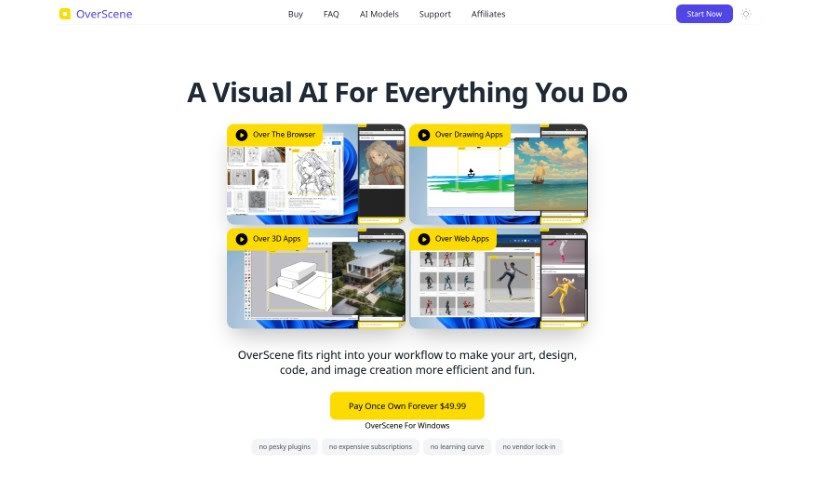
Screenshot of Overscene

Overscene

Discover what Overscene is and how to use it effectively in 2025. We'll explore its features and see how it stacks up against other 3D model generators.

Screenshot

What is Overscene?

Overscene is a smart AI overlay that boosts what desktop apps can do, offering advanced help for art, design, and coding. It works with all sorts of programs like drawing apps, 3D software, and other creative tools, and you don’t need any plugins. Some of its cool features include turning screenshots into code, making sketches look like finished art, and creating lifelike 3D renders. Overscene is built to be light on your computer’s resources and doesn’t require a subscription – you can just buy it once.

Overscene uses top AI platforms like OpenAI and Replicate.com to bring you the latest artificial intelligence features. It’s designed to work smoothly with apps like Photoshop, Illustrator, Blender, ZBrush, and many others, making your desktop applications work better and more efficiently. With neat features like a ‘floating frame’ for easy transformations and the ability to convert images into code, Overscene aims to simplify tasks in art, design, coding, and image creation. Ultimately, it’s all about boosting your productivity and creativity.

Who created Overscene?

Overscene was developed by Unliminal and first came out on March 25, 2024. Unliminal is the company behind this visual AI tool, which is made to improve art, design, code, and image creation within various applications. The best part? You don’t need any plugins, and there’s no subscription required.

What is Overscene used for?

  • It enhances creative tools without needing plugins.
  • It can quickly summarize long or complicated text.
  • It improves the quality of your image creation.
  • It turns screenshots into code with ease.
  • It transforms your sketches into impressive artwork.
  • It makes your 3D models even better.
  • It simplifies your design processes.
  • It streamlines your coding tasks.
  • It boosts the performance of web applications.
  • It helps you get the most out of your creative tools.
  • You can convert screenshots directly into code.
  • It transforms sketches into professional-looking art.
  • It can generate realistic 3D renders.
  • It helps you create higher-quality 3D work.
  • It streamlines your art, design, and coding workflows.
  • It boosts both your productivity and creativity.
  • It works with popular creative tools like Photoshop, Illustrator, Blender, and ZBrush.
  • You can apply AI enhancements to pretty much any content.
  • It maximizes the efficiency of your applications.
  • It helps you create high-quality images with more depth and detail.
  • It gives you access to models from Replicate.com.
  • It includes a handy image-to-code feature.
  • It allows for real-time image generation.
  • It offers style transfer capabilities.
  • It has a multimodal chat mode.
  • You can even suggest new features.
  • It generates moodboards in just seconds.
  • It leads to improved workflow efficiency.
  • It enhances the overall functionality of any software on your computer.
  • It makes image creation much more efficient.
  • It can turn wireframes into functional code.
  • It transforms sketches into masterpieces.
  • It generates realistic 3D renders.
  • It converts screenshots into usable code.
  • It streamlines artistic, design, and coding processes.
  • It works with a variety of desktop applications.
  • You don’t need to worry about plugins.
  • It supports a wide range of different applications.
  • It makes your desktop applications more efficient.
  • It streamlines artistic and design workflows.
  • It improves your coding processes.
  • It makes image creation easier.
  • It transforms wireframes into code.
  • It converts sketches into professional artwork.
  • It converts screenshots to code.
  • It summarizes complex text instantly.
  • It creates moodboards in seconds.
  • It transforms sketches into masterpieces.
  • You can work efficiently with major software.
  • It allows for feature suggestions.
  • It provides instant text summarization.

Who is Overscene for?

  • Artists
  • Designers
  • Coders
  • Image creators
  • Graphic designers
  • Illustrators
  • Web designers
  • 3D Artists

How to use Overscene?

Here’s how to get the most out of Overscene:

  1. Installation:
    • Overscene installs with just one click, so you can get started right away without any complicated setups or too many plugins.
  2. Using the ‘Floating Frame’:
    • Simply drag the ‘floating frame’ over whatever content you’re working on in your desktop app.
    • Click to transform it – you can turn wireframes into code or create realistic 3D renders super easily.
  3. Converting Screenshots:
    • Overscene can quickly turn screenshots into code, which means you can build prototypes fast without having to write a lot of code yourself.
  4. AI Platforms:
    • By using advanced AI platforms like OpenAI and Replicate.com, Overscene brings cutting-edge artificial intelligence right into your workflow.
  5. Enhancing 3D Creations:
    • Overscene really makes 3D models pop with detailed realism, turning basic renders into professional-quality, hyper-realistic images.
  6. Streamlining Processes:
    • Make your art, design, and coding tasks simpler with features that turn sketches into polished artwork and create lifelike 3D models.
  7. Compatibility:
    • Overscene works smoothly with many different applications, including Photoshop, Illustrator, Blender, ZBrush, and more, helping you be more productive across all your tools.
  8. Efficiency and Ease of Use:
    • It’s designed to be user-friendly and optimizes how it uses your computer’s resources, ensuring your workflow stays smooth without slowing down your system.

By following these steps, you can really tap into Overscene’s abilities across lots of different applications and make your creative processes much more efficient.

Related AI Tools

Discover more tools in similar categories that might interest you

123RF AI Image Generator

Creative Image Generation
Learn More

Stay Updated with AI Tools

Get weekly updates on the latest AI tools, trends, and insights delivered to your inbox

Join 25,000+ AI enthusiasts. No spam, unsubscribe anytime.