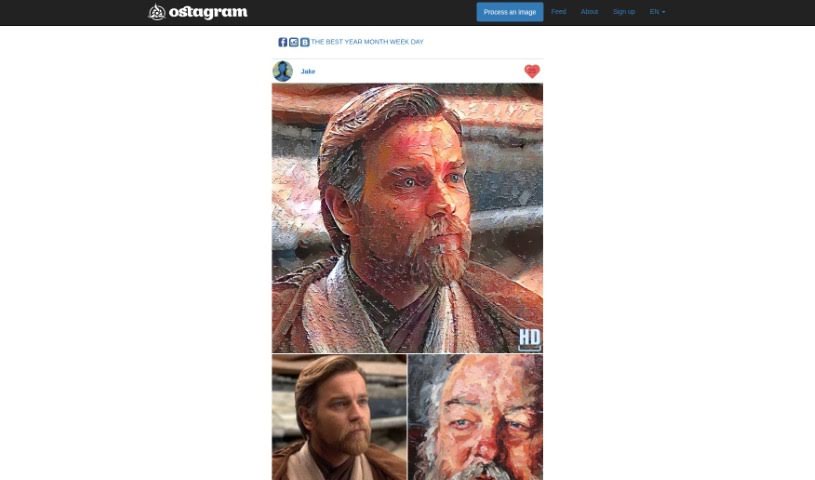
Screenshot of Ostagram

Ostagram

Discover Ostagram in 2025! Learn what this fun image mixing tool does, how to use its features effectively, and how it stacks up against other photo editors.

Screenshot

What is Ostagram?

Ostagram is a really fun tool that lets you mix images and change the style of your photos. You can upload a picture, pick from lots of different art styles, and blend them together. Imagine taking a selfie and making it look like a painting by Van Gogh, like his “Starry Night”! It’s a free service, but if you’re using it without paying, you might have to wait a little bit while your image is processed.

Who created Ostagram?

Peter is the person behind Ostagram, the creative mind that developed this neat image mixing tool. The platform he built lets anyone upload their photos and apply different artistic styles to create something totally unique. You can pick from styles like Van Gogh’s “Starry Night” to give your pictures that special artistic flair. Ostagram offers this service for free, though sometimes free users might find themselves in a processing queue, meaning a short wait for the final artwork.

What is Ostagram used for?

  • Changing the look and feel of your images and photos.
  • Blending various art styles and famous artworks into your own pictures.
  • Making artistic portrait paintings from your photos.
  • Automatically processing your images with the styles you choose.
  • Creating art that looks like Van Gogh’s work, but automatically.
  • Making drawings by using neural networks that understand artistic style.
  • Letting you create art even if you don’t have drawing skills.
  • Uploading your photos to be processed and have their style changed.
  • Getting really cool results from image processing.
  • Giving you a chance to connect with the art world in a new way.
  • You can transform your photos by merging them with a vast number of styles and artworks.
  • Try uploading a selfie and picking a style, like Van Gogh’s “Starry Night,” to turn it into an artistic portrait.
  • You can create artistic portraits without needing any drawing talent yourself.
  • Produce impressive results by mixing images in different artistic styles.
  • Use neural networks, along with artistic style algorithms, to generate unique art.
  • Explore a gallery filled with works that mimic Van Gogh’s style.
  • Experience the world of art through an automated image editing process.
  • Enjoy how simple it is to let a computer create art from your photos.
  • Sign up to upload images for processing and check out different artistic styles.
  • Feel free to reach out to Ostagram if you have questions or comments about their image mixing tool.
  • Transform your photos by fusing them with a huge number of styles and artworks.
  • Turn your selfies into artistic portraits by picking styles from famous artworks, like Van Gogh’s ‘Starry Night’.
  • Create amazing results without needing any artistic skills.
  • Let a computer create artwork for you, usually taking about 1.5 to 2 hours.
  • Use neural networks with the artistic Style algorithm developed by Gatys, Ecker, and Bethge.
  • View a gallery of works that look like they were made by Van Gogh.
  • Register to upload your pictures and get access to more features.
  • Contact Ostagram with questions or comments via channels like Facebook, Instagram, and VKontakte.
  • Use an AI image editor tool for creative artistic transformations of your images.
  • Explore free AI image tools for your creative projects.

Who is Ostagram for?

  • Graphic Designers
  • Photographers
  • Social Media Managers
  • Digital Artists
  • Content Creators
  • Advertising Specialists
  • Fashion Designers
  • Art Teachers

How to use Ostagram?

Using Ostagram is pretty straightforward. Just follow these simple steps:

  1. Head over to the Ostagram website – you can find the link easily.
  2. Upload the image you’d like to give a new style.
  3. Browse through the many styles and artworks offered on the platform.
  4. Pick the style you want to blend into your photo. For example, you could choose Van Gogh’s “Starry Night” to make your picture look like that famous painting.
  5. Give it a few minutes for the image processing to finish. Remember, free users might have a short wait in the queue.
  6. Once your artistic mix is ready, you can download and save your transformed image.

Have fun exploring all the different artistic styles and creating your own unique images with Ostagram!

Related AI Tools

Discover more tools in similar categories that might interest you

123RF AI Image Generator

Creative Image Generation
Learn More

Stay Updated with AI Tools

Get weekly updates on the latest AI tools, trends, and insights delivered to your inbox

Join 25,000+ AI enthusiasts. No spam, unsubscribe anytime.