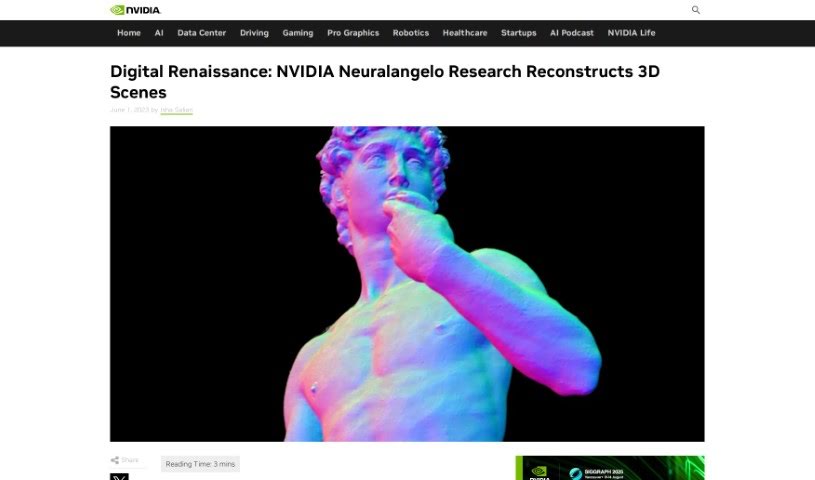
Screenshot of NVIDIA Neuralangelo

NVIDIA Neuralangelo

Discover NVIDIA Neuralangelo, a powerful AI for turning 2D videos into detailed 3D models in 2025. We'll walk you through how to use it and compare it to other 3D generators.

Screenshot

What is NVIDIA Neuralangelo?

NVIDIA Neuralangelo is a really smart AI that NVIDIA Research developed specifically for creating 3D models from 2D videos. It uses neural networks to take simple video clips and turn them into incredibly detailed 3D structures. Imagine capturing a building or a sculpture with your phone and having this AI build a realistic virtual copy for you. It’s a bit like how Michelangelo brought his sculptures to life from raw stone, but Neuralangelo does it digitally. It doesn’t just create the shape; it also adds all the textures, making the 3D objects look super realistic. This means creative folks can easily drop these detailed 3D assets into their projects, whether they’re making art, developing video games, working on robotics, or building digital twins. What’s really cool is how accurately it translates textures from the 2D video to the 3D model, making it a big step up from older methods and allowing for quick creation of high-quality virtual objects for all sorts of uses.

Who created NVIDIA Neuralangelo?

NVIDIA Research is the brilliant team behind Neuralangelo. Ming-Yu Liu, who’s a senior director of research and also helped write the project’s paper, is a key figure. NVIDIA Research is well-known for pushing the boundaries with new technologies, and Neuralangelo is a prime example. Their focus here is on 3D reconstruction, using neural networks to turn those 2D video clips into those intricate 3D structures we talked about. It’s a real breakthrough that’s opening up exciting possibilities in areas like art, video game creation, robotics, and even industrial digital twins.

How to use NVIDIA Neuralangelo?

Ready to turn your videos into 3D models? Here’s a straightforward way to use NVIDIA Neuralangelo:

  1. Shoot Your Video: First, you’ll need to film the object or scene you want to recreate. Make sure to capture it from lots of different angles. This gives the AI the depth and shape information it needs.
  2. Pick Your Best Shots: From your video, select a few key frames. These should be the ones that really show off different viewpoints of your subject.
  3. Let the AI Work: Now, you feed these frames into the Neuralangelo AI. It’ll get to work analyzing them and building a basic 3D version of what you filmed.
  4. Refine the Details: Once the AI has a rough model, it goes back and fine-tunes it. This step is all about making those details, like textures and shapes, look even better.
  5. Get Your 3D Model: The final result is a high-quality 3D object or scene. You can then use this in virtual reality, for digital twins, with robots, or in game development.

Basically, you can use Neuralangelo to take your 2D videos and transform them into really detailed 3D structures that look lifelike and have great textures. It’s a super helpful tool for artists, developers, and anyone working in these fields because it creates such high-quality reconstructions and is pretty easy to use.

Related AI Tools

Discover more tools in similar categories that might interest you

123RF AI Image Generator

Creative Image Generation
Learn More

Stay Updated with AI Tools

Get weekly updates on the latest AI tools, trends, and insights delivered to your inbox

Join 25,000+ AI enthusiasts. No spam, unsubscribe anytime.