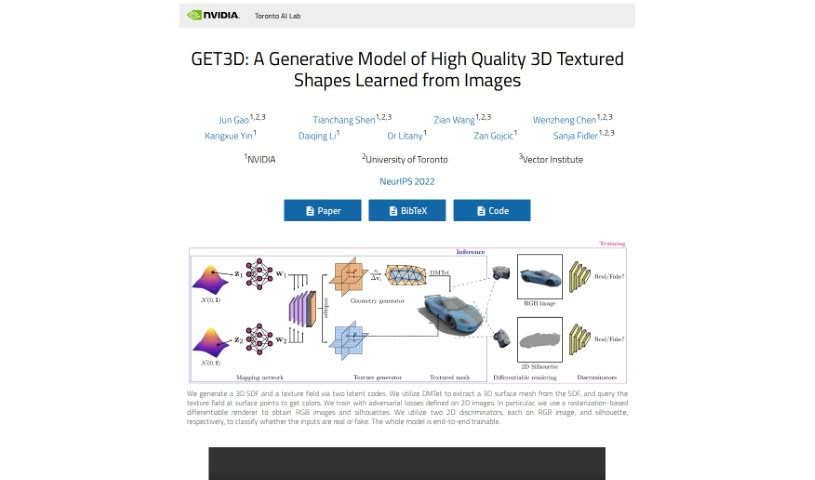
What is NVIDIA Get3D?
NVIDIA’s GET3D is a really impressive generative model designed to create detailed, textured 3D meshes straight from 2D images. It’s a pretty advanced piece of tech, a collaboration between researchers at NVIDIA, the University of Toronto, and the Vector Institute, and it was actually shown off at NeurIPS 2022. What makes GET3D special compared to older 3D generative models is its ability to produce these high-quality, textured 3D meshes that work smoothly with standard 3D rendering tools. A standout feature is its text-guided shape generation. This means you can type in a description, and the model will use that to help create the 3D shape you’re looking for, really boosting user interaction and creativity in the whole process. Plus, the fact that it’s trainable end-to-end, with a clever separation between the geometry and the texture, shows how focused it is on being both efficient and creative for 3D modeling.
Who created NVIDIA Get3D?
GET3D was actually created by a team of researchers from NVIDIA, the University of Toronto, and the Vector Institute. They presented their work at NeurIPS 2022. The brilliant minds behind it include Jun Gao, Tianchang Shen, Zian Wang, Wenzheng Chen, Kangxue Yin, Daiqing Li, Or Litany, Zan Gojcic, and Sanja Fidler. This innovative technology is all about generating high-quality, textured 3D shapes directly from 2D images, which is a big deal for industries that need detailed 3D assets.
What is NVIDIA Get3D used for?
GET3D is pretty versatile, but here are some of its main uses:
- Creating High-Quality 3D Assets: It’s fantastic for generating 3D textured shapes with really intricate details, all from just 2D images.
- Advanced Disentanglement: It does a great job of keeping the geometry and texture separate, which gives you a lot more creative freedom.
- Text-Guided Shape Generation: You can actually create shapes by typing in text prompts, making it much more interactive and user-friendly.
- End-to-End Trainable Model: It uses adversarial losses and differentiable rendering, making the training process really efficient.
- Unsupervised Material Generation: It can produce materials and even lighting effects that change depending on your viewing angle, all without needing any special supervision.
- Diverse Shape Generation: It can create all sorts of shapes with different topologies, high-quality geometry, and textures.
- Smooth Transitions: You can even interpolate between latent codes to get smooth transitions between different shapes.
- Local Variations: It can generate similar shapes but with slight local differences.
- Meaningful Lighting Effects: It’s great for unsupervised material generation that includes realistic view-dependent lighting.
- User-Friendly Text Prompts: Text-guided shape generation lets you use your own text prompts to guide the creation process, making it more interactive.
- Creative Flexibility: The advanced disentanglement between geometry and texture really helps with creative flexibility.
- Efficient Training: The end-to-end trainable model, using adversarial losses and differentiable rendering, ensures an efficient training process.
Who is NVIDIA Get3D for?
This technology is particularly useful for professionals in:
- The Gaming Industry
- The Film Industry
- The Virtual Reality Industry
How to use NVIDIA Get3D?
Here’s a general idea of how you might approach using NVIDIA’s GET3D:
- Access the Model: Start by getting access to the GET3D generative model itself. Remember, it’s designed to create high-quality 3D textured meshes directly from 2D images.
- Leverage Advanced Techniques: You’ll be using advancements in areas like differentiable rendering, surface modeling, and generative adversarial networks. These help produce complex 3D shapes with rich textures.
- Explore Key Features: Get familiar with its capabilities. This includes generating high-quality 3D assets, the advanced disentanglement of geometry and texture, creating shapes using text prompts, its end-to-end trainable nature, and unsupervised material generation.
- Learn from Resources: Check out FAQs and resources. For instance, it’s helpful to know it was developed by researchers from NVIDIA, the University of Toronto, and the Vector Institute, and was presented at NeurIPS 2022.
- Experiment with Shapes: Try generating diverse shapes! It can handle things like cars, chairs, animals, and even human characters, all with detailed textures and complex topology.
- Use Text-Guided Generation: This is a fun part! Input text prompts to guide the creation of 3D shapes. It really enhances user interactivity and lets you be more creative.
- Consult the Paper: For a deeper dive, refer to the original paper, “GET3D: A Generative Model of High Quality 3D Textured Shapes Learned from Images,” by Jun Gao et al., presented at NeurIPS 2022.
- Stay Updated: Keep an eye on related works and citations for any new features or advancements concerning GET3D.