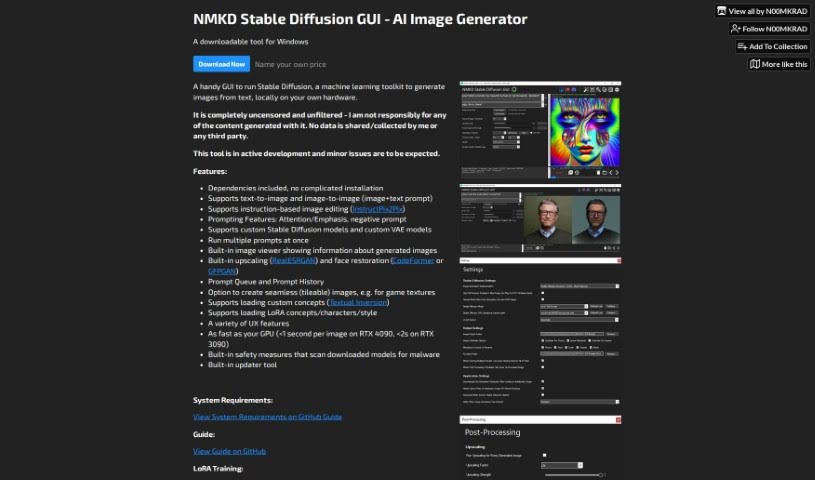
Screenshot of NMKD Stable Diffusion

NMKD Stable Diffusion

Discover NMKD Stable Diffusion in 2025! Learn what this powerful tool is, how to use its many features for image generation, and how it stacks up against other Image Generators.

Screenshot

What is NMKD Stable Diffusion?

NMKD Stable Diffusion is a user-friendly graphical interface (GUI) tool built specifically for running Stable Diffusion. If you’re not familiar, Stable Diffusion is a powerful machine learning toolkit that’s fantastic for creating images from text descriptions. What’s really neat about NMKD Stable Diffusion is that it lets you run this entire image generation process right on your own computer, using your own hardware. It’s packed with features to make your creative process smoother. You can do text-to-image generation, where you describe what you want and it creates it, and image-to-image, where you give it an image and some instructions to transform it. It also supports instruction-based editing, letting you fine-tune images with specific commands. Plus, it has advanced prompting features like attention/emphasis (to tell it what’s most important) and negative prompts (to tell it what to avoid). You can even load your own custom models, manage a queue of prompts so you can run multiple jobs, keep a history of your prompts, upscale images to higher resolutions, and restore faces in generated images, among other things. The developers are actively working on it, releasing regular updates, and they’ve even built in safety measures to scan downloaded models for any potential malware.

Who created NMKD Stable Diffusion?

NMKD Stable Diffusion was developed by N00MKRAD. This company is dedicated to creating tools that make powerful technologies like Stable Diffusion more accessible. Stable Diffusion itself is a machine learning toolkit that excels at generating images from text prompts. The GUI that N00MKRAD created for it is designed to let users run this toolkit locally on their own systems. It offers a range of helpful features, including support for both text-to-image and image-to-image generation, the ability to load custom models you might find or create, a prompt queue to manage your requests, a history of your past prompts, and important built-in safety features to protect against malware.

Who is NMKD Stable Diffusion for?

This tool is incredibly versatile and can be a game-changer for a wide range of creative professionals:

  • Graphic Designers: Create unique visuals, mockups, and concept art.
  • Digital Artists: Explore new styles, generate assets, and bring imaginative ideas to life.
  • Content Creators: Produce eye-catching images for social media, blogs, and videos.
  • Advertising Professionals: Develop compelling ad creatives and campaign visuals.
  • Game Developers: Generate character concepts, environment art, and in-game assets.
  • Fashion Designers: Visualize new designs, create mood boards, and explore textile patterns.
  • Architects: Render conceptual designs and visualize building exteriors or interiors.
  • Illustrators: Experiment with different styles and create unique illustrations for books or projects.
  • Social Media Managers: Quickly generate engaging visuals to boost online presence.
  • Marketing Specialists: Craft unique imagery for campaigns and promotional materials.
  • Photographers: Enhance existing photos or create entirely new visual concepts.
  • Animators: Generate reference images, textures, or even keyframes.

How to use NMKD Stable Diffusion?

Getting started with NMKD Stable Diffusion is pretty straightforward. Here’s a simple breakdown of the steps:

  1. First, you’ll want to download the NMKD Stable Diffusion GUI tool. It’s specifically made for Windows, and you can find the link to download it.
  2. Once it’s downloaded, go ahead and install it. Then, you can launch the tool right from your computer.
  3. Take a little time to get familiar with all the features it offers. This includes understanding how text-to-image and image-to-image generation work, how to use instruction-based editing, and exploring the prompting options, custom model support, prompt queue, and history.
  4. Start using it for all sorts of tasks! You can run multiple prompts at once, easily view the images you generate, upscale them to make them bigger and clearer, restore faces if they look a bit off, and even create images that blend together seamlessly.
  5. Don’t forget to check out the extra features, like being able to load your own custom concepts or specific LoRA models for characters or styles you like.
  6. It’s also a good idea to make sure your computer system meets the requirements. You can usually find these details in a system requirements section, so just double-check that your hardware is up to the task.
  7. The best way to learn is by doing, so experiment! Try out different text prompts to see how efficiently you can generate images and explore all the diverse capabilities this tool offers for both creating new images and editing existing ones.

By following these steps, you’ll be well on your way to effectively using the NMKD Stable Diffusion tool for all your image generation and editing needs on your Windows system.

Related AI Tools

Discover more tools in similar categories that might interest you

123RF AI Image Generator

Creative Image Generation
Learn More

Stay Updated with AI Tools

Get weekly updates on the latest AI tools, trends, and insights delivered to your inbox

Join 25,000+ AI enthusiasts. No spam, unsubscribe anytime.