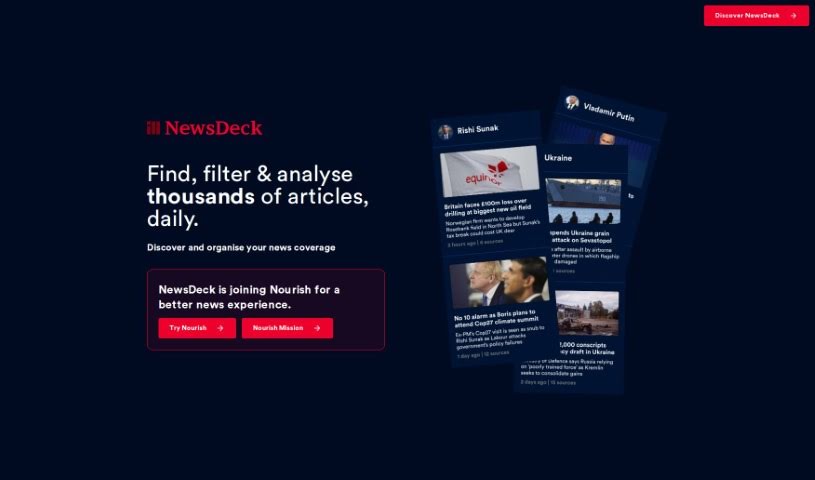
Screenshot of NewsDeck

NewsDeck

Discover what NewsDeck is and how to make the most of it in 2025. We'll explore its features, compare it to other journalist tools, and show you how to use it.

Screenshot

What is NewsDeck?

Newsdeck, brought to you by Onesub, is an AI-powered newsreader. It was developed by a small, dedicated team: Laura, Jason, and Jim. Essentially, it’s designed to analyze, connect, and filter news updates from all sorts of publishers, giving you a real-time look at what’s happening worldwide. You can use it to filter news from many different sources, follow how a story develops over time, and get a better understanding of how news is being framed. It’s pretty impressive, as it can track news related to over 500,000 different topics, people, companies, and countries. The team really values your input, too, actively encouraging feedback to keep improving and stay transparent.

While Newsdeck shines with its real-time news analysis, broad global access, and openness about its funding, it does have a few limitations. Because it’s a small team, support might not be as immediate. You also can’t customize filters much, there isn’t an app version yet, and it relies on publishers for its data. Plus, there’s no offline mode or support for multiple languages.

The main goal for the Newsdeck team is to really change how we read the news using AI. They’re big on transparency and making ethical choices, especially with how the AI works, and they want to give you a clear view of how news stories unfold. Newsdeck is great for keeping up with the global news cycle, streaming news about topics you care about, and it can track news related to more than half a million different subjects. Even though they haven’t laid out specific company values in detail, their actions show a strong commitment to being open, using AI ethically, and involving users.

Who created NewsDeck?

Newsdeck from Onesub was actually created by Laura, Jason, and Jim. They launched it on October 31, 2022. This small team of three is really focused on changing how people consume news, using OneSub’s smart newsreader AI technology. They make a point of being transparent about their company values, their finances, and how their AI makes decisions. They also really welcome user feedback, seeing it as key to making the tool better all the time.

What is NewsDeck used for?

  • Encourages user feedback: They actively ask for your thoughts to improve the tool.
  • Real-time news analysis: Get up-to-the-minute insights into current events.
  • Filters thousands of articles: Sifts through a massive amount of news to find what’s relevant.
  • Correlates coverage across publishers: See how different news outlets report on the same stories.
  • Traces story evolution: Follow a news story from its beginning to its current state.
  • Company transparency: They’re open about their funding and how their AI works.
  • Works with hundreds of publishers: Access news from a wide range of sources.
  • Offers insight into news characterization: Understand how news stories are presented.
  • Supports tracking news related to specific entities: Keep tabs on news about people, companies, or countries.
  • Analyzes over 500,000 topics: Covers a vast range of subjects.
  • Open to user feedback: Your input is valued and used for development.
  • Ethical decision-making: Commitment to responsible AI practices.
  • Provides insight into news characterization: Helps you understand the framing of news.
  • Can analyze over 500,000 topics: Extensive topic coverage.
  • Stream-news feature: Get a continuous flow of news.
  • Global news access: Stay informed about worldwide events.
  • Stream news feature: Enjoy a continuous news feed.
  • Insight into news characterization: Understand how news is presented.
  • User feedback incorporation: Your feedback directly influences improvements.
  • Tracking news related to specific entities: Monitor news about particular subjects.

Who is NewsDeck for?

  • Journalists
  • Researchers
  • Media professionals
  • News analysts
  • Content creators
  • News enthusiasts

How to use NewsDeck?

To really get the most out of NewsDeck from OneSub, here’s a simple guide:

  1. Access Real-time Global News: Dive into the global news cycle with NewsDeck’s AI. It gives you immediate access to a huge number of stories from all over the world.
  2. Stream Personalized Topics: Want news that’s just for you? You can stream topics related to over 500,000 different things – think people, companies, countries, and all sorts of subjects.
  3. Correlated Coverage: It’s helpful to see how different publishers cover the same story. Newsdeck lets you see these different perspectives as they unfold over time.
  4. Company Transparency: NewsDeck is upfront about how its AI makes decisions, where its news comes from, and how it’s funded. This means you get ethical and trustworthy news content.
  5. User Feedback: You can connect with the small but dedicated team of three – Laura, Jason, and Jim. They’re really keen to hear your feedback, share progress updates, and make sure user input is a top priority.
  6. News Analysis: Make the most of the AI system. It can filter through thousands of articles, compare how different publishers report on the same events, track how stories develop, and give you insights into how the news is characterized.

Basically, NewsDeck is a fantastic tool for finding, organizing, and understanding the ever-changing world of global news. It’s built with users in mind, focusing on transparency and ethical practices.

Related AI Tools

Discover more tools in similar categories that might interest you

Stay Updated with AI Tools

Get weekly updates on the latest AI tools, trends, and insights delivered to your inbox

Join 25,000+ AI enthusiasts. No spam, unsubscribe anytime.