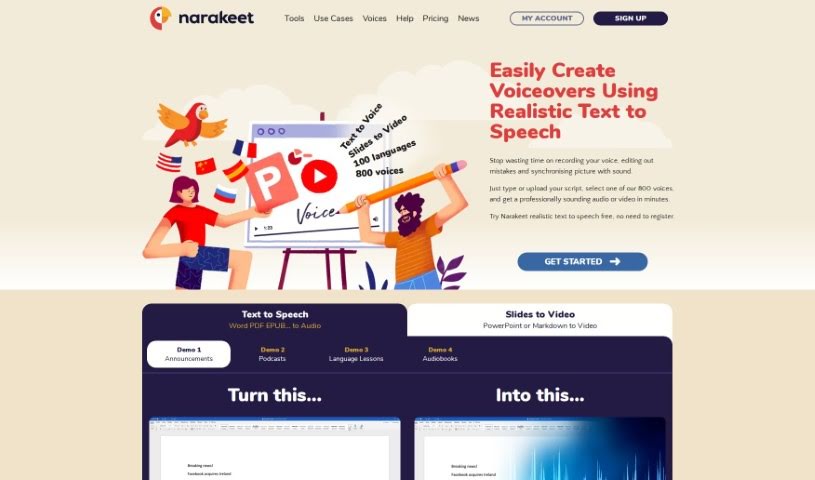
Screenshot of Narakeet

Narakeet

Discover what Narakeet is and how to use it effectively in 2025. We'll explore its features and see how it stacks up against other Text-to-Speech tools.

Screenshot

What is Narakeet?

Narakeet is a registered trademark belonging to Video Puppet Limited, a company that’s been around since at least 2018 and continues its work through 2024. It seems Narakeet also has a connection to a GitHub repository filled with examples. This suggests it’s a platform where users can find and maybe even add to a collection of helpful materials. Given Video Puppet Limited’s focus on video services and technology, it’s likely Narakeet offers tools or resources for things like puppetry and animation.

Who created Narakeet?

Gojko Adzic is the person behind Narakeet. He started the project because he was tired of how much time video creation took, especially tasks like matching pictures to sound or recording narration. He found it all pretty inefficient, so he decided to build a solution that could automate these steps. That’s how Narakeet came to be. The company that owns Narakeet is Video Puppet Limited, and Narakeet itself is a registered trademark of that company.

What is Narakeet used for?

Narakeet is incredibly versatile. You can use it to:

  • Easily create videos from your PowerPoint, Google Slides, or Keynote presentations.
  • Automatically add subtitles and closed captions to your videos.
  • Generate videos using just images and audio files.
  • Turn a script into a voiceover and then edit your videos without much fuss.
  • Automate video production, making multiple versions in different languages or resolutions.
  • Help developers integrate video creation into their continuous delivery pipelines and automation systems.
  • Quickly produce marketing videos, announcements, demos, or documentation videos.
  • Convert text into speech in many languages using realistic AI voice generators.
  • Transform subtitle files into audio, perfectly synced with timestamps.
  • Stop spending time recording voiceovers, syncing audio with visuals, or adding subtitles – Narakeet handles it all.
  • Create full HD videos for YouTube directly from your slides.
  • Write your entire video script using Markdown, even embedding visual assets.
  • Automate video production to create various versions in different languages or resolutions.
  • Turn text into lifelike speech with features like Text to Voice and Slides to Video.
  • Convert a subtitle file into audio for dubbing or as an alternative audio track.
  • Quickly create narrated videos from sources like PowerPoint, Google Slides, Keynote, images, and scripts.
  • Make videos from PowerPoint, Google Slides, or Keynote specifically for YouTube or social media.
  • Create videos using images and audio.
  • Script videos using Markdown and embed visual assets like images, screen recordings, and video clips.
  • Allow developers to integrate video production into continuous delivery pipelines and automation systems using the Narakeet API or its command-line client.
  • Convert text to speech in multiple languages, offering 700 different voices for narrated videos.
  • Convert subtitles into audio for e-learning content or as alternative audio tracks.
  • Create video presentations with voice-overs, convert presentations into videos, or turn lecture slides into videos.
  • Make videos from PowerPoint, Google Slides, or Keynote.
  • Automate Video Production.
  • Generate several versions of a single video in different languages or resolutions.
  • Automatically build documentation videos using up-to-date images.
  • Create narrated videos quickly.
  • Convert Text To Speech in 100 languages.
  • Convert Subtitles to Audio.
  • Create training video lessons in multiple languages.
  • Convert Powerpoint to Video.

Who is Narakeet for?

Narakeet is a great tool for a wide range of professionals:

  • Animators
  • Video Editors
  • Content Creators
  • Educators
  • Digital Marketers
  • Graphic Designers
  • Storytellers
  • Social Media Managers
  • Trainers
  • Presentation Specialists

How to use Narakeet?

Using Narakeet is pretty straightforward. Just follow these simple steps:

  1. Access the Narakeet Platform: Head over to the Narakeet website at narakeet.com to get started.
  2. Text to Speech Conversion: Narakeet lets you turn text into realistic speech using over 700 voices across 90 languages. It’s perfect for creating audio versions of your blogs, educational videos, and much more.
  3. Multimedia Conversion: You can easily convert text into audio files like MP3, M4A, or WAV, and also transform your PowerPoint slides into MP4 videos.
  4. Intuitive Interface: Narakeet has a user-friendly interface that makes creating professional voiceovers simple, without needing complicated editing.
  5. Script Input: You have two options: type your script directly into the platform, or upload a script you already have to begin the voiceover or video creation process.
  6. Voice Selection: Pick from Narakeet’s wide variety of voices to give your audio or video content a personalized touch.
  7. No Registration Required: Narakeet makes voiceover production even easier by not requiring you to register, so you can start creating right away.

By following these steps, you can effortlessly create high-quality audio and video content with Narakeet’s advanced text-to-speech features. You’ll experience smooth voiceover production and multimedia conversion thanks to this easy-to-use platform.

Related AI Tools

Discover more tools in similar categories that might interest you

Stay Updated with AI Tools

Get weekly updates on the latest AI tools, trends, and insights delivered to your inbox

Join 25,000+ AI enthusiasts. No spam, unsubscribe anytime.