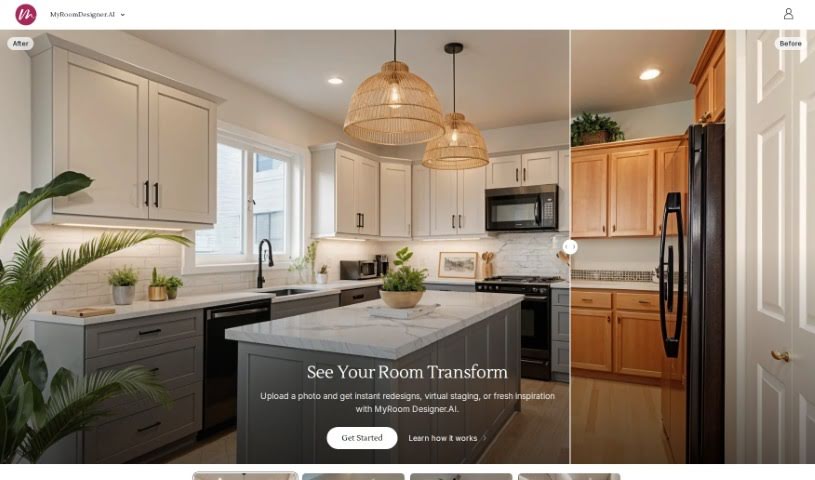
Screenshot of Myroomdesigner.ai

Myroomdesigner.ai

Discover Myroomdesigner.ai in 2025! Learn what this AI interior design tool does, how to use its features, and how it stacks up against other photo editors.

Screenshot

What is Myroomdesigner.ai?

MyRoomDesigner.ai is a really neat online tool that acts like your personal AI interior designer. You can upload pictures of your rooms and then easily try out different design styles and themes – think Farmhouse, Coastal, Modern, or Traditional – to completely refresh your living spaces. What’s great is that it’s a secure experience; your photos aren’t shared online or with any third parties. This means you can confidently compare how your room looks before and after using a handy slider. Plus, you can keep all your photos, design renders, and account details organized right within the app. MyRoomDesigner.ai also offers different subscription plans that give you access to features like AI background removal, the ability to import products, and a large database of items to really boost your interior design projects.

Who created Myroomdesigner.ai?

The person behind MyRoomDesigner.ai isn’t specifically named in the information we have. However, the company is all about bringing innovation to interior design, offering a tool that uses AI to help users easily redesign their homes. You can upload photos of your rooms and instantly apply popular styles like Farmhouse, Coastal, Modern, and Traditional. MyRoomDesigner.ai prioritizes your privacy, keeping your personal information secure and ensuring your photos aren’t shared. It also makes managing your pictures and account super simple, all within the app itself. You can grab the tool for iOS now, and an Android version is on its way!

What is Myroomdesigner.ai used for?

  • Get custom design ideas from an AI, just by clicking a few buttons.
  • Instantly apply different themes and styles to your room photos.
  • Keep your personal details safe – your photos are never shared with anyone else.
  • You have complete freedom to delete any photos, renders, or even your entire account whenever you wish.
  • Explore and use popular interior design themes like Farmhouse, Coastal, Modern, and Traditional styles.

Who is Myroomdesigner.ai for?

  • Interior designers looking for quick visualization tools.
  • Homeowners wanting to refresh their living spaces.
  • Decorators seeking inspiration and easy style application.
  • Architects needing to present design concepts.
  • Real estate professionals aiming to stage properties virtually.

How to use Myroomdesigner.ai?

Using MyRoomDesigner.ai is pretty straightforward. Here’s a simple breakdown:

  1. Upload Your Photo: Start by uploading a picture of your room to the MyRoomDesigner.ai platform. It’s the first step to seeing your space transformed.
  2. Select Room Type: Tell the tool what kind of room it is – maybe a Living Room, Bedroom, or Kitchen. This helps the AI understand the context.
  3. Choose a Design Style: Pick from a variety of popular design styles like Farmhouse, Coastal, Modern, or Traditional to see how they look in your room.
  4. Get Personalized Design Suggestions: The AI will offer custom design recommendations to help you enhance your space even further.
  5. Rest Assured with Privacy and Security: Your photos are kept private and secure. They aren’t shared with any third parties, so you can use the tool with peace of mind.
  6. Enjoy Flexibility: You have the freedom to delete photos, renders, or your entire account whenever you feel the need.
  7. Compare Before and After: Easily see the difference your design choices make by using the convenient slider feature to compare the before and after views.
  8. Manage Everything In-App: Keep all your photos, renders, and account settings organized and accessible right within the MyRoomDesigner.ai application.
  9. Download the App: For even more convenience, you can download the MyRoomDesigner.ai app on iOS. An Android version is also in development!

By following these steps, you can really transform your living spaces with MyRoomDesigner.ai’s AI-powered interior design tools. Have fun exploring different styles and reinventing your rooms with ease!

Related AI Tools

Discover more tools in similar categories that might interest you

123RF AI Image Generator

Creative Image Generation
Learn More

Stay Updated with AI Tools

Get weekly updates on the latest AI tools, trends, and insights delivered to your inbox

Join 25,000+ AI enthusiasts. No spam, unsubscribe anytime.