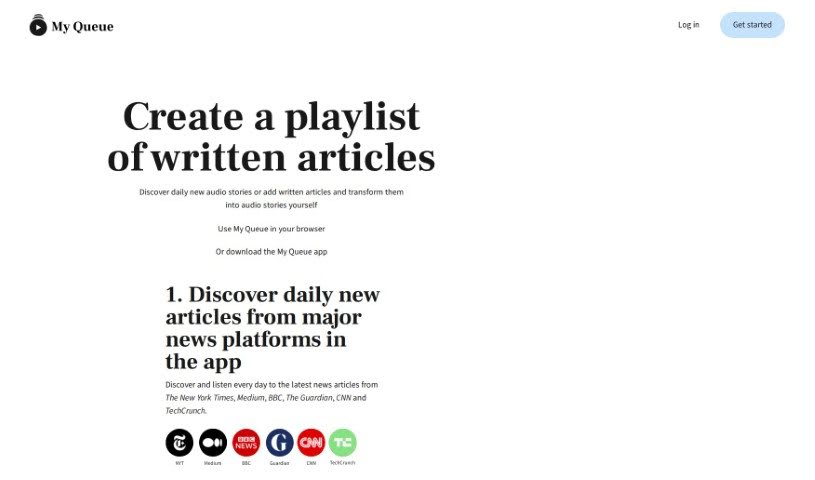
Screenshot of My Queue

My Queue

Discover what My Queue is and how to use it effectively in 2025. Explore its features and see how it stacks up against other Text-to-Speech tools.

Screenshot

What is My Queue?

My Queue is a handy tool that lets you create playlists from written articles, turning them into audio you can listen to. Imagine starting your day with fresh audio stories from places like The New York Times, Medium, BBC, The Guardian, CNN, and TechCrunch. It’s a great way to cut down on screen time, especially when you’re busy or on the move. You can just listen to articles instead of reading them. The tool supports 48 languages, gives you player controls to make listening just right, and even lets you read along as you listen. Plus, you can build your own personal library of online content with My Queue, and it works seamlessly on both your phone and computer, syncing everything up for you.

Who created My Queue?

My Queue was developed by a company that wanted to change how people consume written content. Their goal was to offer an audio alternative. While the founder’s name isn’t mentioned in the available information, the company’s main focus is making user experiences better. They offer a convenient way to listen to articles from many news sources as audio. This helps people reduce screen time while they’re commuting, exercising, or even just walking the dog.

What is My Queue used for?

  • Listen to articles while you’re out and about – think commuting, walking the dog, or hitting the gym.
  • Cut down on screen time by listening to articles instead of reading them.
  • Enjoy audio stories in 48 different languages.
  • You can read along while you listen.
  • Use the player controls to fine-tune your listening experience.
  • Build a personal library of online content you want to listen to.
  • Create custom playlists of written articles.
  • Find and listen to new articles daily from major news platforms.
  • Manually add articles as audio stories by pasting their URL links.
  • Use the Chrome extension to easily add articles from webpages to your audio queue.
  • Listen to articles hands-free when you’re commuting, walking, or working out.
  • Add articles to a personalized queue for audio listening.
  • Turn written articles into audio stories in 48 languages.
  • Read articles at the same time you listen to the audio.
  • Control the audio player for the best listening experience.
  • Listen to audio stories from popular news outlets like The New York Times, Medium, BBC, and others.
  • Access My Queue on both mobile and desktop devices.
  • Your queue syncs across devices for a smooth listening experience.
  • Create playlists of written articles.
  • Discover new audio stories daily or turn your own written articles into audio.
  • Listen hands-free while commuting, walking the dog, or working out.
  • Reduce screen time by listening instead of reading.
  • Listen to articles in 48 languages.
  • Optimize your listening with player controls for voice speed and skipping.
  • Experience My Queue on mobile and desktop.
  • Access My Queue via your browser or the app.
  • Read and listen to articles at the same time.
  • Player controls help optimize the listening experience.
  • Discover new audio stories daily from major news platforms.
  • Paste a link to automatically add content as an audio story to your queue.
  • Add articles to My Queue using the Chrome extension.
  • Discover daily new articles from major news platforms in the app.
  • Paste a link to add content as an audio story to your queue.
  • Add articles with the Chrome extension for automatic queue addition.
  • Read and listen simultaneously with My Queue.
  • Build your personalized library of online written content.
  • Listen to your queue while commuting, walking the dog, or working out.

Who is My Queue for?

  • Journalists
  • News enthusiasts
  • Anyone looking to cut down on screen time
  • Multitaskers
  • Content creators
  • Students
  • Commuters
  • People who want to reduce their screen time

How to use My Queue?

Here’s how to get started with My Queue:

  1. First, discover daily articles from platforms like The New York Times, Medium, BBC, and others right in the app.
  2. Then, swipe horizontally to pick articles and add them to your queue.
  3. You can also add articles manually by pasting their URLs; the tool will automatically convert them into audio stories.
  4. While browsing the web, use the Chrome extension to easily add articles to your queue.
  5. Make sure to install the browser extension for quick access.
  6. You can access My Queue on your smartphone, laptop, or through the dedicated app.
  7. Listen to your queue while you’re on the go, like during your commute or other activities, to help reduce screen time.
  8. Enjoy articles in 48 different languages, and you can even choose to read along as you listen.
  9. Use the player controls to make your listening experience just right for you.
  10. Building a personalized library of online content is simple and easy.

My Queue really changes how you consume written content. It smoothly transitions articles from top news outlets into audio stories, letting you listen on the go. You can customize languages and control playback for a better experience. Why not join the My Queue community today? It’s a great way to enrich your life and make things more efficient.

Related AI Tools

Discover more tools in similar categories that might interest you

Stay Updated with AI Tools

Get weekly updates on the latest AI tools, trends, and insights delivered to your inbox

Join 25,000+ AI enthusiasts. No spam, unsubscribe anytime.