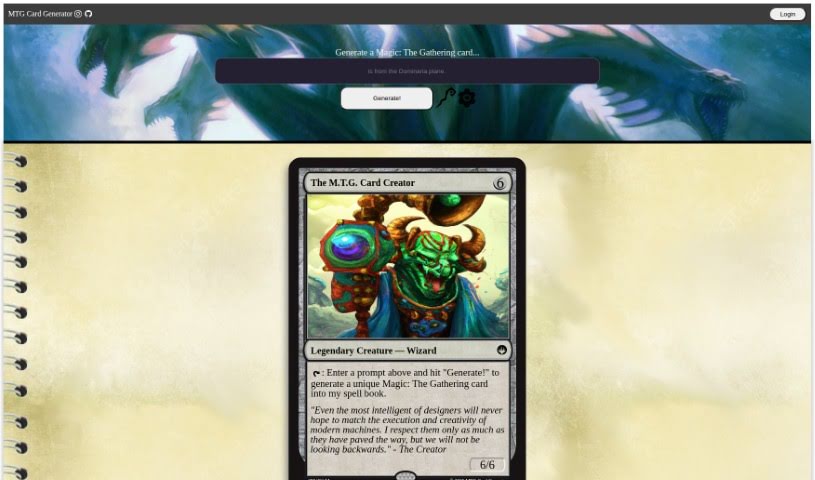
Screenshot of Mtg. Card Creator

Mtg. Card Creator

Curious about Mtg. Card Creator? Learn what this tool is and how to use it effectively in 2025. We'll dive into its features and see how it stacks up against other design generators.

Screenshot

What Exactly is Mtg. Card Creator?

The “MTG Card Creator” tool is a neat way for anyone to whip up their own unique Magic: The Gathering cards. All you have to do is type in what you’re imagining and hit “Generate.” The tool even has a quote that talks about how great modern machines are at creative tasks, but it also wisely points out that human ideas are still super important going forward. You can zip around the tool using keyboard shortcuts and even bookmark it so you can easily come back later. If you’re interested, you can find the tool on GitHub right here: mtg-card-creator.pdf.

Who’s Behind Mtg. Card Creator?

Forrest Coward is the creative mind behind the Mtg. Card Creator. His main idea is that technology really helps with design. He put it this way: “Even the most intelligent of designers will never hope to match the execution and creativity of modern machines.” You can check out Forrest Coward’s project on GitHub at this link: MTG-Card-Generator.

What Can You Do with Mtg. Card Creator?

  • Create your very own, unique Magic: The Gathering cards.
  • Make designing and coming up with new MTG card ideas easier.
  • Keep a “spell book” to store all the cards you’ve made.
  • Save your favorite card designs so you can find them again later.
  • Move around the card generator interface super fast.

Who Should Use Mtg. Card Creator?

  • People who design things.
  • Anyone who likes to create.
  • Developers looking for inspiration or tools.

How Do I Actually Use Mtg. Card Creator?

Using the Mtg. Card Creator is pretty straightforward. Just follow these simple steps:

  1. Head over to the Mtg. Card Creator website. Then, just type in a prompt – whatever you imagine for a unique Magic: The Gathering card.
  2. Click “Generate!” to see your card come to life and add it to your personal spell book.
  3. Want to save the site for later? Use handy shortcuts like Ctrl + D to bookmark it.
  4. Need to jump to the top or bottom of your generated cards? Use Ctrl + ↑ or Ctrl + ↓.
  5. You can sort your cards by when you made them or alphabetically using Ctrl + ← or Ctrl + →.
  6. Getting around is easy with the ↑↓←→ keys, or if you want to open a specific card in a new tab, just hit Enter.
  7. Want to see more or less of your card list? You can expand or collapse it using ⇧ + ↑ or ⇧ + ↓.
  8. If you’re ever unsure about something, the help menu is there for you. Just toggle it with the ? key.
  9. For even more features and to see what else the Mtg. Card Creator can do, definitely check out their GitHub page: https://github.com/forrestcoward/MTG-Card-Generator.

By following these steps, you’ll be able to use the Mtg. Card Creator tool like a pro, generating and customizing your Magic: The Gathering cards exactly how you want them.

Related AI Tools

Discover more tools in similar categories that might interest you

123RF AI Image Generator

Creative Image Generation
Learn More
Stay Updated with AI Tools

Get weekly updates on the latest AI tools, trends, and insights delivered to your inbox

Join 25,000+ AI enthusiasts. No spam, unsubscribe anytime.