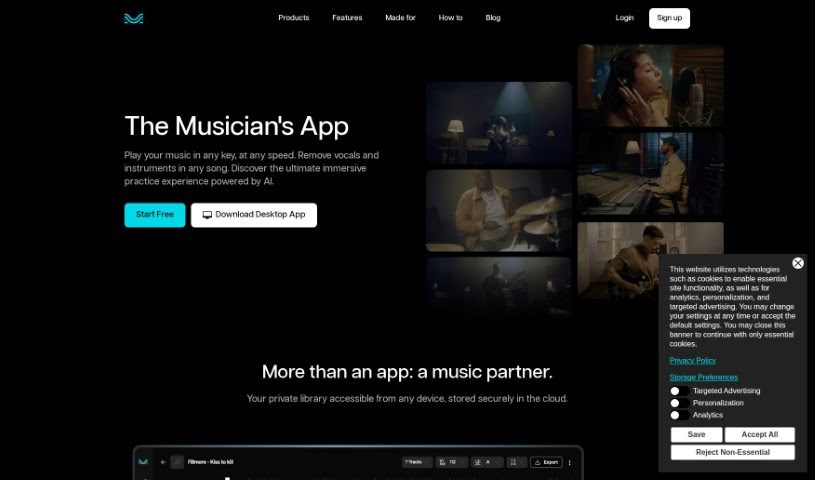
Screenshot of Moises

Moises

Discover what Moises is and how to use it effectively in 2025. We'll explore its features and see how it stacks up against other music generators.

Screenshot

What is Moises?

Moises is a really handy tool for musicians looking to improve their practice sessions. It’s packed with features like removing vocals, separating instruments, mastering tracks, remixing songs, changing pitch, a smart metronome, and even detecting chords. Basically, it’s an AI-powered app that lets you tweak the speed and pitch of songs, giving you a complete music practice experience. Its advanced tech can pick out and isolate vocals and instruments, so you can really focus on what matters to you in a song.

Who created Moises?

The Moises App was brought to life by a team passionate about transforming how musicians practice using AI. They launched it on June 17, 2024, giving musicians tools like vocal removal, instrument isolation, and track mastering to hone their skills. The company behind Moises App aims to offer a full music practice experience, and it’s already a hit with over 40 million music lovers worldwide.

What is Moises used for?

  • Separate instruments: Easily isolate vocals, drums, guitar, bass, keys, and more.
  • Create click tracks: Instantly generate click tracks that perfectly sync with any song.
  • Adjust tempo: Slow down or speed up songs with just one click.
  • Change pitch: Match songs to your vocal range or play in any key without needing a capo.
  • Real-time chord detection: See chords appear as the music plays.
  • Isolate vocals: Focus on the vocal track.
  • Master tracks: Improve the overall sound quality of your recordings.
  • Remix songs: Get creative and put your own spin on tracks.
  • Practice parts: Work on different sections of a song simultaneously.
  • Smart metronome: Keep your timing perfect.
  • Adjust audio speed: Fine-tune the playback speed.
  • Music modulation: Change the musical key of a song.

Who is Moises for?

Moises is a great tool for anyone involved in music, including:

  • Singers
  • Guitarists
  • Drummers
  • Bassists
  • Music producers
  • Individual musicians
  • Anyone looking to create or perform music!

How to use Moises?

Here’s a straightforward guide to getting the most out of the Moises App:

  1. Get Started: Open the Moises App on your device – whether it’s iOS, Android, or your desktop.
  2. Add Your Music: Upload the song you want to practice or work with.
  3. Separate Sounds: Use the AI to isolate vocals, drums, guitar, bass, keys, or any other instrument in the track.
  4. Tweak Speed & Pitch: Easily change the song’s speed and pitch to suit your practice needs or vocal range.
  5. Boost Your Practice: Use the smart metronome to keep time and check out the real-time chord detection for added insight.
  6. Polish & Remix: Apply mastering to improve your recordings or remix songs to add your personal touch.
  7. Focus on What Matters: Isolate specific instruments, like drums or guitar, to really nail those tricky parts.
  8. Customize Your Sound: Control the song’s pace, adjust the pitch to fit your voice, and instantly transpose chords.

Following these steps should help you make the most of Moises App for a really rewarding music practice and production experience. If you want to dive deeper into any specific feature, the official Moises App user guide or their tutorial materials are excellent resources.

Related AI Tools

Discover more tools in similar categories that might interest you

Stay Updated with AI Tools

Get weekly updates on the latest AI tools, trends, and insights delivered to your inbox

Join 25,000+ AI enthusiasts. No spam, unsubscribe anytime.