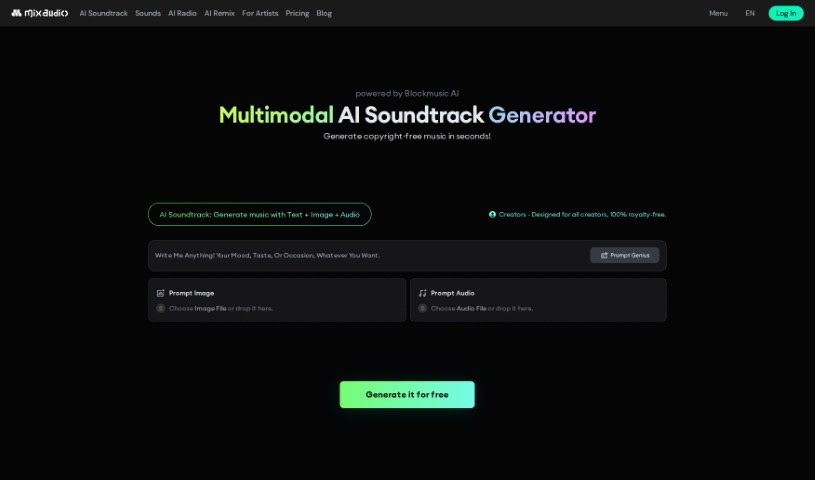
Screenshot of MixAudio

MixAudio

Discover MixAudio in 2025! Learn what this AI music generator is, how to use its features effectively, and how it stacks up against other music creation tools. Get royalty-free tracks for your projects.

Screenshot

What is MixAudio?

MixAudio is a really cool AI platform that lets you create music in all sorts of ways. Think background music (BGM), remixes, or even radio-style tracks. It’s designed for creators who want to bring their musical ideas to life. You can customize and generate high-quality, royalty-free background music for pretty much anything. What’s neat is how flexible it is with inputs – you can give it text prompts, images that capture a certain feeling, or even existing audio files that have the vibe you’re going for. MixAudio can whip up music from any of these, giving you lots of control. And the best part? All the music you make is royalty-free, so no worries about copyright issues. It’s built for everyone, whether you’re a music producer, making videos, designing podcasts, or anything else. It really opens up creative freedom for sound design and describing moods.

MixAudio also lets you customize your music, create remixes, and generate radio-style tracks, so it can handle a wide range of tastes. One of its standout features is how it can interpret a story or narrative you provide to create music, making the whole personalized music creation process even more engaging.

Who created MixAudio?

MixAudio was developed by an unnamed founder. It’s a multimodal AI music generator, meaning it can work with different types of input to create music. You can use it to produce various kinds of music, like background music, remixes, and radio-style tracks. The platform allows you to customize royalty-free, high-quality background music for all sorts of projects. You can generate music using text prompts, by selecting an image that matches the mood you want, or by uploading an existing audio file that has a similar vibe to your envisioned music. MixAudio is really aimed at any creator who wants more creative freedom in sound design and wants to express their musical imagination.

What is MixAudio used for?

  • You can generate music just from an image.
  • It’s also great for creating music from an existing audio file.
  • You can even mix text, images, and audio together for music generation.
  • It’s perfect for creating royalty-free music.
  • It’s suitable for all sorts of creators, including music producers, video creators, and podcast designers.
  • You can use it for sound design tasks.
  • It can generate remixes and radio-style music.
  • The platform can interpret a narrative to create music.
  • You can customize music using text prompts, images, and audio files.
  • It’s capable of generating various music styles, such as Background Music (BGM), remixes, and radio-style music.

Who is MixAudio for?

  • Music producers
  • Video creators
  • Podcast designers

How to use MixAudio?

To get the most out of MixAudio, here’s a simple breakdown:

  1. Choose Your Input: Start by picking how you want to feed the AI. You can go with text, an image, or an audio file. Or, why not combine them? Mixing inputs can lead to a really personalized outcome.
  2. Tell Your Story: Next, input a narrative or describe the mood you’re aiming for. MixAudio will use this to craft music that really fits the context you’ve provided.
  3. Customize It: Once you’ve got your inputs, you can dive into MixAudio’s customization tools. Tweak your tracks using text prompts, the images you’ve chosen, or the audio files you’ve uploaded.
  4. Generate Your Music: After you’ve set everything up, MixAudio will generate a composition that matches your inputs, creating high-quality, royalty-free music.
  5. Explore Music Styles: MixAudio is versatile and can generate a wide range of styles. Whether you need Background Music (BGM), remixes, or radio-style music, it can do it based on what you input.
  6. Use It Commercially: The music you create with MixAudio is 100% royalty-free. This means you can use it for commercial projects without any copyright headaches.
  7. Handle Sound Design: The platform also helps with sound design, letting you create intricate and customized royalty-free music.
  8. For All Creators: MixAudio is designed for everyone, from music producers to podcast designers. It offers you the creative freedom to really express your musical ideas.

By following these steps, you’ll be able to effectively use MixAudio to create, customize, and generate fantastic, royalty-free background music for all your projects.

Related AI Tools

Discover more tools in similar categories that might interest you

Stay Updated with AI Tools

Get weekly updates on the latest AI tools, trends, and insights delivered to your inbox

Join 25,000+ AI enthusiasts. No spam, unsubscribe anytime.