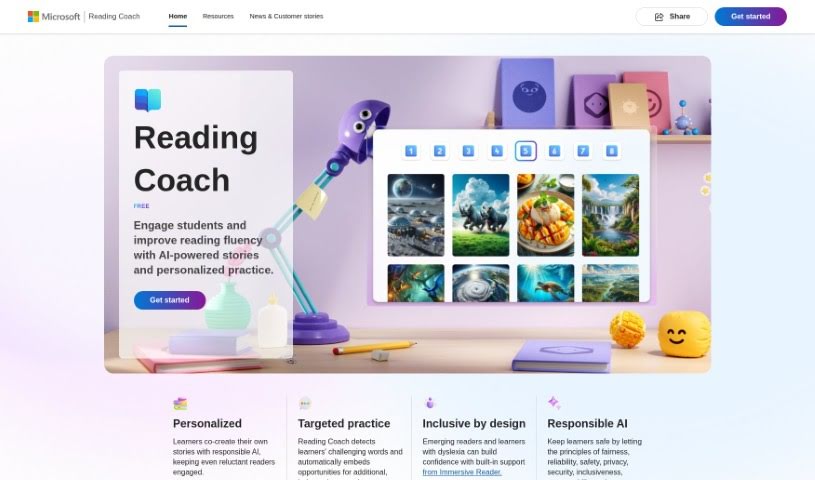
Screenshot of Microsoft Reading Coach Preview

Microsoft Reading Coach Preview

Discover what Microsoft Reading Coach Preview is all about and how to use it effectively in 2025. We'll explore its features and see how it stacks up against other teacher tools.

Screenshot

What is Microsoft Reading Coach Preview?

Microsoft Reading Coach Preview is a neat AI tool from Microsoft designed to make reading more engaging for students. It uses AI-powered stories and personalized practice to help kids get better at reading. It is a digital reading buddy! It lets students co-create stories with AI, which is pretty cool. It also helps identify words they find tricky, offering extra practice. Plus, it includes Immersive Reader, which is a big help for learners with dyslexia. The tool keeps track of progress, celebrates reading wins, and is built with safety and privacy in mind, following principles like fairness and reliability. You can use Reading Coach either through a web browser or a special Windows app, making it handy for learning at home or in the classroom. It’s really meant to support all sorts of learning needs.

Who created Microsoft Reading Coach Preview?

Microsoft developed the Reading Coach Preview. It first launched on January 20, 2024. This AI-driven educational tool aims to boost students’ reading fluency by offering personalized stories and practice sessions. Key features include personalized learning experiences, focused practice on challenging words, and support for students with dyslexia through Immersive Reader. It also tracks progress and celebrates reading achievements to keep students motivated. While it’s a great tool, it’s currently only available on Windows and doesn’t have a mobile app version yet.

What is Microsoft Reading Coach Preview used for?

This tool is pretty versatile, here’s a breakdown of what it’s great for:

  • Creating Stories Together: Learners can co-create stories with AI, making the reading process more personal and fun.
  • Boosting Reading Fluency: It engages students and helps them improve their reading skills through AI-powered stories and tailored practice.
  • Personalized Learning: Students get a unique learning experience, especially when they can build stories alongside an AI.
  • Targeted Word Practice: The tool automatically spots words that learners struggle with, offering them extra chances to practice.
  • Supporting Specific Needs: It provides help for emerging readers and those with dyslexia, thanks to the Immersive Reader feature.
  • Tracking and Celebrating: It monitors how learners are doing and celebrates their reading accomplishments.
  • Engaging Reluctant Readers: By personalizing the reading experience, it helps encourage kids who might not usually enjoy reading.
  • Keeping Things Fresh: New story elements are unlocked as learners read, which helps maintain their interest.
  • Flexible Use: It’s accessible via the web or a dedicated Windows app, perfect for both home and school.
  • Promoting Inclusivity: The design aims to be inclusive for all readers.
  • Ensuring Safety: It prioritizes user privacy and security.
  • Boosting Engagement: It actively works to improve reading fluency through AI stories and practice.
  • Focused Practice: It zeroes in on challenging words to give extra practice.
  • Reader Support: Offers help for new readers and those with dyslexia via Immersive Reader.
  • Progress Monitoring: A built-in system tracks and celebrates achievements.
  • Continuous Interest: Keeps learners hooked by unlocking new story parts.
  • Accessibility: Available on web and Windows app.
  • Home & School Ready: Great for parents and educators alike.
  • Personalized Creation: Enhances learning by letting students create stories with AI.
  • Motivation: Keeps learners engaged through story creation and celebrating wins.
  • Specific Practice: Offers targeted practice features.
  • Emerging Reader Aid: Supports those just starting to read.
  • Dyslexia Support: Specifically helps learners with dyslexia.
  • Immersive Reader: A key feature for accessibility.
  • Progress Tracking: A mechanism to monitor development.
  • Engagement Boost: Helps increase overall reading engagement.
  • Story Unlocking: Keeps things interesting by revealing new elements.
  • Web/App Access: Easy to get to.
  • Home/School Versatility: Works in different learning environments.
  • Fluency Improvement: Aims to improve reading fluency with AI stories and practice.
  • AI Co-creation: Personalized learning through AI story building.
  • Word Identification: Targets challenging words for extra practice.
  • Reader Support: Aids emerging and dyslexic readers with Immersive Reader.
  • Progress Monitoring: Built-in tracking for achievements.
  • Celebrated Achievements: Encourages continued engagement by celebrating wins.
  • Engagement Through Unlocking: Keeps learners interested by unlocking story elements.
  • Home/School Use: Versatile for both settings.
  • Safety First: Adheres to strict principles for user safety and privacy.
  • Inclusive Design: Caters to all readers, including those with dyslexia.
  • Co-creation Tool: Empowers learners to create.
  • Reluctant Reader Focus: Specifically designed to engage reluctant readers.

Who is Microsoft Reading Coach Preview for?

This tool is designed for several key groups:

  • Educators: To use in classrooms and support student learning.
  • Parents: To help their children practice reading at home.
  • Guardians: Similar to parents, for supporting young learners.
  • IT Administrators: To manage and deploy the tool in school settings.
  • Teachers: To integrate into their lesson plans and teaching strategies.

How to use Microsoft Reading Coach Preview?

Getting started with Microsoft Reading Coach is straightforward. Here’s a simple guide:

  1. Accessing Reading Coach: You can easily get to Microsoft Reading Coach by using a web browser or by downloading the dedicated Windows app. It’s designed to be accessible.
  2. Exploring Key Features: The coach offers a really personalized learning path. Learners can actually co-create stories with an AI, which is a fantastic way to engage them. It also provides targeted practice, helping to identify challenging words and offering extra practice opportunities. Plus, it includes support for dyslexic learners through the Immersive Reader feature.
  3. Personalizing the Experience: Make the most of the co-creation feature. It’s a great way to really get learners involved and tailor their reading journey.
  4. Supporting Specific Needs: Don’t forget to use the built-in Immersive Reader. It’s a powerful tool that offers essential support for emerging readers and learners who have dyslexia.
  5. Monitoring Progress: The tool has a built-in progress tracking system. Use it to keep an eye on how learners are advancing and to celebrate their reading achievements.
  6. Keeping Learners Engaged: To maintain engagement, encourage learners to unlock new story elements as they progress. Celebrating their achievements also plays a big role.
  7. Ensuring Safety and Privacy: Microsoft takes learner safety and privacy seriously. The Reading Coach adheres to important principles like fairness, reliability, privacy, and security.
  8. Leveraging AI: The tool uses AI smartly for personalized learning, pinpointing areas for targeted practice, and boosting overall engagement.
  9. For Educators: If you’re an educator, you can join the community, share your feedback, and sign up for the free public preview. This lets you bring Reading Coach into your school as a helpful extra resource.

Just remember, Reading Coach works well for both home education and school environments. It offers features like personalized learning, progress tracking, and inclusive design elements. It’s a really adaptable tool aimed at improving reading fluency and keeping learners interested.

Related AI Tools

Discover more tools in similar categories that might interest you

Academic Help Free Essay Generator

Education Academic Writing
Learn More

Stay Updated with AI Tools

Get weekly updates on the latest AI tools, trends, and insights delivered to your inbox

Join 25,000+ AI enthusiasts. No spam, unsubscribe anytime.