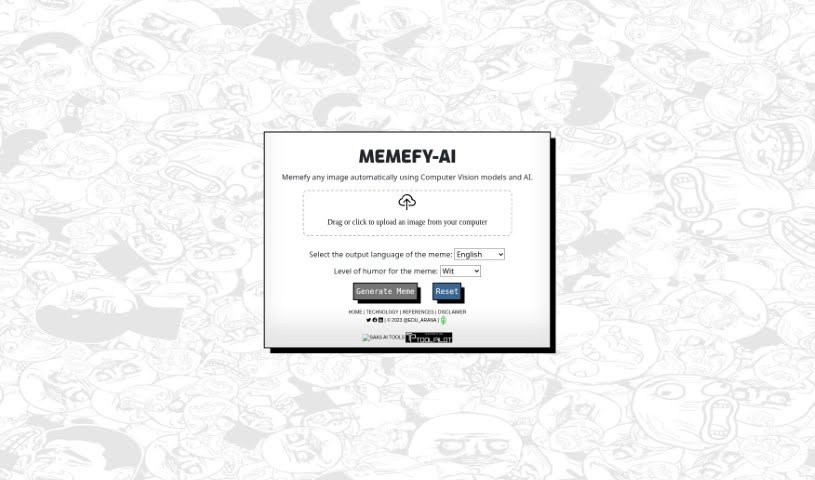
Screenshot of Memefy-AI

Memefy-AI

Learn what Memefy-AI is and how to use it effectively in (2025). Explore its features and how it compares with other Image Generators.

What is Memefy-AI?

MemefyAI is a really neat tool that uses AI, specifically ChatGPT and computer vision, to help you make memes from pictures you upload. It’s pretty straightforward: you just give it an image, and it figures out what’s in it. Then, it adds some funny quotes that fit the picture, and you can even pick the language and how humorous you want it to be. It’s designed to be super easy, so you just drag or click to upload your image, choose your settings, and the AI does all the heavy lifting – the editing, the text insertion, everything. What really sets MemefyAI apart from other meme generators is this smart use of AI and computer vision. It means the memes it creates aren’t just random; they’re visually relevant and genuinely funny because the AI understands the image. You don’t have to worry about any complicated manual editing or typing in text yourself; the AI handles it all automatically, making the whole process feel quite seamless.

Who created Memefy-AI?

MemefyAI was actually created by @edu_arana. He launched it on July 24, 2023. It’s an AI-powered tool, and as I mentioned, it really leans on ChatGPT AI and computer vision technology to create memes from uploaded images. The process is designed to be very smooth and automatic. What’s cool is that MemefyAI gives you options to really tailor the meme. You can choose the output language, which is handy if you’re communicating with people who speak different languages. Plus, you can customize the level of humor. It offers different styles, like wit, slapstick, sarcasm, parody, and even dark humor, so you can really dial in the exact kind of funny you’re going for.

What is Memefy-AI used for?

You can use MemefyAI for a bunch of things, really centered around making and sharing memes easily.

  • Generating memes from uploaded images: This is the core function. It uses Computer Vision models and AI to take your picture and turn it into a meme.
  • Customizing the humor: You can really play around with the level of humor. It offers options like wit, slapstick, sarcasm, parody, or dark humor, so you can pick the vibe that suits your meme best.
  • Selecting the output language: This is a great feature. You can choose to generate your meme in English, Spanish, French, German, or Portuguese, which is super useful for broader sharing.
  • Downloading generated memes: Once you’ve got your perfect meme, you can download it. This means you can easily use it on social media, send it through messaging apps, or just keep it in your personal collection.
  • No manual editing needed: This is a big one. You don’t need to do any manual editing or text insertion yourself. The AI models handle all those tasks automatically and seamlessly.
  • Differentiating with AI and computer vision: It uses these technologies to make meme creation more effective and engaging.
  • Direct social media use: You can use the memes you create with MemefyAI directly on your social media platforms.
  • Image analysis: The computer vision technology is key here. It analyzes your uploaded images to understand the content and visual elements, which helps in creating a relevant meme.
  • AI processing: The AI models process your uploaded images to analyze them and then generate memes with relevant quotes.
  • Using ChatGPT AI and computer vision: It combines these powerful technologies for the whole meme generation process.
  • Creating memes from uploaded images: This is the fundamental purpose.
  • Generating memes with funny quotes: It uses AI and computer vision to add those funny quotes.
  • Customizing humor levels: You can really fine-tune the humor by selecting from different styles.
  • Selecting output language: As mentioned, this is a key customization option.
  • Downloading for various uses: Whether it’s social media, messaging, or personal use, downloading is straightforward.
  • No manual editing or text insertion: You get to skip all the tedious parts.
  • Benefiting from AI and computer vision: The technology itself makes the process better.
  • Exploring humor styles: You can really experiment with wit, slapstick, sarcasm, parody, and dark humor.
  • Quick image uploading: It’s as simple as dragging or clicking to upload your images.
  • Experiencing ‘meme thinking’: It’s described as a process where ChatGPT AI and computer vision models work together to analyze images and generate memes, almost like a creative thought process.
  • Generating memes from uploaded images: Again, this is the core function.
  • Customizing humor: Fine-tuning the funny is a key feature.
  • Creating memes in different humor styles: You have a range of options to choose from.
  • Using memes for social media: It’s perfectly suited for this.
  • Automated editing and text insertion: This saves you a lot of time and effort.
  • Downloading generated memes: Making them ready for sharing.
  • Analyzing images: The computer vision part is crucial for understanding the picture.
  • Utilizing ChatGPT AI: This powers the text generation.
  • Selecting output language: A practical feature for global users.
  • Creating visually relevant and engaging memes: The AI helps ensure the memes make sense and are enjoyable.

Who is Memefy-AI for?

MemefyAI is a fantastic tool for anyone who wants to create and share memes easily and effectively. Specifically, it’s great for:

  • Content creators: If you’re making content for blogs, websites, or other platforms, memes can be a great way to engage your audience.
  • Social media managers: Keeping social media feeds fresh and engaging often involves memes, and this tool makes that process much simpler.
  • Marketers: Memes can be a powerful tool for marketing campaigns, making brands more relatable and shareable.
  • Digital artists: For those who work with visuals, MemefyAI offers a quick way to add a humorous twist to images.
  • Graphic designers: Similar to digital artists, designers can use it to quickly generate meme-style graphics or add a fun element to projects.

Essentially, if you use images and want to add a touch of humor or create shareable content, MemefyAI is designed for you.

How to use Memefy-AI?

Using MemefyAI is really quite simple, and they’ve made it very user-friendly. Here’s a step-by-step guide:

  1. Go to the MemefyAI website: The first thing you’ll do is navigate to their website.
  2. Upload an image: Once you’re there, you’ll see an area where you can upload your image. You can do this easily by dragging and dropping your chosen picture directly into the upload area, or you can simply click on the area to open your file browser and select the image.
  3. Select the output language: After uploading, you’ll have the option to choose the language you want the meme to be generated in. This is a nice touch, as it supports multiple languages like English, Spanish, French, German, and Portuguese.
  4. Choose the humor level: This is where you can really customize the fun! You can select the specific level or style of humor you want the AI to use. Options include wit, slapstick, sarcasm, parody, or even dark humor, allowing you to tailor the meme’s tone precisely.
  5. Wait for generation: Now, you just let MemefyAI do its magic. It will analyze the uploaded image using its computer vision technology. At the same time, its AI models, including ChatGPT AI, will work to generate a meme, complete with funny quotes that are relevant to the image.
  6. Download your meme: Once the meme is created and ready, you’ll be able to download it. This makes it super easy to then use it on social media platforms, send it to friends via messaging apps, or save it for your personal collection.

So, in essence, MemefyAI uses ChatGPT AI and computer vision technology to analyze your images and then add humorous quotes to create memes. You get to customize the language, the humor level, and the style, making it a really versatile and fun tool for anyone wanting to create memes.

Related AI Tools

Discover more tools in similar categories that might interest you

123RF AI Image Generator

Creative Image Generation
Learn More

Stay Updated with AI Tools

Get weekly updates on the latest AI tools, trends, and insights delivered to your inbox

Join 25,000+ AI enthusiasts. No spam, unsubscribe anytime.