What is MediScribe Pro?
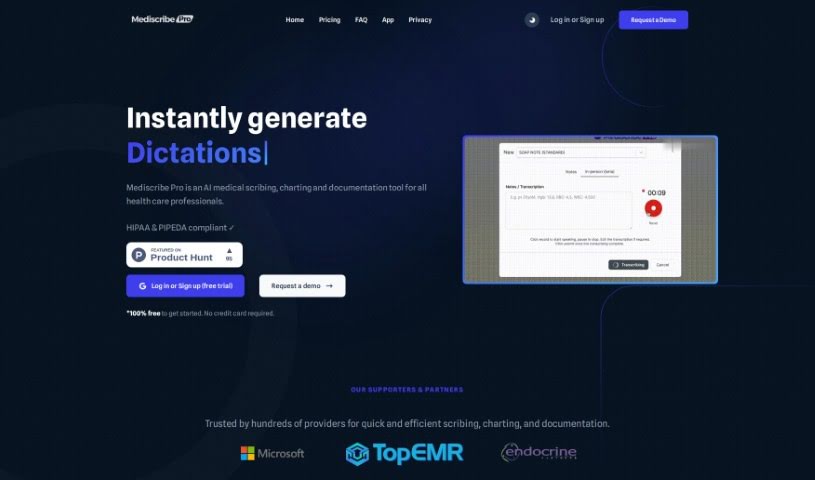
MediScribe Pro is an AI tool designed to help healthcare professionals with medical scribing, charting, and documentation. It is a digital assistant that takes on the heavy paperwork, aiming to cut down on the burnout many doctors and nurses experience. It comes in different plans, so whether you’re a solo practitioner, run a small clinic, or manage a large healthcare network, there’s likely an option for you. Its features include dictation and transcription services, help with clinical decision-making, pre-built medical templates, and even billing management. Essentially, MediScribe Pro is built to save you a ton of time. You can customize templates to fit your specific needs, and they’ve put a strong emphasis on security to keep patient data private. The main goal? To make your documentation process smoother, so you can spend more time focusing on your patients and running your clinic efficiently.
Who created MediScribe Pro?
The team behind MediScribe Pro is TopEMR. They’re all about making healthcare charting simpler and more efficient, offering plans that are easy for healthcare professionals to use. Their whole idea is to help providers save time on documentation, freeing them up to concentrate on patient care. The folks at TopEMR, including the founder and leadership, really praise the app. They highlight how fast and accurate it is, how easily you can customize it, and how smoothly it fits into a busy clinical workflow, making those documentation tasks feel much less like a chore.
What is MediScribe Pro used for?
- Scribing, Charting, and Documentation: It handles all of these efficiently.
- Reducing Clinician Burden: It significantly cuts down on administrative tasks and the fatigue that comes with them.
- Quick Note Generation: You can create notes in under 10 seconds.
- Medical Code Extraction: It automatically pulls out medical codes like ICD-10.
- Automated Referral Letters: It can generate referral letters for you.
- EMR Integration: It works seamlessly with your existing Electronic Medical Record systems.
- Medical Templates: You get access to over 100 medical templates that you can customize.
- Free Plan: There’s a free option available, though it has a monthly usage limit.
- Security & Privacy: It prioritizes keeping your data safe with encryption and compliance with standards like HIPAA and PIPEDA.
- Easy Note Management: You can easily edit, copy, and paste the notes it produces.
- Focus on Patients: It helps reduce administrative work, allowing care teams to focus more on patients instead of clinical notes.
- Personal Medical Assistant: Think of it as your personal assistant for all things medical documentation.
- Device Compatibility: It works across various devices, including smartphones, tablets, and computers.
- Workflow Integration: It integrates smoothly into your workflow without needing installation within your existing EMR.
- Charting Ease: It makes charting easier with a variety of compliant templates.
- Significant Time Savings: Users report reducing their charting time by 70-80%.
- Customizable Templates: You can customize templates using just your voice.
- Conversation Chaining: You can engage in conversations to link additional notes, letters, and referrals together.
- Technical Support: They offer technical support and assistance.
Who is MediScribe Pro for?
- Individual healthcare providers
- Small clinics
- Larger clinics
- Care centers
- Hospital networks
- Healthcare providers in general
- Clinics of all sizes
How to use MediScribe Pro?
Here’s a straightforward guide to using MediScribe Pro effectively:
- Get Set Up: First, download and install the MediScribe Pro software onto your computer. Make sure your system meets the requirements so it runs smoothly.
- Sign In: When you open the software, you’ll likely need to register or log in. If it’s your first time, create an account to unlock all the features.
- Explore the Interface: Take a moment to get familiar with how the software looks and works. You’ll usually see options for starting new documents, bringing in files, and managing what you’ve already created.
- Start a New Document: To begin, click on something like “New Document.” You’ll then enter basic details like patient info, the date, and what kind of document it is.
- Use Dictation: This is where you speak your document’s content. Just talk clearly, enunciating each word, so the transcription is accurate.
- Edit and Format: After it’s transcribed, give the text a good review for any mistakes. Make any necessary edits and format it just right for your needs.
- Save and Send: Save your document within the software so you have a copy. You can also export it in different formats, like PDF or Word, to share or keep.
- Voice Commands (If Available): Some versions might let you control the software with your voice. Learning these can really speed things up.
- Connect with Other Tools (If Applicable): If there are integration features, see how you can link MediScribe Pro with other systems you use to make your workflow even smoother.
- Keep it Updated: Make sure to install any new versions or updates the MediScribe team releases. They often include helpful improvements and new features.
By following these steps and exploring what MediScribe Pro has to offer, you can really improve your documentation process and boost your efficiency, whether you’re in a medical practice or doing transcription work.