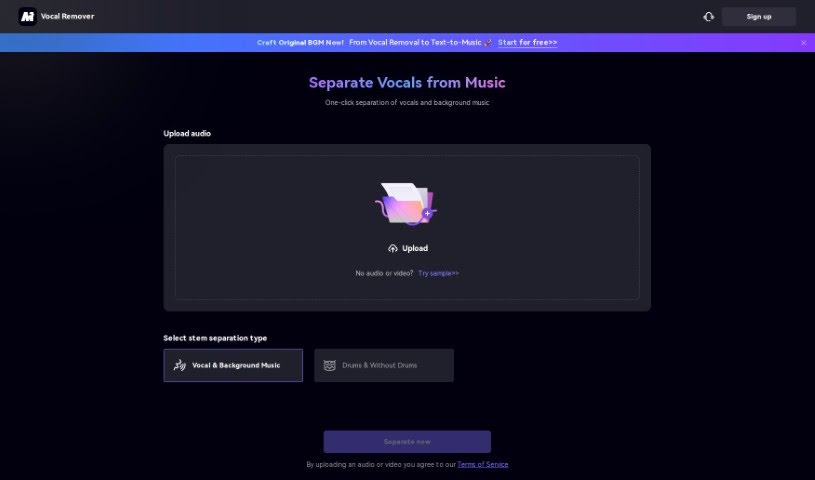
Screenshot of Media.io Vocal Remover

Media.io Vocal Remover

Discover what Media.io's Vocal Remover is and how to use it effectively in 2025. We'll explore its features and how it stacks up against other music generators.

Screenshot

What is Media.io Vocal Remover?

Media.io offers a really easy-to-use, free online tool called the AI Vocal Remover. It’s designed to help you effortlessly separate vocals from music tracks. This smart tool uses advanced artificial intelligence to precisely pull out vocals, instrumentals, and acapellas. It’s a fantastic option for DJs, musicians, and anyone who loves music and wants to create karaoke tracks or remixes. The Vocal Remover is super versatile, simple to use, and works for all sorts of music editing tasks. It really lets you extract vocals or instrumentals from any song with great accuracy. Why not explore the magic of Media.io’s Vocal Remover today and boost your music editing skills?

Who created Media.io Vocal Remover?

Media.io’s Vocal Remover is part of a platform that provides advanced AI tools for music lovers. While the specific details about the founder or the company’s background aren’t readily available in the information I have, the platform itself really shines. It’s known for its user-friendly design, its ability to handle various music editing needs, and its use of cutting-edge artificial intelligence. This tech allows for incredibly precise vocal isolation and removal, making it a standout choice.

What is Media.io Vocal Remover used for?

  • Making your own karaoke tracks
  • Creating cool remixes
  • Pulling out just the vocals from a song
  • Getting rid of vocals in a track
  • Extracting acapellas
  • General music editing
  • Improving your music editing skills
  • Turning songs into versions without vocals
  • Singing along without the original singer
  • Helping out DJs, musicians, and music fans

Who is Media.io Vocal Remover for?

  • DJs
  • Musicians
  • Music Enthusiasts

How to use Media.io Vocal Remover?

Using the Vocal Remover tool on Media.io is pretty straightforward. Just follow these simple steps:

  1. Upload Your Audio: Start by uploading the audio file you want to work with. You can drag and drop it right into the tool.
  2. Pick Your Separation Type: Decide how you want to split the audio:
    • Vocal & Background Music: This is your go-to for separating the singing from the music.
    • Drums & Without Drums: Use this if you want to isolate the drums or remove them from the track.
  3. Agree to the Terms: Before you proceed, just give the Terms of Service a quick read and agree, especially regarding uploading audio or video files.
  4. Enjoy the Features: Make the most of what the Vocal Remover offers:
    • Super Versatile: It’s perfect for making karaoke tracks and remixes.
    • It’s Free! You can remove or isolate vocals and instrumentals without paying a dime.
    • Smart AI Tech: It uses the latest artificial intelligence for really accurate results.
    • Easy to Use: The interface is simple to navigate, no matter your tech skills.
    • Great for Music Editing: You can extract vocals or instrumentals from pretty much any song.
  5. Explore and Create: Jump into the fun world of music editing! You can transform songs into amazing vocal-free versions or pull out just the singing.

Media.io’s Vocal Remover is a fantastic tool for DJs, musicians, and music fans who want to easily improve their music editing. Experience the cool factor of isolating vocals and instrumentals with this user-friendly and innovative online tool. Give your music projects a boost today with Media.io’s AI-powered Vocal Remover.

Related AI Tools

Discover more tools in similar categories that might interest you

Stay Updated with AI Tools

Get weekly updates on the latest AI tools, trends, and insights delivered to your inbox

Join 25,000+ AI enthusiasts. No spam, unsubscribe anytime.