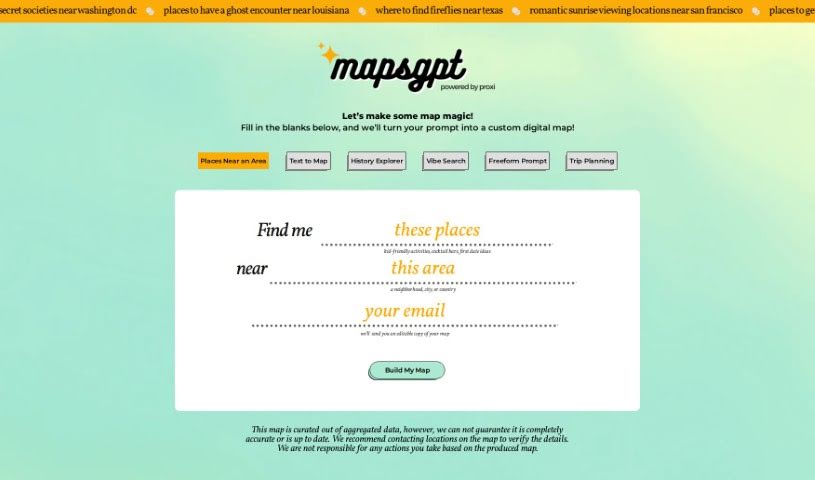
Screenshot of MapsGPT

MapsGPT

Discover what MapsGPT is and learn how to use it effectively in 2025. We'll explore its features, compare it to other trip planners, and show you how to create custom maps with AI.

Screenshot

What is MapsGPT?

MapsGPT is a really user-friendly tool that helps you create custom maps. It uses AI to map out locations based on what you type in. It is a smart assistant for map-making! It’s great for travelers planning a trip, event planners organizing venues, or educators creating visual aids. You can easily add pins, customize them, go back to maps you’ve already made, and search for places based on a certain ‘vibe’ or specific categories like coffee shops or historical sites. MapsGPT works right in your web browser, so you don’t need to install anything. It’s known for being fast, sparking creativity, offering lots of different features, and letting you share your creations easily. While you can try it out for free, there are subscription plans if you need more advanced features. It’s a strong competitor to tools like Google My Maps, offering a more automated and often simpler way to build your maps.

Who created MapsGPT?

We don’t have specific details about who founded MapsGPT. The information available doesn’t name a particular founder or founding team. What we do know is that the tool is designed for everyone, from casual users to professionals who love maps. It’s an innovative approach to creating personalized maps quickly and efficiently, all thanks to AI technology.

What is MapsGPT used for?

MapsGPT is super versatile! Here are just a few ways people use it:

  • Planning out trip itineraries step-by-step.
  • Gathering and organizing event venues.
  • Exploring historical sites and routes.
  • Finding and mapping out unique, off-the-beaten-path locations.
  • Curating the perfect spots for events.
  • Creating visual aids for educational purposes.
  • Generating maps quickly for all sorts of reasons.
  • Sharing your carefully curated maps with friends, colleagues, or clients.
  • Making personalized maps without any hassle.
  • Boosting collaboration on projects and making presentations more engaging.
  • Organizing field trips or educational outings.
  • Mapping out stops for a fun road trip.
  • Tailoring travel experiences to your specific interests.
  • Discovering those special, hidden places.
  • Putting together personalized city guides.
  • Developing themed tours for a specific interest.

Who is MapsGPT for?

  • Travelers
  • Event Planners
  • Educators

How to use MapsGPT?

Getting started with MapsGPT is pretty straightforward. Here’s a quick rundown:

  1. Getting to Know MapsGPT: First off, MapsGPT is designed to make creating custom maps super easy. Whether you’re a traveler planning an itinerary, an event planner picking venues, or an educator mapping out historical sites, it’s built to help.

  2. Key Features You’ll Love:

    • Text-to-Map Magic: Just type in a description, and MapsGPT will create a map with pins at the locations you mention. It’s like magic!
    • Make Pins Your Own: You can add, edit, and personalize the pins on your maps to make them exactly how you want them.
    • Come Back Anytime: Log in to access maps you’ve previously created, perfect for ongoing projects or revisiting past plans.
    • Search Your Way: Look for places based on a general ‘vibe’ or get specific by searching for categories like coffee shops or historical landmarks.
    • Share with Ease: You can easily share your map links and export them in various formats, which is great for collaborating or presenting your work.
  3. Where it Works: MapsGPT is a standalone tool that runs right in your web browser. You don’t need to download any special software, making it accessible from pretty much anywhere with an internet connection.

  4. Why It’s Great:

    • Speedy Results: You can turn your text descriptions into map locations really quickly.
    • Boost Your Creativity: It helps you explore unique places with very little effort.
    • Lots of Uses: It’s versatile enough for all sorts of personal and professional mapping needs.
    • Easy Sharing: Collaborating and presenting your maps is a breeze thanks to the simple sharing options.
  5. Pricing: You can try MapsGPT for free to see what it can do. If you find you need more advanced features or continuous access, they offer subscription plans.

  6. Need Help? If you get stuck or have questions, there’s detailed documentation, customer service, and a community forum where you can find assistance.

  7. How it Stacks Up: MapsGPT really shines with its automated map creation, which sets it apart from tools like Google My Maps. Other options out there include MapQuest and BatchGeo, but MapsGPT offers a unique blend of ease of use and AI-powered features.

So, to sum it all up, MapsGPT is a really handy tool that makes map-making simple with AI. It’s fast, intuitive, and offers lots of ways to create and share maps, making the whole process enjoyable and efficient.

Related AI Tools

Discover more tools in similar categories that might interest you

Stay Updated with AI Tools

Get weekly updates on the latest AI tools, trends, and insights delivered to your inbox

Join 25,000+ AI enthusiasts. No spam, unsubscribe anytime.