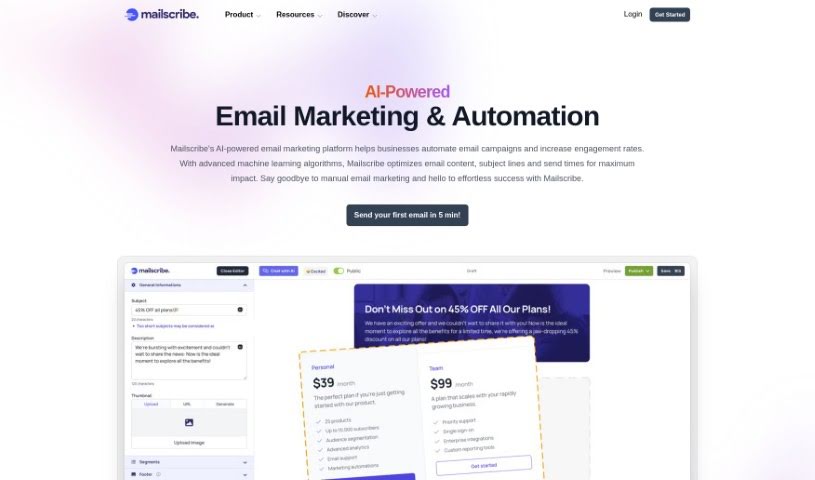
Screenshot of Mailscribe

Mailscribe

Discover what Mailscribe is and how to use it effectively in 2025. We'll explore its features and see how it stacks up against other content marketing tools.

Screenshot

What is Mailscribe?

Mailmaker, by Mailscribe, is a really neat AI-powered tool built to help you create professional and good-looking emails. It comes packed with features like AI assistance, grammar checking, language translation, an AI Painter for images, and a handy Compose feature that makes content creation a breeze. You can easily drag and drop ready-made components – think headers, footers, text blocks, buttons, and images – to design your emails quickly. Plus, Mailmaker offers customizable templates, detailed analytics, reporting tools, and even a feature to help cut down on your email marketing costs.

Want to give it a try? You can sign up for a free account and start using Mailmaker right away.

The AI Assistant within Mailmaker is pretty smart; it looks at your past email campaigns and how your audience responded. Based on that, it offers personalized tips to help you nail your subject lines, content, and even the best times to send your emails, all aimed at boosting engagement and getting more conversions.

Mailmaker gives you these ready-to-use components like headers, footers, text blocks, buttons, and images. You just drag and drop them into your email designs. This really saves you time and effort when you’re trying to put together professional-looking emails.

Got grammar worries? Mailmaker’s advanced grammar checker can help. It scans your text and suggests ways to make it better, so your emails always sound polished.

And if you need to reach a wider audience, Mailmaker’s Translate feature is a lifesaver. It accurately translates your email campaigns into different languages. This means you can connect with more people without needing to be a language expert or relying on clunky online translators.

So, to sum it up, Mailmaker by Mailscribe is an innovative AI tool that really simplifies email marketing. It offers a whole suite of features to improve how you create content, design emails, handle translations, and boost your campaign’s overall performance.

Who created Mailscribe?

Mailmaker was created by Mailscribe, and it launched on May 31, 2024. This AI-powered tool is designed to make email marketing easier, offering features like an AI assistant, grammar checker, language translator, AI Painter, and a Compose feature for creating email content. You’ll find it super convenient with its drag-and-drop functionality for designing emails, plus customizable templates, advanced analytics, and a feature that helps reduce costs. Mailscribe also offers flexible pricing, with personalized plans to fit what you need.

What is Mailscribe used for?

  • Keeping track of how your emails are doing with advanced analytics and reporting.
  • Easily building emails using a drag-and-drop interface.
  • Fixing any writing mistakes with its grammar correction feature.
  • Sending personalized emails automatically to your audience.
  • Using ready-made email parts like headers and footers.
  • Designing emails exactly how you want them with customizable options.
  • Understanding what content works best by analyzing engagement.
  • Translating your emails accurately into different languages.
  • Quickly creating content with the handy Compose feature.
  • Starting with modern, adaptable templates that you can tweak.

Who is Mailscribe for?

  • People who focus on email marketing.
  • Writers who create content.
  • Digital marketing professionals.
  • Marketing Managers.
  • Small business owners.
  • Entrepreneurs looking to grow.

How to use Mailscribe?

Here’s a simple guide to getting the most out of Mailmaker by Mailscribe:

  1. Sign Up: First things first, create a free account on the Mailmaker By Mailscribe platform. It’s your starting point for everything.
  2. AI Assistant Recommendations: Make sure to use the AI Assistant. It’s great for getting personalized suggestions based on your past email campaigns. This helps you fine-tune your subject lines, content, and even the best times to send emails to get the most engagement.
  3. Built-in Components: You’ll find handy components like headers, footers, text blocks, buttons, and images. Just drag and drop them to build professional-looking emails really efficiently.
  4. Compose Feature: Need to create content fast? The Compose feature is your go-to. It lets you easily adjust the tone, style, or length of your text without any fuss.
  5. Grammar Correction: Don’t let grammar slip-ups happen. Use the advanced grammar checker to fix any errors in your emails and make sure everything reads perfectly.
  6. Translation: Reach a global audience by translating your emails accurately with the built-in Translate feature. It’s much better than relying on unreliable online tools.
  7. AI Painter: Want eye-catching images for your emails? The AI Painter tool lets you create them quickly, so you don’t need complicated design software.
  8. Cost Reduction Tool: Keep an eye on your budget with the ‘Cost Reducer’ tool. It helps optimize your email campaigns in real time, potentially lowering your email marketing expenses.
  9. Customizable Templates: Pick from a range of modern, customizable email templates to create visually appealing emails that really match your brand’s look and feel.
  10. Analytics and Reporting: See how well your email campaigns are performing with advanced analytics and reporting. This data is key to improving your future strategies.
  11. Collaboration: If you work with a team, you can collaborate on email campaigns smoothly. Manage permissions and access rights to keep everyone on the same page.
  12. Custom Domains and Automation (Coming Soon!): Keep an eye out for future updates! We’re planning to add features like custom domains for your profile and ways to automate your email campaigns more efficiently.
  13. Pricing Plans: You can choose a free plan to get started, or opt for premium plans if you need more advanced features. These might include unlimited projects, higher email sending limits, and the ability to include unlimited team members, depending on what works best for you.

Following these steps should give you a solid guide to using Mailmaker By Mailscribe effectively for crafting great, professional emails.

Related AI Tools

Discover more tools in similar categories that might interest you

Stay Updated with AI Tools

Get weekly updates on the latest AI tools, trends, and insights delivered to your inbox

Join 25,000+ AI enthusiasts. No spam, unsubscribe anytime.