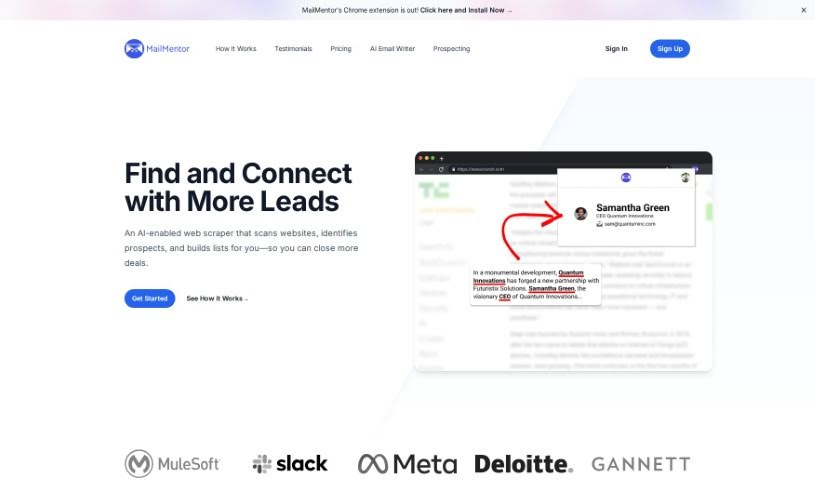
Screenshot of MailMentor

MailMentor

Discover what MailMentor is and how to use it effectively in 2025. We'll explore its features and see how it stacks up against other prospecting tools.

Screenshot

What is MailMentor?

MailMentor is a handy Chrome extension that uses AI to boost your lead generation. It is your smart assistant for finding great sales leads. It’s designed to go beyond what you’d typically find in standard databases by scanning news articles and web pages to pinpoint valuable contacts and companies. With over 4,000 users already on board, MailMentor offers some really useful features. You get an AI sequence builder to help craft email campaigns, direct email outreach through Gmail, and a sales message optimizer to make sure your communication hits the mark. It really helps streamline how you connect with potential clients. Plus, you can export unlimited contacts, search for prospects instantly right from your browser, build email sequences with AI, send emails directly from Gmail, and refine your messages for maximum impact. Basically, MailMentor is a complete package for boosting your prospecting game and finding the right leads efficiently.

Who created MailMentor?

While the specific founder isn’t mentioned in the details we have, MailMentor was created by someone focused on making sales prospecting smarter. The information available really zeroes in on what MailMentor does – its AI-powered prospecting, how it makes finding leads easier, and its user-friendly design. The software is built to help salespeople connect with quality leads by digging through news and web pages to find contacts and companies. With a user base of over 4,000, MailMentor provides tools like an AI sequence builder, direct email outreach via Gmail, and a sales message optimizer to smooth out communication and improve prospecting. Even without the founder’s name, it’s clear MailMentor is all about being practical and effective for finding and reaching out to sales leads.

What is MailMentor used for?

MailMentor is a versatile tool that helps with several key sales and outreach tasks:

  • Chrome Extension: Easily search for prospects while you browse.
  • Unlimited Contact Exports: Get all the contact data you need, without limits.
  • Prospect Browsing: Find contacts directly on websites and social media.
  • AI Sequence Builder: Create effective email campaigns automatically.
  • Gmail Email Outreach: Send emails straight from your inbox.
  • Prospect Scraping: Pull contact information from any website.
  • Availability Integration: Automatically include your Google Calendar availability in messages.
  • Case Study Integration: Add relevant case studies to your outreach messages.
  • Sales Message Optimizer: Fine-tune your messages for better engagement.
  • Webhook Integration: Connect MailMentor with other systems using webhooks.

Essentially, it helps you:

  • Build email sequences with AI.
  • Conduct email outreach directly through Gmail.
  • Scrape prospects from any website.
  • Incorporate your availability from Google Calendar.
  • Include relevant case studies.
  • Optimize your sales messages.
  • Integrate with external systems using webhooks.

Who is MailMentor for?

MailMentor is designed for anyone involved in sales and connecting with potential customers:

  • Sellers
  • Marketing professionals
  • Sales Representatives
  • Lead Generation professionals
  • Sales teams
  • Marketing teams
  • Lead generation specialists
  • Email Outreach specialists
  • Sales professionals
  • Outreach specialists

How to use MailMentor?

Here’s a simple guide to getting the most out of MailMentor:

  1. Export Contacts: You can scrape contacts using MailMentor and then export them as a CSV file. Alternatively, you can send them directly to any system you use via webhooks.
  2. Chrome Extension: Make sure to install the MailMentor extension. This lets you quickly find contact details when you’re browsing a prospect’s website or social media profile.
  3. AI Sequence Builder: Crafting email sequences is a breeze with the built-in builder. It saves you a ton of time on writing those initial emails.
  4. Gmail Email Outreach: Connect your Gmail account to MailMentor. This allows you to send outreach messages directly from your familiar email inbox.
  5. Prospect Scraping: Use the AI-powered web scraper to pull prospects and their contact information from pretty much any website you visit.
  6. Incorporate Availability: When MailMentor generates messages for specific contacts, it will automatically include your available times from your Google Calendar.
  7. Case Study Integration: If there are relevant case studies for a particular contact, the AI will automatically add them to the messages it creates.
  8. Sales Message Optimization: Want to make your sales messages even better? Use the sales message optimizer feature to fine-tune them for maximum impact.
  9. Webhook Integration: Need to connect MailMentor with other tools or workflows? Webhooks make it easy to integrate seamlessly.

By following these steps and using MailMentor’s features – like exporting contacts, building sequences, integrating with Gmail, and more – you’ll find your prospecting and outreach efforts become much more streamlined and effective.

Related AI Tools

Discover more tools in similar categories that might interest you

Stay Updated with AI Tools

Get weekly updates on the latest AI tools, trends, and insights delivered to your inbox

Join 25,000+ AI enthusiasts. No spam, unsubscribe anytime.