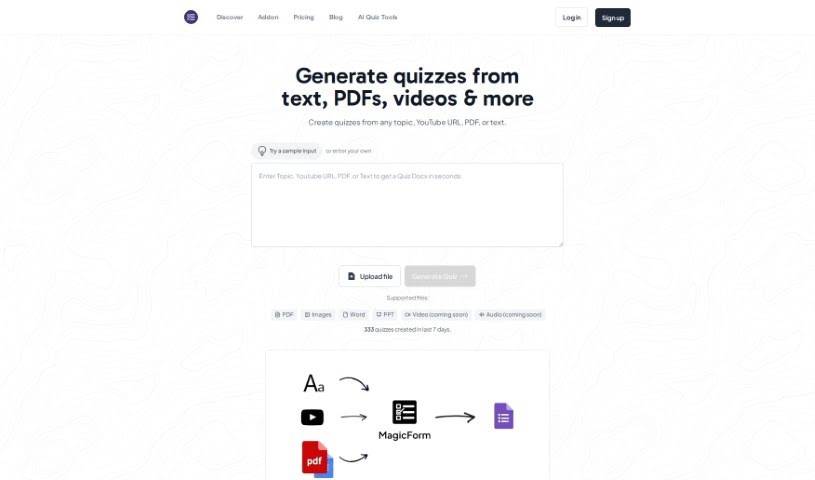
Screenshot of Magicform App

Magicform App

Discover what Magicform App is and how to use it effectively in 2025. We'll explore its features and see how it stacks up against other teacher tools.

Screenshot

What is Magicform App?

MagicForm App is a smart, AI-powered tool designed to make creating quizzes and tests a breeze. It quickly generates quiz questions from all sorts of text content – think web pages, Wikipedia articles, PDF books, and more. It’s a real time-saver for anyone who needs to create assessments efficiently, whether you’re a teacher, a student, part of an HR team, a publisher, or an edtech company. You just input your content, tell it how many questions you want and what kind, and the AI does the rest. It even supports multiple languages! Plus, there are three pricing options: Free, Pro, and Premium, each offering different features like unlimited quiz questions and varying question limits per quiz.

You can use MagicForm App on several computers without needing a credit card or a license key to get it installed. The platform is also mindful of your privacy; it doesn’t look at or share your customer data beyond what’s absolutely necessary for the tool to work. If you need help with installation, licensing, or just figuring out how to use it, support is available. Just keep in mind that help with customization or developing new features isn’t part of the package. For HR teams, a big plus is how fast they can create assessments from compliance documents – tests can be ready in under 2 minutes, which really boosts efficiency and how quickly they can respond.

Who created Magicform App?

MagicForm App was developed by MagicForm and first launched on June 17, 2024. This app really simplifies the process of creating quizzes and tests by using AI technology. It’s a great tool for teachers, students, HR teams, publishers, and really anyone who needs to generate quiz questions efficiently. MagicForm App lets you pull questions from all sorts of text sources, including web pages, Wikipedia, PDF books, DOCX files, and even YouTube video URLs. The company is serious about data privacy and doesn’t share or use customer data.

What is Magicform App used for?

MagicForm App is incredibly versatile for quiz creation:

  • From PDFs: Easily turn your PDF documents into quizzes.
  • From YouTube Videos: Create interactive assessments directly from YouTube videos.
  • From Images: You can even convert images into quiz questions.
  • High Volume: It boasts a high quiz creation rate, with over 3673 quizzes generated in the last 7 days alone.
  • Interactive Assessments: Make learning more engaging by creating interactive assessments from YouTube videos.
  • Speedy Creation: Generate quiz questions rapidly from various text sources.
  • Diverse Sources: Pull questions from places like Wikipedia, PDF books, and websites.
  • HR Compliance: Create assessments from compliance documents, perfect for HR teams.
  • Easy Installation: It’s free to install and doesn’t require a credit card or license key.
  • Multi-Device Use: You can use it on multiple computers.
  • URL Quizzes: Convert web links into quiz questions.
  • Content Transformation: It efficiently transforms content from topics, text, URLs, PDFs, and DOCX files into quiz questions using AI.
  • New Question Sets: Teachers and HR teams can create fresh question sets quickly.
  • Professional Flexibility: Offers flexible content transformation for professionals and educators.
  • Time & Cost Savings: Publishers and edtech companies can save time and money with a smaller in-house team.
  • Multiple Formats: Supports a wide range of content formats for quiz generation, including topics, plain text, URLs, YouTube video URLs, PDFs, and DOCX files.

Who is Magicform App for?

MagicForm App is designed for a broad audience, including:

  • Teachers
  • Students
  • HR teams
  • Publishers
  • Edtech Companies
  • Organizations like universities and corporations

How to use Magicform App?

Using MagicForm App is straightforward. Here’s a quick guide:

  1. Installation:
    • First, install MagicForm from the Google Workspace Marketplace.
    • Then, open a new form in Google Forms and launch MagicForm from the add-ons menu.
  2. Creating Quizzes:
    • Simply enter the topic for your quiz and the number of questions you need.
    • MagicForm’s AI will then automatically generate the quiz questions, drawing from sources like URLs, YouTube videos, PDFs, and other text content you provide.
  3. Pricing:
    • MagicForm offers different pricing tiers to suit various needs: Free, Pro, and Premium. These tiers include features like unlimited quiz questions and support for multiple languages.
  4. Support:
    • If you have any questions about installation, licensing, or how to use the app, feel free to reach out to [email protected].
  5. User Base:
    • MagicForm is a great fit for teachers, students, HR teams, publishers, and edtech companies, as it allows for swift quiz creation from a variety of text sources.
  6. Data Privacy:
    • We respect your privacy. MagicForm doesn’t share your data and only saves essential information needed for the tool to function correctly.
  7. Content Transformation:
    • MagicForm uses AI to efficiently transform content from topics, text, URLs, PDFs, and DOCX files into quiz questions.

In short, by following these simple installation steps, you can quickly create quizzes using MagicForm App across many different content formats. It’s a flexible tool that caters to a diverse user base with all sorts of needs and preferences.

Related AI Tools

Discover more tools in similar categories that might interest you

Academic Help Free Essay Generator

Education Academic Writing
Learn More

Stay Updated with AI Tools

Get weekly updates on the latest AI tools, trends, and insights delivered to your inbox

Join 25,000+ AI enthusiasts. No spam, unsubscribe anytime.