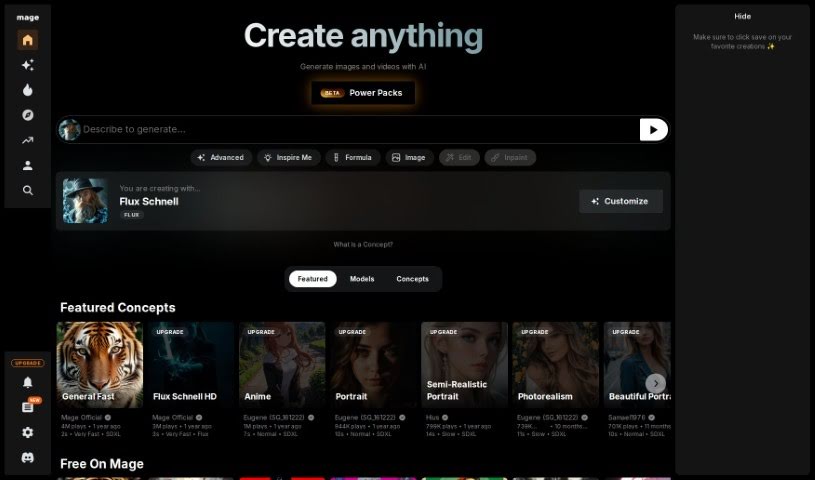
Screenshot of Mage

Mage

Discover what Mage is and how to use it effectively in 2025. We'll explore its features, compare it to other Image Generators, and show you how to get started.

Screenshot

What is Mage?

Mage is a platform that makes it easy to create unique images and videos using Stable Diffusion, and the best part? It’s completely free! It offers a straightforward interface with settings you can tweak to generate all sorts of visual styles – think art, photorealism, anime, and so much more. Mage really cares about your privacy, too. You can keep your creations completely confidential using a handy ‘Create Privately’ feature. Plus, you have the freedom to adjust things like control nets, aspect ratios, and other parameters to get exactly the look you want. And don’t worry about limits; you can generate as much content as you like with Mage.

Who created Mage?

Mage was developed by Mage.space, an innovative company focused on helping people express their creativity by generating visual content with advanced AI models. This platform gives you customizable settings, keeps your work private, and offers a variety of artistic styles to play with. Mage.space is committed to user privacy and also provides more advanced features for professionals through their ‘Pro’ upgrades. What really makes Mage stand out is how easy it is to use, along with the huge creative possibilities it opens up for making one-of-a-kind images and videos.

What is Mage used for?

  • Keeping your creations private
  • A focus on user privacy
  • Creating art with AI
  • Using customizable control networks
  • Fine-tuning your creations
  • Selecting different aspect ratios
  • Unlimited Stable Diffusion generation
  • Access to top AI models
  • Completely free to use
  • Highly customizable options

How to use Mage?

Here’s a simple guide to using Mage:

  1. Head over to Mage.space: Start by visiting Mage.space. It’s a platform built for creating unique visuals using advanced AI models, and it won’t cost you anything.
  2. Explore the Interface: You’ll find a user-friendly interface that lets you adjust settings to match your creative vision. It’s designed to be easy for everyone.
  3. Create Your Art: Dive into AI-powered art creation. You can generate visuals in styles ranging from classic art to anime, all powered by top AI models.
  4. Customize Your Images: Take control of your image’s structure, poses, and depth using specialized networks. You can also pick from various aspect ratios to get the perfect composition.
  5. Refine Your Results: Make your images even better with options like adjusting the guidance scale or using seed refiner modes to denoise and perfect the final output.
  6. Protect Your Privacy: If you want to keep your work confidential, just use the ‘Create Privately’ feature. Your creations will stay private.
  7. Consider Pro Upgrades: For professionals who need even more control, Mage offers ‘Pro’ upgrades that include additional control networks.
  8. Create Without Limits: You get unlimited Stable Diffusion, meaning you can generate as many unique images and videos as you want without any usage restrictions.
  9. Check the FAQs: If you have more questions about Mage, the types of visuals you can create, how privacy is protected, or any limitations, the website’s FAQs section is a great resource.
  10. It’s Free! Mage is completely free to use. This makes advanced content creation accessible and effortless for everyone.

By following these steps, you can easily and securely use Mage’s innovative features to create a wide variety of visually appealing content. Have fun exploring your creativity with Mage!

Related AI Tools

Discover more tools in similar categories that might interest you

123RF AI Image Generator

Creative Image Generation
Learn More

Stay Updated with AI Tools

Get weekly updates on the latest AI tools, trends, and insights delivered to your inbox

Join 25,000+ AI enthusiasts. No spam, unsubscribe anytime.