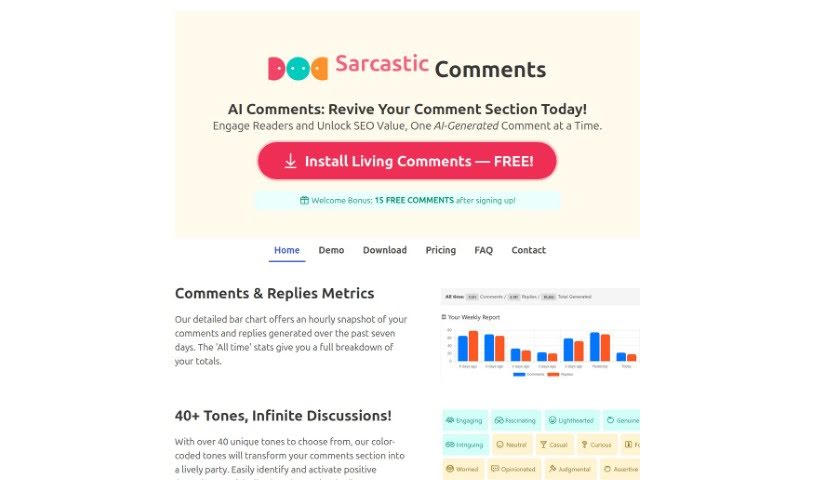
Screenshot of Living Comments

Living Comments

Discover what Living Comments is and how to use it effectively in 2025. We'll dive into its features and see how it stacks up against other blogging tools.

Screenshot

What is Living Comments?

Living Comments is a smart WordPress plugin that uses AI to turn your blog’s comment sections into lively, engaging communities. It’s designed to really bring your comments back to life, get your readers involved, and tap into the SEO benefits that comments can offer. It is a way to revitalize your blog’s discussions, keep readers hooked, and make the most of the SEO power hidden in your comment sections. The plugin comes packed with features like AI-generated comments, engaging replies with a variety of tones, a boost for your SEO, easy-to-understand analytics, and solid moderation tools to help build a positive space for everyone.

Basically, Living Comments is a neat tool that uses AI to create comments and replies. This helps spark more interaction on your blog, keeps users more engaged, and generally improves your website’s SEO performance.

Who created Living Comments?

Living Comments first came out in January 2024. The main idea was to take those quiet, empty comment sections and turn them into active communities using AI-generated comments and replies. It was started by someone (or a group) who wanted to boost user engagement and SEO for WordPress sites by creating more dynamic interactions.

What is Living Comments used for?

  • Breathing new life into your blog’s comment section.
  • Getting your readers more involved and talking.
  • Unlocking the SEO potential that comments can provide.
  • Creating interesting comments that feel natural.
  • Guiding the conversation with different engagement modes.
  • Scheduling comments and controlling how long they are.
  • Boosting your SEO by generating comments that fit the context of your posts.
  • Giving you detailed analytics on how your comments are performing.
  • Supporting interactions in up to 35 different languages.
  • Helping you optimize user engagement.
  • Making sure you can tap into the SEO value comments offer.
  • Controlling the flow of conversations using various engagement modes.
  • Offering options to schedule comments and set their length.
  • Providing over 40 unique tones to match different kinds of discussions.
  • Connecting with a wider audience by supporting 35 languages.
  • Keeping your community safe and secure with content moderation tools.

Who is Living Comments for?

  • Anyone who blogs.
  • People who create content.
  • Website owners looking to boost engagement.

How to use Living Comments?

Using Living Comments is pretty straightforward. Just follow these simple steps:

  1. Get Living Comments: You can install the plugin on your WordPress site easily. Signing up is free, too.
  2. Adjust Preferences: Take a moment to customize things like the tones used for comments, your moderation settings, and the engagement mode that best suits your needs.
  3. Watch Engagement Rise: Once you’ve got your settings just right, simply click ‘Run.’ The AI will then start generating comments that naturally boost interaction and improve your blog posts’ SEO.

Beyond these main steps, you can also manage comment moderation, have the plugin engage with guest or dummy users, and review feedback reports. The plugin offers different pricing plans depending on how many comments you need each month, from a free option to custom plans for various website sizes. Plus, Living Comments gives you detailed metrics on comments and replies, offers over 40 tone choices, generates comments in 35 languages, includes 5 engagement modes, and lets you set comment scheduling and word length to really maximize engagement.

Give your blog a boost with the lively discussions that Living Comments makes possible, helping to increase both audience engagement and your site’s SEO visibility. To get started, just download the plugin and explore all the features designed to make your blog community richer.

Related AI Tools

Discover more tools in similar categories that might interest you

Stay Updated with AI Tools

Get weekly updates on the latest AI tools, trends, and insights delivered to your inbox

Join 25,000+ AI enthusiasts. No spam, unsubscribe anytime.