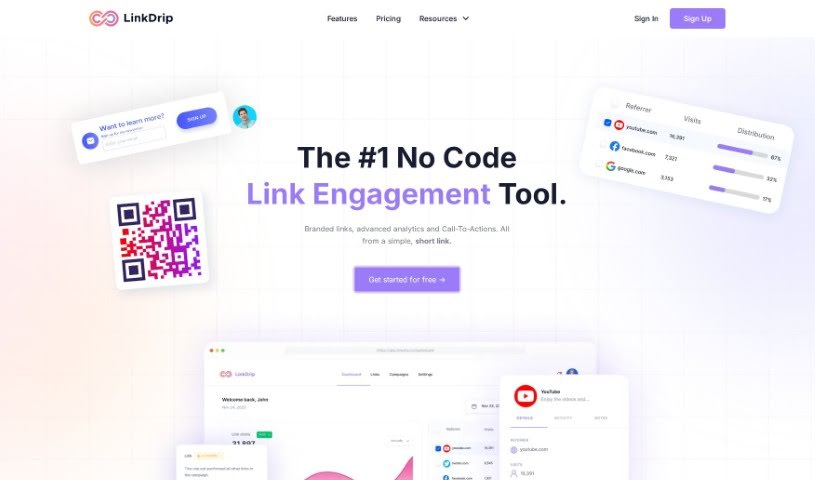
Screenshot of LinkDrip

LinkDrip

Discover LinkDrip in 2025! Learn what this powerful tool does, explore its features for optimizing link engagement, and see how it stacks up against other digital marketing tools. We'll cover everything from analytics to retargeting.

Screenshot

What is LinkDrip?

LinkDrip is a really handy no-code tool designed to help you get more out of your links. It is a way to make every click count. It offers a bunch of features to help you track, analyze, and improve how people interact with your links. You get advanced analytics to see exactly how your links are performing, plus you can run A/B tests to figure out what works best. It also lets you do ad retargeting on popular social media platforms like Facebook and Google, so you can reach people again who clicked your links. Need to connect with people offline? LinkDrip can generate custom QR codes for that. You can also tweak how your links look when shared, customizing things like images, titles, and descriptions. For better organization, you can use UTM tags, and if you’re looking for more advanced control, LinkDrip supports custom domains and scripts to tailor link behavior precisely. Oh, and if you sign up early, there’s a special offer: a 30% lifetime discount! It’s a great way to turn your simple links into a real engine for getting more conversions.

Who created LinkDrip?

LinkDrip was actually created by Daniel Woods. He’s also the VP of Marketing over at Facebook. The company itself focuses on providing advanced analytics and tools that help you optimize how people engage with your links. They offer features like real-time analytics, A/B testing, ad retargeting, and even QR code branding. Plus, they’re offering a 30% lifetime discount for those who sign up early.

What is LinkDrip used for?

LinkDrip is a versatile tool that helps you with several key marketing tasks:

  • Advanced Analytics: You can keep a close eye on how your links are performing in real-time. It breaks down the data by things like who referred the click, what device they used, and even where they were located.
  • Ad Retargeting: Ever want to bring people back who clicked your link but didn’t convert? LinkDrip lets you do just that by serving them targeted ads on platforms like Facebook, LinkedIn, YouTube, and Google.
  • QR Codes: If you’re looking to connect with your audience offline, you can create branded QR codes. These codes can direct people straight to your digital content.
  • Call-To-Action Overlays: You can add custom overlays to your destination pages. These are great for prompting users to take a specific action, like signing up or making a purchase, which really helps boost conversions.
  • Link Rotation and A/B Testing: LinkDrip can automatically rotate through different links, and you can set up A/B tests. This helps you figure out which links are most effective at grabbing user attention and driving engagement.
  • Custom Domains: Want your links to look more professional and branded? You can use your own custom domains.
  • Custom Scripts: For those who need more specific functionality, you can add custom JavaScript to your links.
  • UTM Tracking: Keep your analytics neat and tidy by including UTM tags in your links.
  • LinkDrip Pixel: You can add the LinkDrip Pixel to your website to track custom events, giving you even more insight.
  • Build UTM Templates: Save time by creating and reusing UTM templates for all your campaigns.

Who is LinkDrip for?

LinkDrip is a great tool for a variety of users, including:

  • Individual content creators
  • Professional marketers
  • Businesses of all sizes
  • Marketing agencies

How to use LinkDrip?

To really get the most out of LinkDrip, here’s a simple step-by-step guide:

  1. Sign Up: First things first, sign up for LinkDrip. You’ll get a 7-day free trial to play around with everything. Don’t worry, you can cancel anytime during that trial period if it’s not the right fit.
  2. Create Workspaces: LinkDrip lets you set up workspaces, which is super useful if you’re working with a team. It makes collaboration much smoother.
  3. Payment Handling: When it comes time to subscribe, LinkDrip uses Stripe, a secure and widely used payment processor. You can use various credit or debit cards for your subscription.
  4. Feature Overview: Take some time to explore all the powerful features LinkDrip offers. This includes things like advanced analytics to see how your links are doing, ad retargeting on social media, QR codes to connect with offline audiences, call-to-action overlays to encourage user action, and link rotation with A/B testing to ensure you’re always sending users to the most effective place.
  5. Customize Links: Make your links really stand out! You can customize the metadata, like the image, title, and description that appear when you share them on social media. This helps grab attention.
  6. UTM Tags: To keep your analytics organized and make tracking easier, be sure to use UTM tags within your links.
  7. Advanced Use Cases: If you want to go deeper, LinkDrip has advanced features like custom domains, custom scripts for unique link behaviors, and the LinkDrip Pixel for tracking specific events on your website.
  8. Pricing Plans: LinkDrip offers different pricing plans to suit your needs. You can choose to pay monthly or yearly, and often, opting for a yearly subscription can save you money.

By following these steps, you’ll be well on your way to using LinkDrip’s full potential to really optimize how your links perform and drive more conversions.

Related AI Tools

Discover more tools in similar categories that might interest you

Stay Updated with AI Tools

Get weekly updates on the latest AI tools, trends, and insights delivered to your inbox

Join 25,000+ AI enthusiasts. No spam, unsubscribe anytime.