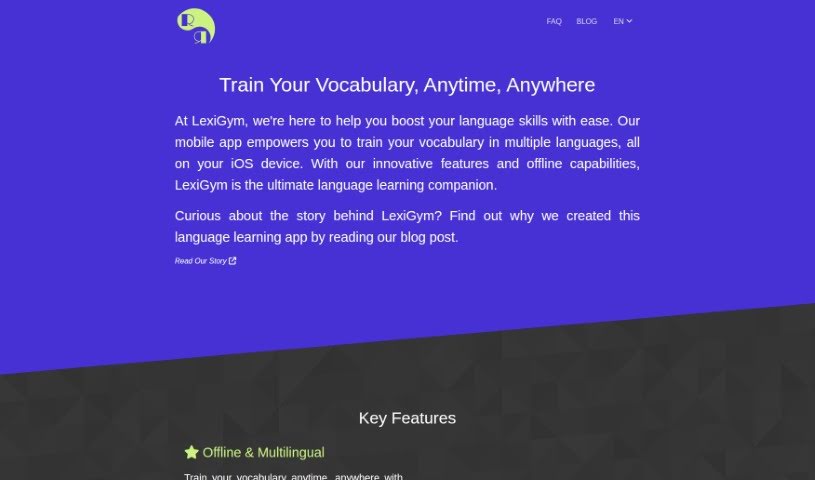
Screenshot of Lexigym

Lexigym

Discover LexiGym in 2025! Learn what this language learning tool is, how to use its features effectively, and how it stacks up against other language learning apps.

Screenshot

What is LexiGym?

LexiGym is a really neat language learning platform designed to make your learning journey smoother and more effective. It keeps track of your progress in real-time, lets you easily build your own dictionaries, and offers a flexible approach to learning languages without breaking the bank. What’s cool is that its dictionary entries are packed with context, and it cleverly avoids repeating things you already know, which really speeds up your training. It supports a bunch of different languages, and you can even learn offline. Plus, you can grab ready-made dictionaries from the LexiGym Dictionary Hub. Need a dictionary fast? LexiGym GPT can whip one up for you in no time, using smart algorithms that adjust to how quickly you learn. You can try it out for free by watching ads, or if you prefer an ad-free experience, there’s a premium subscription available.

LexiGym is a great starting point for anyone new to learning languages. It’s got an easy-to-use interface, makes creating dictionaries a breeze, and its adaptive learning algorithms really help you along. But it’s not just for beginners! Experienced language learners, or polyglots, will also find it super useful with advanced features like LexiGym GPT and support for many languages. You can really see how you’re doing with detailed training stats, and you can even share your progress across all your dictionaries. Switching between languages is a snap, and there are plenty of exercises to boost your vocabulary.

Who created Lexigym?

LexiGym was developed by a founder whose name isn’t publicly shared, and it first launched on December 21, 2023. The company focuses on providing language learning solutions that are flexible with cost. You can access all the training features for free, and there’s no mandatory subscription. If you’re happy to watch ads, you get free training; otherwise, a premium subscription offers an uninterrupted learning experience. LexiGym also supports learning without an internet connection, works with multiple languages, lets you create your own dictionaries, and uses smart algorithms that adjust to your personal learning speed.

What is LexiGym used for?

Here’s a quick rundown of what you can do with LexiGym:

  • Keep tabs on your progress as you learn, right as it happens.
  • Easily put together your own word lists and dictionaries.
  • Learn languages in a way that fits your budget.
  • Get dictionary entries that give you plenty of context.
  • Generate dictionaries super quickly.
  • Navigate the platform with a smooth, easy-to-use interface.
  • It’s a flexible tool that adapts to your learning style.
  • Build and use your own personal dictionaries.
  • Learn even when you don’t have internet access.
  • Share your learning progress across all the dictionaries you use.
  • Avoids teaching you words you already know, making training more efficient.
  • Offers tools specifically for creating your own dictionaries.
  • Quickly find and use dictionaries that others have already made.

Who is LexiGym for?

LexiGym is a great tool for anyone involved with languages, including:

  • People just starting out with language learning
  • Translators who need to expand their vocabulary
  • Interpreters who require quick recall of terms
  • Polyglots who enjoy mastering multiple languages
  • Language Teachers looking for effective teaching aids
  • Linguists interested in language structure and acquisition

How to use LexiGym?

To get the most out of LexiGym, here’s a simple step-by-step guide:

  1. Pick the Language You Want to Learn:
    • Inside the app, just select the language you’re aiming to learn from the list of supported languages.
  2. Create or Load a Dictionary:
    • You can use the app’s built-in feature to create your very own dictionary, or if you prefer, you can even use Google Sheets to build it.
  3. Explore Ready-to-Use Dictionaries:
    • Check out the LexiGym Dictionary Hub. It’s full of pre-made dictionaries designed for all sorts of learning goals.
  4. Dive into Training Exercises:
    • Jump into the exercises the platform offers. They’re designed to really help you build your vocabulary and improve your language skills.
  5. Use LexiGym GPT for Quick Dictionary Creation:
    • Take advantage of LexiGym’s smart GPT feature. It uses machine learning models to help you create dictionaries rich with context, and it does it really fast.
  6. Track Your Progress:
    • Keep an eye on how you’re doing. LexiGym gives you detailed training statistics so you can see your progress clearly.
  7. Benefit from Adaptive Algorithms:
    • Enjoy a learning experience that feels personalized. The platform’s intelligent algorithms learn your pace and adjust the training content just for you.
  8. Enjoy Multilingual Support:
    • The platform supports many languages, making it super easy to switch between them – it only takes a couple of clicks!
  9. Consider Your Cost Options:
    • If you want to learn without any interruptions, a premium subscription is a great choice. Or, you can stick with the free version, which is supported by ads.

By following these steps, you’ll be well on your way to making the most of LexiGym’s features and really boosting your language learning journey in an efficient and effective way.

Related AI Tools

Discover more tools in similar categories that might interest you

Academic Help Free Essay Generator

Education Academic Writing
Learn More

Stay Updated with AI Tools

Get weekly updates on the latest AI tools, trends, and insights delivered to your inbox

Join 25,000+ AI enthusiasts. No spam, unsubscribe anytime.