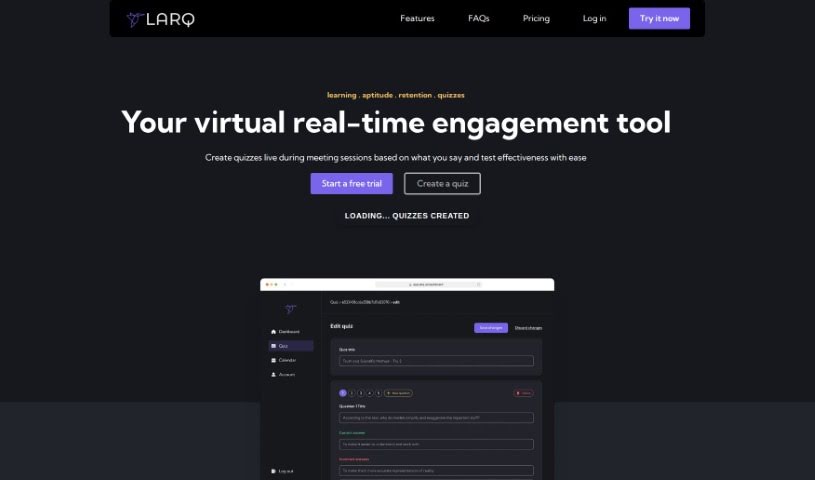
Screenshot of Larq

Larq

Discover what Larq is and how to use it for real-time communication experiences and automated quizzes in 2025. We'll cover its features, compare it to other tools, and explore its applications in education and training.

Screenshot

What is Larq?

Larq is a really neat tool designed to make real-time communication experiences more engaging. It is a way to create quizzes right from your live meetings, which automatically check how well everyone’s grasping the material. The whole process is pretty straightforward: you host your remote sessions, then Larq helps you build automated quizzes using the video and text from those sessions. It then analyzes the results super quickly and accurately.

Larq offers some great features, like generating quizzes directly from your meetings, working smoothly with YouTube videos and PDF files, and providing smart assessments for those quizzes. It also gives you detailed performance analysis for each participant and can adapt to how well your audience is understanding things. It’s a fantastic fit for all sorts of situations, whether you’re teaching in higher education, running employee training programs, building online courses, or just need a scalable way to evaluate quizzes.

However, it’s not perfect. Some things to keep in mind are that Larq’s effectiveness really depends on the quality of the original content source. It also doesn’t currently include interactive learning elements beyond the quizzes themselves, and you can’t create custom quizzes from scratch. Plus, its mobile app support is a bit limited.

Who created Larq?

Larq, the company behind this service for boosting real-time communication with quizzes, was actually created by Andrews Dawson. The platform first launched on December 6, 2023. Essentially, Larq lets you host remote sessions, automatically build quizzes from what happens in those live video sessions, and then really nail down how effective those quizzes are.

What is Larq used for?

Here’s a look at what Larq can do:

  • It works with PDF files, making it easy to integrate existing documents.
  • You can generate quizzes directly from your meetings, capturing key information.
  • It’s compatible with YouTube videos, so you can quiz on video content too.
  • Larq provides analytical quiz assessment, giving you deeper insights.
  • You get performance analysis for participants, showing individual progress.
  • The system adapts to user understanding, tailoring the experience.
  • It really enhances remote learning experiences.
  • It’s ideal for higher education settings.
  • It’s very useful for employee training programs.
  • Larq suits online course creation perfectly.
  • You can create quizzes from meetings, as mentioned, which is a core function.
  • It offers scalable quiz evaluation, meaning it can handle many participants.

Specific Use Cases:

  • Universities: Make sure all your remote students are really learning and understanding the material.
  • Employers: Easily test the understanding of everyone in your meetings to gauge comprehension.
  • Online Courses: Create and test your online learners efficiently and at scale.
  • Content Conversion: It helps convert pre-existing content into quiz formats.
  • Interactive Learning: It facilitates more interactive learning experiences.
  • Meeting-Based Quizzes: Again, generating quizzes directly from meetings is a key use.
  • University Focus: Ensure all remote students are learning well.
  • Employer Focus: Test the understanding from all your meetings.
  • Online Course Focus: Create and test online learners at scale.

Who is Larq for?

Larq is particularly useful for:

  • Universities looking to improve remote student engagement.
  • Employers wanting to assess meeting comprehension.
  • Online courses aiming for effective learner assessment.

How to use Larq?

Using Larq is a pretty straightforward process. Here’s a breakdown of the steps:

  1. Host Remote Sessions: Start by hosting your remote sessions. This is your chance to share knowledge with people anywhere in the world, in real-time.
  2. Create Automated Quizzes: Next, you’ll use Larq to automatically build quizzes. These quizzes are based on the content from your live meetings – think text, YouTube videos, and PDFs. It’s a simple way to turn your sessions into interactive quizzes.
  3. Analyze Effectiveness: Once the quizzes are done, you can evaluate how effective they were. Larq provides detailed results and analytics on how participants performed, giving you valuable insights into what they understood and remembered.
  4. Utilize Various Settings: Larq is designed to be flexible. It works well in different environments, like universities, for employers analyzing meetings, and for online courses. This makes it a versatile tool for all sorts of learning scenarios.
  5. Enjoy Interactive Learning: Take advantage of features like analytical quiz assessment, participant performance analysis, and scalable quiz evaluation. These really help enhance remote learning, employee training, and the creation of online courses.
  6. Pros and Cons: As we’ve touched on, Larq offers some great benefits, such as making learning more interactive, providing content analysis capabilities, and simplifying remote session hosting. On the flip side, remember its limitations: it relies on the quality of your original content source, and it doesn’t offer custom quiz creation or extensive mobile app support.

By following these steps, you can really make the most of Larq to create engaging quizzes and accurately assess learning outcomes, whether that’s in an educational setting or a professional one.

Related AI Tools

Discover more tools in similar categories that might interest you

Academic Help Free Essay Generator

Education Academic Writing
Learn More

Stay Updated with AI Tools

Get weekly updates on the latest AI tools, trends, and insights delivered to your inbox

Join 25,000+ AI enthusiasts. No spam, unsubscribe anytime.