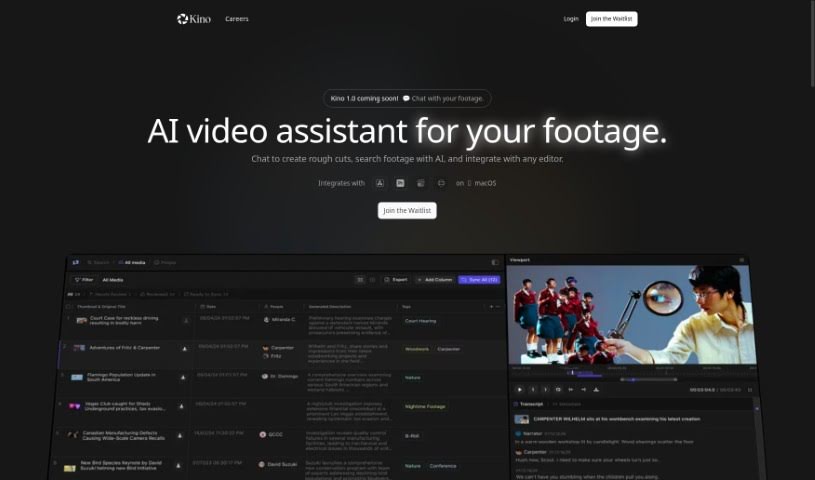
Screenshot of Kino AI

Kino AI

Discover what Kino AI is and how to use it effectively in 2025. Explore its features for filmmakers and see how it stacks up against other tools.

Screenshot

What is Kino AI?

Kino AI is your go-to assistant for filmmaking, specifically designed to help you keep all your media assets organized and managed. It really acts like a combination of an assistant editor, a digital imaging technician, and a script supervisor, all rolled into one handy tool. Kino AI offers a bunch of useful features to make your life easier. For starters, it can automatically back up your footage from SD cards. Plus, it works seamlessly with external hard drives and cloud storage, and it can organize your files into custom folder structures. You also get automatic metadata labeling, AI transcription, sound artifact removal, and it can even generate proxy files, among other things. It’s built for pretty much anyone involved in filmmaking, whether you’re a documentarian, a short film director, a commercial editor, a content creator, a music video director, working with TV studios, editing features, shooting events, making promos, or even if you’re a film student.

If you’re keen to get early access to Kino AI, you can head straight to their website and join the waitlist. The fact that Kino AI is currently in private beta means it’s being tested by a select group of users. This is usually to iron out any bugs and fine-tune everything before it’s released to everyone.

Who created Kino AI?

Kino was developed by a company focused on providing an AI assistant that helps track footage metadata and organize media assets. This company launched Kino on March 2, 2023. The idea behind Kino was to create something that functions like an assistant editor, a digital imaging technician, and a script supervisor all in one. Its main goal is to help various filmmakers organize and manage their video content much more efficiently.

What is Kino AI used for?

  • Automatic backup: It backs up your files straight from SD cards.
  • File organization: It can reorganize your files into folders that you set up.
  • Footage analysis: It watches and listens to your footage to help you spot important moments.
  • Script matching: It can match scenes directly to your scripts.
  • Metadata population: It fills in metadata into a digital codebook.
  • Audio-visual sync: It syncs up your audio and video clips.
  • Sound cleanup: It helps remove unwanted sound artifacts.
  • Proxy creation: It generates proxy files for easier editing.
  • Workflow automation: It automates key parts of your workflow.
  • Early access sign-ups: You can sign up to get in early.

How to use Kino AI?

To get the most out of Kino, here’s a step-by-step guide:

  1. Backup and Sync: Just plug in your SD cards, and Kino will automatically back up your files. You can choose to save them to external hard drives or your cloud storage.
  2. File Organization: Kino can then rearrange your files into a folder structure that you prefer, making everything much easier to find and manage.
  3. AI Transcription: Kino actually watches and listens to your footage. It automatically names files based on the slate information and even marks moments that seem interesting, so you can find them quickly.
  4. Metadata Labeling: It populates all this metadata into a digital codebook. This codebook works with any editing software, which really helps different departments stay on the same page.
  5. Audio-Visual Sync: You’ll benefit from Kino automatically syncing your audio and video footage, which really helps improve the overall quality of your project.
  6. Sound Artifact Removal: Kino can also help remove those annoying sound artifacts, keeping your audio nice and clear.
  7. Proxy File Generation: Need proxy files? Kino makes it super easy through its file browser, simplifying your editing process.
  8. Tailored Features: Kino has features designed for all sorts of filmmakers, so it’s really adaptable to different ways of editing.

By signing up for a Kino demo, you can see firsthand how these features can make your filmmaking process more efficient and smoother. You can also sign up for early access on the Kino website to try out these benefits before the public launch. It’s designed to fit right into your current workflow, letting you integrate its AI tools without a hitch for better productivity and creativity. Remember, Kino is really versatile and can be a great help to everyone from documentarians to film students, making it a valuable tool in the industry.

If you want to know more about the hardware and software you’ll need, or if you’re curious about how Kino can really boost your workflow, checking out the private beta is a great way to get a feel for what it can do and where its limits might be.

Related AI Tools

Discover more tools in similar categories that might interest you

Stay Updated with AI Tools

Get weekly updates on the latest AI tools, trends, and insights delivered to your inbox

Join 25,000+ AI enthusiasts. No spam, unsubscribe anytime.