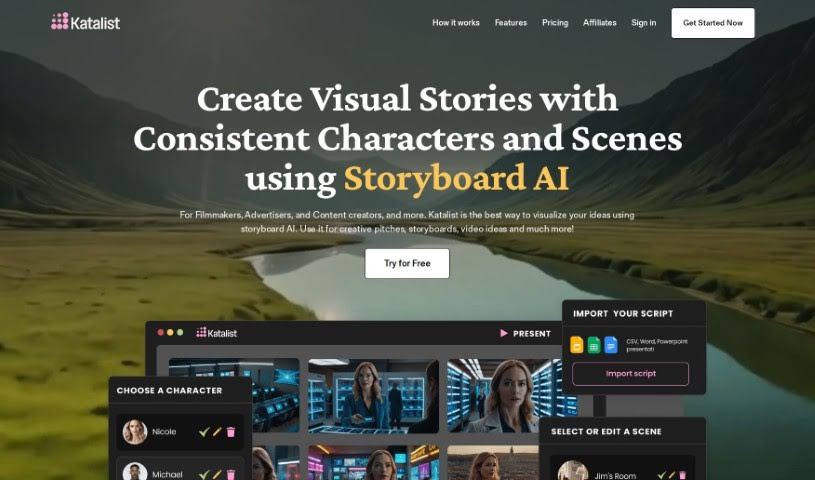
Screenshot of Katalist AI

Katalist AI

Discover what Katalist AI is and how to use it effectively in 2025. We'll explore its features and see how it stacks up against other filmmaking tools.

Screenshot

What is Katalist AI?

Katalist AI is a really neat platform that uses Storyboard AI and AI storytelling to help you whip up storyboards super fast. It basically takes your stories and turns them into visuals automatically, making it way easier for you to develop and polish your ideas visually. Anyone can use Katalist AI to create compelling visual stories, and you get full control over things like camera angles, character poses, and how the shots are composed – no AI experience needed! Plus, it offers tons of ways to customize the visuals, so you can really make each shot match your unique creative vision. Oh, and it can even generate storyboards in just seconds, which really helps keep things consistent, affordable, and efficient throughout your creative process.

Katalist AI really simplifies making storyboards, making it a fantastic tool for filmmakers, animators, content creators, teachers, and anyone who loves visual storytelling. While AI technology is a huge help in storytelling, automating tasks and generating creative content, Katalist AI is built to support and boost human storytellers, not replace them. After all, human emotions, gut feelings, and personal experiences are what make stories truly resonate, and that unique human touch is something AI just can’t replicate. Katalist AI is all about saving you time, sparking your creativity, and smoothing out the creative workflow using the power of AI storytelling. It’s a great way to balance automation with that essential human creativity in your storytelling projects.

Who created Katalist AI?

The Katalist AI Storytelling Studio was brought to life by a team of creative folks and builders. Key figures include Blaz, who’s really into open source and new tech, and Luka, a well-known content creator with a knack for artificial intelligence and multimedia production. The whole team behind Katalist is focused on giving all storytellers the power to express themselves visually without limits, all through a platform that makes creating storyboards simple with AI technology.

What is Katalist AI used for?

  • Movies: Generate storyboards for films in just a few minutes.
  • Visualize Concepts: Bring your ideas to life visually.
  • Present Scripts: Make your scripts more engaging by showing them visually.
  • Filming Plans: Organize your filming days more efficiently.
  • AI Images: Boost your content with images created by AI.
  • Simplify Production: Make the whole content production process easier.
  • Impactful Pitches: Create custom imagery that makes your pitches stand out.
  • Ad Creatives: Design ads effortlessly.
  • Pre-production: Smooth out your pre-production planning.
  • Script to Storyboard: Turn your scripts into dynamic storyboards.

Who is Katalist AI for?

  • Filmmakers
  • Animators
  • Content creators
  • Educators

How to use Katalist AI?

Ready to dive into Katalist AI Storytelling Studio? Here’s a simple guide to get you started:

  1. Get Your Script In: You can either upload your script directly or just copy and paste it from wherever it’s stored, like a Word doc, PowerPoint, or a CSV file.
  2. Let AI Create the Storyboard: Katalist will automatically break down your script into individual shots and generate visuals based on what your script says.
  3. Make It Yours: Now for the fun part! You can tweak all sorts of things like the framing, camera angle, how characters are posed, the overall composition, add props, and adjust scenes to perfectly match your creative vision for each shot.
  4. Share or Download: Once you’re happy, you can create instant presentations to share with others, or download your work as a ZIP file, a PowerPoint presentation, or even a video slideshow.
  5. Boost Your Content Creation: Use these AI-generated visuals to make producing content much simpler, create pitches that really land, plan your filming days more effectively, and make your script presentations shine.
  6. Sign Up and Explore: Head over to the Katalist website, register for an account, pick the plan that works for you, and start creating those engaging visual stories with ease.
  7. Try it Free: You can take advantage of a 7-day free trial to check out all the features and see firsthand how Katalist can really improve your storytelling process.
  8. Join the Conversation: Connect with the Katalist community on Discord. It’s a great place to get more tips and insights on how to get the most out of the platform.

These steps should give you a clear path to using Katalist AI Storytelling Studio effectively to create visually compelling and impactful stories.

Related AI Tools

Discover more tools in similar categories that might interest you

Stay Updated with AI Tools

Get weekly updates on the latest AI tools, trends, and insights delivered to your inbox

Join 25,000+ AI enthusiasts. No spam, unsubscribe anytime.