What is Jobscan?
Jobscan is a really helpful tool for job seekers. Its main goal is to help you get noticed for the jobs you want by making your resumes and cover letters a perfect fit for each specific application. It uses smart technology, like AI and machine learning, to look at your application documents. Then, it gives you instant feedback on how well they match a job description. It also offers tips to make sure your resume gets past those tricky applicant tracking systems (ATS).
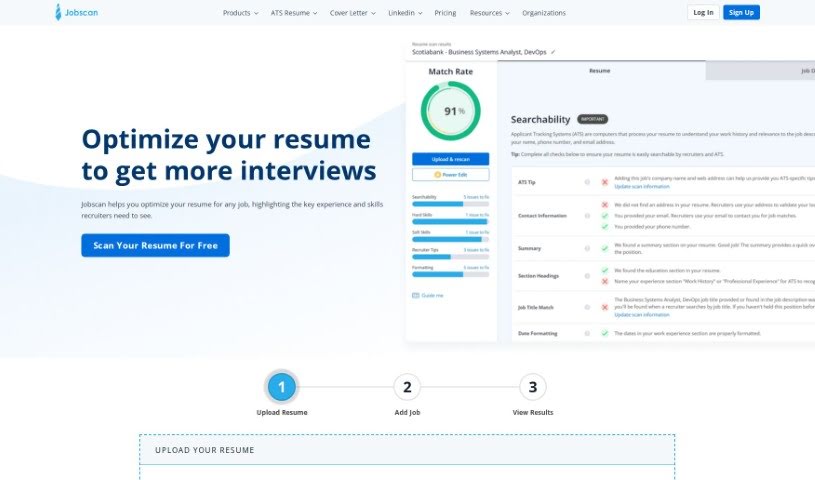
Here’s how it works: you upload your resume and paste the job listing you’re interested in. Jobscan then analyzes everything, pointing out things like formatting errors, whether you’ve included the key qualifications, your hard skills, best practices, word count, and even the tone of your writing. You’ll see a “match rate” that shows how closely your resume lines up with the job requirements. Plus, you get personalized suggestions based on the job description you provided. Jobscan also offers other useful tools to make your job search smoother, like a resume builder, a live resume editor, ways to optimize your LinkedIn profile, a job tracker, a cover letter generator, and even ATS-friendly resume templates.
Jobscan’s resume scanner is pretty thorough. It compares the hard skills, soft skills, and industry buzzwords from the job listing against what’s on your resume. It then gives you a match rate based on important factors like your hard skills, education level, job title, soft skills, and other keywords. You can get even more specific advice by filling out your Jobscan profile, which helps tailor the feedback to your industry and where you are in your job search.
Basically, Jobscan is designed to give you a better shot at landing interviews. It does this by helping you fine-tune your application materials for each specific job and making sure they work well with ATS. The idea is to make your job search process more efficient and, ultimately, more successful.
Who created Jobscan?
James Hu is the founder of Jobscan. He grew up in Seattle and is an alumnus of the University of Washington. Before starting Jobscan, James was involved in co-founding a carpooling startup in Asia. He also worked as a product manager at well-known companies like Kabam Games, Groupon, and Microsoft. The company itself is based in Seattle, but its team is spread out, with employees and contractors working from six different states and four countries. Jobscan’s mission is to equip job seekers with the best possible tools to help them secure their ideal jobs.
What is Jobscan used for?
Jobscan is a versatile tool that can help you with many aspects of your job search:
- Crafting Personalized Cover Letters: Easily generate cover letters that are tailored to each specific job.
- ATS Resume Optimization: Make your resume ATS-friendly to improve your chances of getting an interview.
- Tailoring Resumes: Customize your resume to perfectly match the requirements of specific job descriptions.
- Detailed Resume Analysis: Get feedback on formatting errors, key qualifications, hard skills, best practices, word count, and tone.
- Keyword Matching: Ensure your resume’s keywords align with those found in the job description.
- Personalized Optimization Tips: Receive tailored suggestions to improve your resume based on the job listing.
- Boosting Interview Chances: Increase your likelihood of getting interviews by using Jobscan for every application.
- Recruiter Preference Alignment: Use the resume scanner to compare your resume against what recruiters look for and against job descriptions.
- AI-Powered Skill Matching: Leverage the AI system to match hard skills, soft skills, and keywords from job listings to your resume.
- ATS-Friendly Resume Building: Use the Jobscan resume builder to create resumes that applicant tracking systems can easily read.
- LinkedIn Profile Enhancement: Optimize your LinkedIn profile to improve your visibility and job search outcomes.
- Application-Specific Optimization: Fine-tune your resumes for each individual job application.
- Keyword Alignment: Ensure your resume keywords precisely match those in job descriptions.
- Formatting and Qualification Checks: Analyze your resume for formatting issues and key qualifications.
- Cover Letter Tailoring: Optimize your cover letters for specific job listings.
- Skill-to-Requirement Matching: Match your hard skills, soft skills, and keywords against job requirements.
- ATS Resume Checking: Use the ATS resume checker to ensure your resume is optimized for applicant tracking systems.
- ATS-Friendly Resume Creation: Build resumes that are formatted to be compatible with ATS.
- LinkedIn Visibility Boost: Optimize your LinkedIn profile to be more easily seen by recruiters.
- Job Search Organization: Keep all your job applications, resumes, and interview schedules organized with the Job Tracker tool.
- Quick Cover Letter Generation: Create personalized cover letters efficiently.
- Applicant Tracking System Optimization: Make sure your resume works well with ATS.
- Keyword Optimization for Interviews: Boost your interview chances by optimizing resume keywords.
- Resume and Cover Letter Fine-Tuning: Get your application documents just right.
- Resume Building Assistance: Use the resume builder to create a stronger resume.
- LinkedIn Job Search Optimization: Improve your LinkedIn profile for better job search results.
- Centralized Job Tracking: Keep track of your job search activities in one place with the Job Tracker.
- Free ATS Resume Templates: Download resume templates that are designed to be ATS-friendly.
- Skill Gap Analysis: Identify missing skills and optimize your resume accordingly.
- Free ATS Resume Builder: Create ATS-friendly resumes at no cost.
- Keyword-to-Skill Matching: Match keywords in your resume to the skills listed in job descriptions.
- Keyword Variations: Use both long-form and acronym versions of keywords effectively.
- Resume Formatting: Consider using Chronological or Hybrid resume formats.
- Formatting Best Practices: Avoid tables, columns, or graphics that ATS might struggle with.
- Font Choices: Use screen-friendly, traditional fonts for better readability.
- ATS Combat Strategy: Optimize resumes for ATS to get past applicant tracking systems.
- Resume Analysis: Check resumes for formatting errors, key qualifications, and hard skills.
- Match Rate Improvement: Enhance the match rate between your resume and job listings.
- Personalized Feedback: Get suggestions tailored to specific job descriptions.
- Keyword Optimization: Fine-tune resume keywords for each job you apply for.
- Interview Chance Increase: Aim to increase your interview chances by up to 50%.
- Efficient Resume Building: Create a better resume in less time.
- LinkedIn Profile Improvement: Enhance your LinkedIn profile for better job opportunities.
- Application Organization: Use the Job Tracker tool to organize your job applications and resumes.
- Free Template Downloads: Get free ATS-friendly resume templates.
- Recruiter Preference Analysis: Analyze your resume against what recruiters prefer.
- Skill Matching: Match both hard and soft skills from job listings to your resume.
- Increased Job Placement: Improve your job placement by landing more interviews.
Who is Jobscan for?
Jobscan can be a valuable tool for a wide range of professionals, including:
- Customer Support Associate
- Business Development Representative
- Senior Full Stack Engineer
- Content Writer
- DevOps Engineer
- Junior Financial Analyst
- Customer Success & Education Manager
- Software Engineer
- B2B Marketing Manager
- Product Manager
How to use Jobscan?
To get the most out of Jobscan, here’s a simple step-by-step guide:
- Tailor Your Resume: The first step is to customize your resume for each job. This means carefully incorporating keywords from the specific job description into your resume.
- Upload and Analyze: Upload your resume to Jobscan. Then, paste the job listing you’re targeting into the system. Jobscan will then analyze your resume, checking for things like formatting errors, key qualifications, and more.
- Check Your Match Rate: Jobscan will give you a match rate. This score shows you how well your resume aligns with the requirements of the job you’re applying for.
- Get Personalized Tips: Based on its analysis, Jobscan will provide personalized suggestions to help you optimize your resume for that particular job.
- Refine Your Resume: Make the suggested changes to improve your match rate. This will help you stand out more to recruiters.
- Explore Other Tools: Jobscan offers more than just the scanner. Check out tools like the resume builder, the live resume editor, and LinkedIn optimization features to further boost your job search.
- Understand ATS: It’s helpful to learn about Applicant Tracking Systems (ATS) – how they work and why optimizing your resume for them is so important for getting past the initial screening.
- Consider Resume Details: Jobscan helps you match hard skills, education level, job title, and soft skills to improve your overall match rate.
- Complete Your Profile: Filling out your Jobscan profile can lead to even more personalized suggestions, specifically tailored to your industry and where you are in your job search journey.
By following these steps and using Jobscan’s features, you can effectively optimize your resume, improve your match rate, and significantly increase your chances of securing job interviews.
(Source: jobscan.pdf)